only's easy hotbar
Save single items into Creative Saved Hotbars, one slot at a time.
Editing Creative's Saved Hotbars in vanilla means using a keybind that copies your whole hotbar at once. only's easy hotbar lets you skip that. Open the Creative inventory, go to the Saved Hotbars tab, and edit exactly the slot you want.
Features
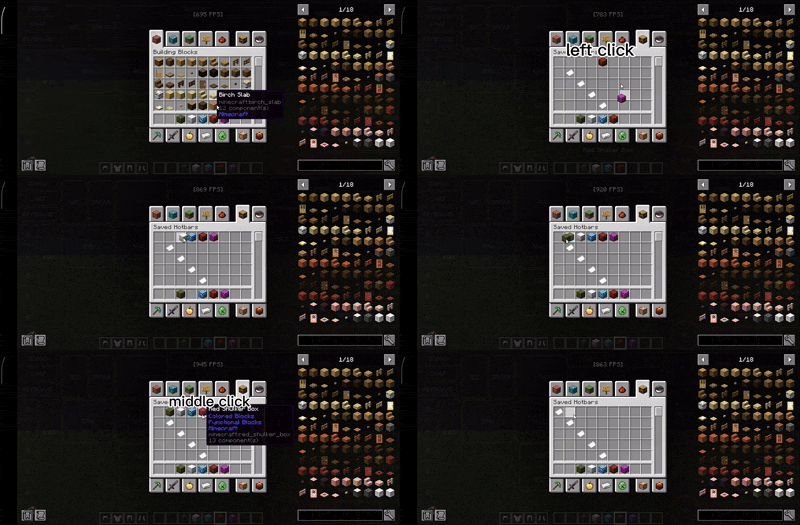
Drag-style saving: hold an item and left-click a saved slot to store a copy of it there.
Precise edits: only the slot you click changes. Your active hotbar is never copied, and other slots and other saved hotbars are left alone.
Middle-click to clear: middle-click a saved slot to empty just that slot.
Uses vanilla storage: saves go into the normal hotbar.nbt file, so the vanilla saved-hotbar keys still work.
Small and focused: no extra keybinds, no commands, no settings menu, and no background work.
How to use
Open your inventory in Creative mode and select the Saved Hotbars tab.
Pick up an item from your inventory or the Creative menu.
Left-click a saved slot. The item on your cursor stays there, and a copy is saved.
To remove an item from a saved slot, middle-click that slot.
Requirements
Minecraft Java Edition 26.2
Fabric Loader 0.19.3 or newer
Java 25
Fabric API is not required
Compatibility and notes
Client-side only. Install it on your own game. You don't need it on a server, and it works on servers that don't have it.
Editing a slot rewrites that one saved-hotbar row. Items in that same row that vanilla can't read (for example, from a mod you've removed) will be lost. Other rows are not touched.
This mod does not change the normal hotbar, the regular inventory, or vanilla hotbar loading.
Links
Discord: only_5117
Discord invite: https://discord.gg/TAhVqtr5JM
License
All Rights Reserved. Copyright (c) 2026 only5117. You may download and use the mod, but redistribution, modification, or republishing requires permission from the copyright holder, except where the law allows otherwise.