


Loading...
Beta Modpages Unclaimed

Neat

Minimalistic Functional Unit Frames for the modern Minecrafter

Likes
118296914 Downloads
Created by

Description

About

This is the Forge version of Neat. You can also get it for Fabric/Quilt here.

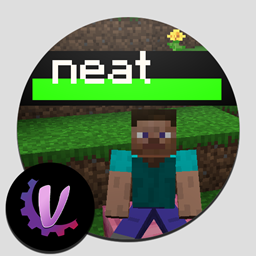
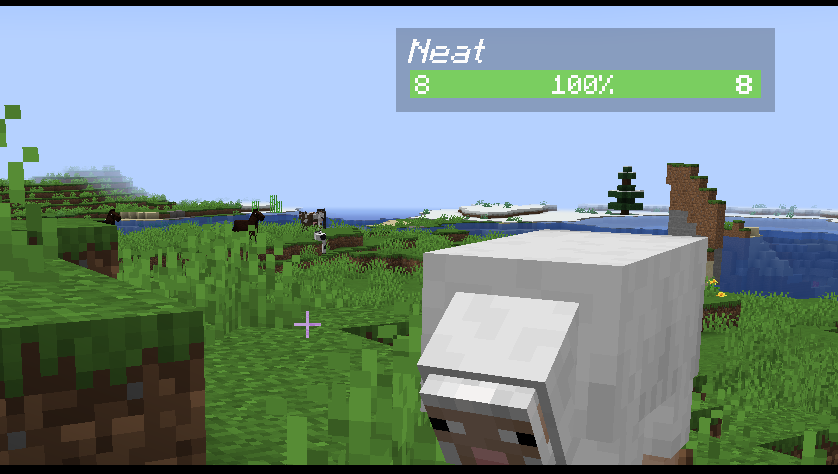
Neat is a mod that adds Unit Frames to the top of every entity, as seen in the image above. You can see info such as name, health, and armor. Yes, the name is a pun on Tidy Plates.


Features

  • Fully client sided
  • Health bars only show up if the mob is not obstructed
  • Health bar color changes depending on the mob's health % (green to yellow to red)
  • Shows the mob's attribute (for Smite or Bane of Arthropods) and their armor
  • Groups up health bars for mob stacks (like spider of chicken jockeys)
  • Works with minecraft's Scoreboard Teams. Mobs and players in teams will have a colored name.
  • Very configurable
  • A keybind to toggle the health bars


AD Become Premium to remove Ads!

What means Verified?

  • Compatibility: The mod should be compatible with the latest version of Minecraft and be clearly labeled with its supported versions.
  • Functionality: The mod should work as advertised and not cause any game-breaking bugs or crashes.
  • Security: The mod should not contain any malicious code or attempts to steal personal information.
  • Performance: The mod should not cause a significant decrease in the game's performance, such as by causing lag or reducing frame rates.
  • Originality: The mod should be original and not a copy of someone else's work.
  • Up-to-date: The mod should be regularly updated to fix bugs, improve performance, and maintain compatibility with the latest version of Minecraft.
  • Support: The mod should have an active developer who provides support and troubleshooting assistance to users.
  • License: The mod should be released under a clear and open source license that allows others to use, modify, and redistribute the code.
  • Documentation: The mod should come with clear and detailed documentation on how to install and use it.

AD Become Premium to remove Ads!

How to Install

1

Download Forge & Java

Download Forge from the offical Site or here. If you dont have Java installed then install it now from here. After Downloading Forge you can run the file with Java.

2

Prepare

Lounch Minecraft and select your Forge istallation as Version this will create a Folder called Mods.

3

Add Mods

Type Win+R and type %appdata% and open the .minecraft Folder. There will you find your Folder called Mods. Place all Mods you want to play in this Folder

4

Enjoy

You are now Ready. Re-start your Game and start Playing.

More Mods like this

JourneyMap

Real-time map used for mapping in-game or your browser as you explore.

Jade 🔍

Shows information about what you are looking at. (Hwyla/WAILA fork for Minecraft 1.16+)

Xaero's Minimap

Displays the nearby world terrain, players, mobs, entities in the corner of your screen. Lets you create waypoints which help you find the locations you've marked.

Xaero's World Map

Adds a fullscreen worldmap which shows you what you have explored in the world. Can work together with Xaero's Minimap.

Akashic Tome

The Book of Books. Store every documentation book in one.

Hwyla

Hwyla (Here's What You're Looking At) is a UI improvement mod aimed at providing block information directly in-game. It is also a fork of Waila.

Explorer's Compass

Explorer's Compass is an item that allows you to locate structures anywhere in the world.