Loading...
Beta Modpages Unclaimed

More Overlays

Brings back the NEI Overlays

Likes
73933623 Downloads
Created by

Description

This mods adds some of the overlays from NEI.


Client Side only mod!


Update / Info:

Most of you probably notices that this mod is still stuck in 1.14. While I've made attempts to get this mod updated in the past, it would require a full rewrite. Since I'm currently not really active in Minecraft especially Modded Minecraft, I don't have much interest updating it. I'm sorry, you can checkout a independently updated version made by RiDGo8 here: https://www.curseforge.com/minecraft/mc-mods/more-overlays-updated


Please report any Issues and Suggestions here (Issue Page on Github).

I might not notice issues or suggestions in the Comments.

 (Check the Mod / Modpack version before you write an Issue)


Overlays:

  • Chunk Boundaries
  • Light Level / Mob spawns ( 16 block range )
  • Item search (only if JEI is installed)

Default Keys:

  • F9 : Chunk Boundaries
  • F7 : Light Level / Mob spawns
  • Double click on the JEI Search Field for Item Search

In version 0.5 or above you can change the config ingame:

  •   from the Main Screen:   Mods ->  MoreOverlays -> Config
  •   from the Pause Menu:   Mod Options... ->  MoreOverlays -> Config   [Not working in Minecraft 1.14.x since "Mod Options..." is missing in the pause menu]


Mob Spawns / Light Level:

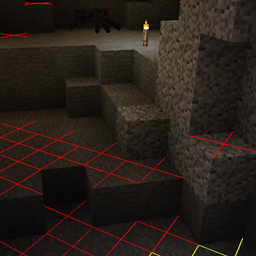
Shows a yellow X on blocks if monsters can spawn at night or a red X if spawns are always possible.


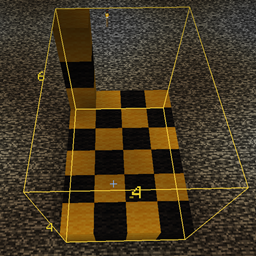
Chunk Boundaries:

Has three modes  it shows red lines in the corners and a yellow line in the middle of the chunk.

In the 2. mode it also shows a green grid on the edges of the chunk.

In the 3. mode the green grid outlines a minecraft or cubicchunks region and displays the corresponding region save file in the top left corner. (since version 1.15.0 for minecraft 1.12.2)


Inventory Search:

Only works if JEI is installed.

If it is enabled you can search in JEI for items and all items in the currently open inventory that doesn't match the filter will get blacked out.

Before 1.10 (for MC 1.10.2/1.11.2) there was a Keybinding to enable that feature.

Since 1.10 you can double click on the JEI Search bar to enable that feature (Just like in NEI). 


Integration

This mod integrates with some other mods to fix bugs or add features.

  • JustEnoughItems (by mezz): Item Search only works when JEI is installed since it uses the search algorithm from JEI to highlight items.
  • Custom Mob Spawner (by DrZharks): Light Overlay integrates with that mod to show where mobs can spawn according to the custom spawn handling implemented by that mod. (temporary removed in 1.16.0) 
  • OpenCubicChunks (by barteks2x): Region Overlays show the save files that cubic chunks uses. (Chunk & Region grids needs improvement)
  • Mantle: Item Search integrates with the GUI API that is part of mantle in order to show slots at the position they appear on screen.

I allow distribution of my mod in modpacks. Would be nice if you give credits 


Reuploading the file is allowed ( But only if the download is free, because commercial use of this mod is against the Minecraft EULA, but you can use my code for anything you want)

Please try to keep the files on your website updated and don't lie about the Mod and Minecraft Version. (If there is no file for MC 1.13 don't write in the Tile "More Overlays 1.12 / 1.13" )

AD Become Premium to remove Ads!

What means Verified?

  • Compatibility: The mod should be compatible with the latest version of Minecraft and be clearly labeled with its supported versions.
  • Functionality: The mod should work as advertised and not cause any game-breaking bugs or crashes.
  • Security: The mod should not contain any malicious code or attempts to steal personal information.
  • Performance: The mod should not cause a significant decrease in the game's performance, such as by causing lag or reducing frame rates.
  • Originality: The mod should be original and not a copy of someone else's work.
  • Up-to-date: The mod should be regularly updated to fix bugs, improve performance, and maintain compatibility with the latest version of Minecraft.
  • Support: The mod should have an active developer who provides support and troubleshooting assistance to users.
  • License: The mod should be released under a clear and open source license that allows others to use, modify, and redistribute the code.
  • Documentation: The mod should come with clear and detailed documentation on how to install and use it.

AD Become Premium to remove Ads!

How to Install

1

Download Forge & Java

Download Forge from the offical Site or here. If you dont have Java installed then install it now from here. After Downloading Forge you can run the file with Java.

2

Prepare

Lounch Minecraft and select your Forge istallation as Version this will create a Folder called Mods.

3

Add Mods

Type Win+R and type %appdata% and open the .minecraft Folder. There will you find your Folder called Mods. Place all Mods you want to play in this Folder

4

Enjoy

You are now Ready. Re-start your Game and start Playing.

More Mods like this

JourneyMap

Real-time map used for mapping in-game or your browser as you explore.

Jade 🔍

Shows information about what you are looking at. (Hwyla/WAILA fork for Minecraft 1.16+)

Xaero's Minimap

Displays the nearby world terrain, players, mobs, entities in the corner of your screen. Lets you create waypoints which help you find the locations you've marked.

Xaero's World Map

Adds a fullscreen worldmap which shows you what you have explored in the world. Can work together with Xaero's Minimap.

Neat

Minimalistic Functional Unit Frames for the modern Minecrafter

Akashic Tome

The Book of Books. Store every documentation book in one.

Hwyla

Hwyla (Here's What You're Looking At) is a UI improvement mod aimed at providing block information directly in-game. It is also a fork of Waila.