Badges update automatically and link to the mod page on MineUniverse.
# Map Marker
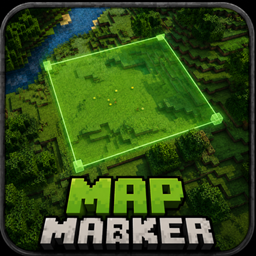
**Mark out a region with two key presses. Name it, colour it, and find it through walls.**
## The gap this fills
You build a trap and three days later walk into it yourself, because you no longer remember
which pressure plate was the live one.
You dig out a room for a farm, log off, and come back unsure where you meant the wall to go.
You leave a redstone line half-finished across a hillside and cannot tell later which blocks
belong to it.
Every existing answer solves a *different* problem:
| What people use | Why it does not fit |
|---|---|
| **Waypoint mods** (Xaero, JourneyMap) | A waypoint is a point. It says "something is around here", never "this region, these exact blocks, up to this height". |
| **Claim mods** (FTB Chunks and friends) | Server-side, chunk-sized, and built to control who may build. You cannot claim anything on a server where you are a plain player, and a chunk is 16 blocks wide when you needed three. |
| **WorldEdit selections** | One selection at a time, unnamed, gone when you pick the next. And it needs permissions you usually do not have. |
| **Signs and torches** | Take space, everybody sees them, break, despawn — and in a trap they are the last thing you want. |
| **Writing down coordinates** | F3 and a notepad on the second monitor. |
**Map Marker is the missing one:** as many named regions as you like, block-precise, private to
you, and readable through terrain.
## How it works
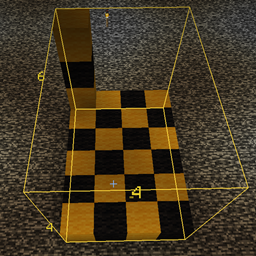
Look at a block and press **`B`**. Look at the opposite corner and press **`B`** again. The
region between them becomes a field — and the configuration screen opens straight away with
the cursor in the name box, because a region called "Field 3" helps nobody.
| Key | Action |
|---|---|
| **`B`** | Set a corner — press twice to complete a region |
| **`Shift`** + **`B`** | Cancel a selection in progress |
| **`K`** | Open the region list |
Two keys, that is the whole thing. Both can be changed under **Options → Controls**, where
they sit in their own **Map Marker** section rather than being scattered through the vanilla
list. `B` and `K` are unused by vanilla Minecraft, so nothing is taken away from you by
default — but if a mod you already run claims them, rebinding takes ten seconds.
- **The outline** is depth-tested like vanilla's own block selection, so once you can see the
region you can see exactly where it ends.
- **The label** — name above, distance below — stays readable **through walls**, and keeps the
same size on screen however far away it is. Finding a region from across the map is the
whole point, so it does not shrink into an unreadable speck.
- While you are choosing, the first corner is highlighted and the region you would get is
previewed live. Sneak cancels.
## Managing regions
One key opens the list. Per region:
- Click the **colour** to cycle through the palette
- Click the **name** to select it, then rename it in the box below
- **shown / hidden** takes a region out of the world without deleting it
- **X** deletes it
Ten palette colours, chosen to differ in **brightness** as well as hue, so they stay apart
for red-green colour blindness.
## Deliberately out of your way
There is **no permanent overlay**. No panel in the corner, no line stuck under your
crosshair. Everything you need is in the world itself; confirmations appear briefly above the
hotbar and fade on their own. A panel that sits there forever costs attention every second
and earns it back only in the few moments something changes.
## Good to know
- **Client-side only.** No server mod, no operator rights, no commands. Works on any server
you can join, including ones where you are a plain player.
- **Nobody else sees your regions.** They live in a file on your machine.
- Stored **per world and per server**, so your singleplayer traps do not follow you onto a
server.
- Saved automatically; written to a temporary file and renamed, so a crash mid-save costs at
most the last change.
## Limits, stated plainly
- Regions are tied to **coordinates**, not to the blocks inside them. Mine everything out and
the region stays — usually what you want when planning, but you clear it yourself.
- Nothing is shared between players. This is a personal notebook, not a claim system.