

 # 🔍 LootLens
### Find your loot faster. Keep your inventory clean. Spend less time searching.
**LootLens** is a lightweight Minecraft mod designed to make searching through chests faster, cleaner, and much more convenient.
Large storage rooms can quickly become a mess. You open chest after chest trying to remember where you placed one specific item. LootLens improves that experience by adding a clean **live search bar directly to supported chest interfaces**, allowing you to instantly focus on the items you are looking for.
No complicated menus. No unnecessary systems. Just a simple quality-of-life feature that feels like it belongs in Minecraft.
> Search less. Loot faster.

## ✨ What LootLens Does
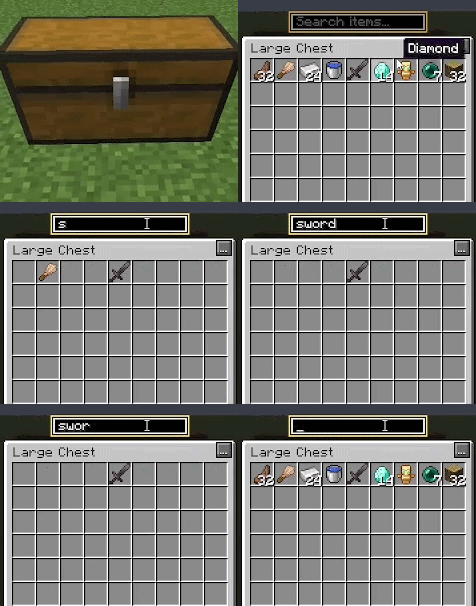
Start typing the name of an item into the search bar and LootLens immediately filters the chest display.
Instead of scanning every slot manually, matching items remain easy to identify while unrelated chest items are filtered from view.
Your **player inventory remains untouched**, so the search only focuses on the storage container you are currently viewing.
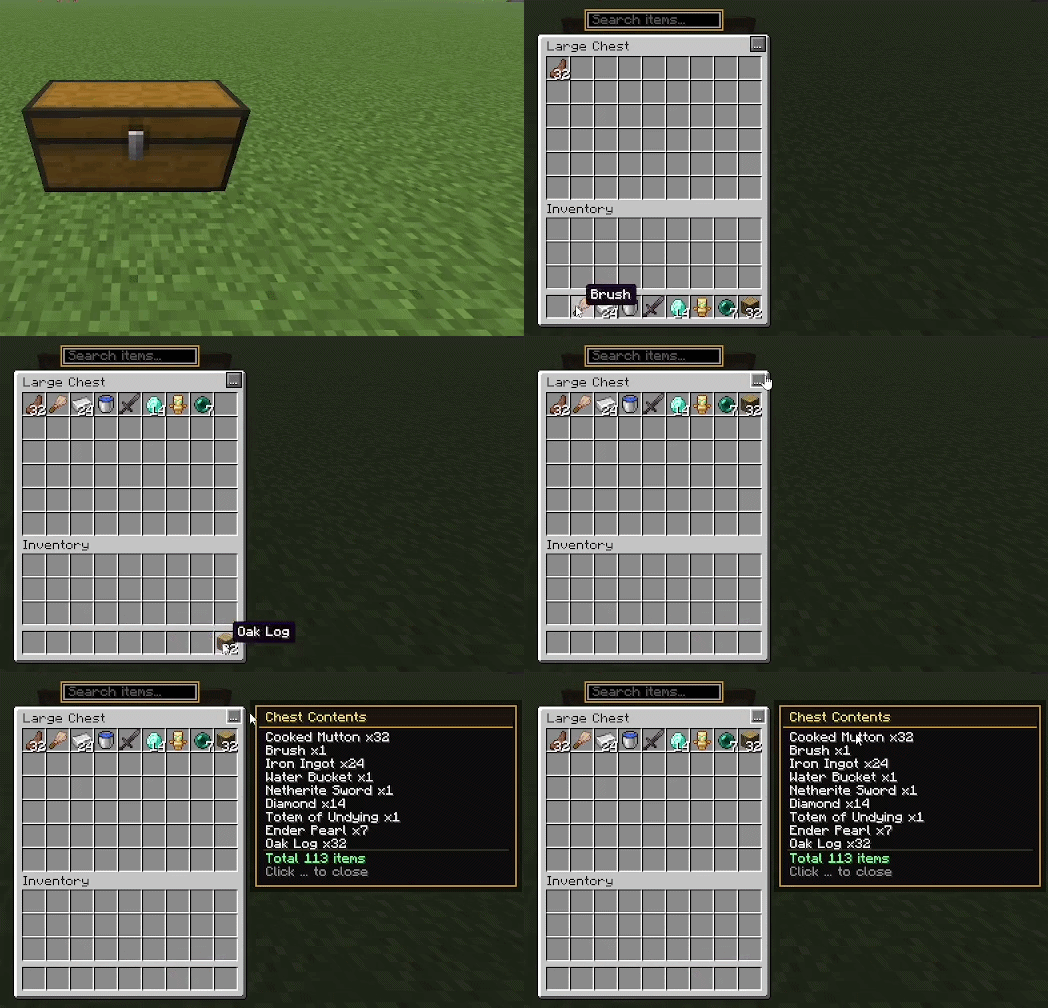
LootLens also includes a compact **three-dot menu** that opens a useful **Chest Contents** panel, giving you a quick overview of the items stored inside the chest.
The result is a faster and cleaner storage experience without changing how Minecraft inventories actually work.

## ⭐ Features
- 🔎 **Live Chest Search** — Find items instantly by typing their name.
- 📦 **Chest-Only Filtering** — Search affects chest contents without hiding items in your player inventory.
- 👁️ **Smart Item Visibility** — Non-matching chest slots are filtered so matching loot is easier to spot.
- 📋 **Chest Contents Summary** — Quickly view stored item names and quantities.
- 🔢 **Item Count Overview** — See how much of each item is stored in the container.
- ⋯ **Clean Three-Dot Menu** — Access the contents summary without cluttering the vanilla interface.
- 🟨 **Gold Search Outline** — A subtle visual highlight that keeps the interface recognizable while giving LootLens its own identity.
- ⚡ **Lightweight Design** — Focused on useful features without unnecessary systems.
- 🎨 **Vanilla-Friendly UI** — Keeps Minecraft's familiar inventory style instead of completely replacing it.

## 🔎 Live Search
LootLens adds a search field directly above the chest interface.
Simply type something like:
`diamond`
`iron`
`book`
`apple`
and matching chest items become much easier to locate.
The search updates as you type, making it useful even when you only remember part of an item's name.
This is especially helpful for large storage rooms, survival bases, technical worlds, long-running multiplayer worlds, and players who keep many different resources in the same area.

## 📋 Chest Contents Panel
Need a quick overview instead of searching manually?
Press the **three-dot button** in the chest interface to open the Chest Contents panel.
It provides a simple summary of what is currently stored inside the chest, including item names and quantities.
The panel is positioned beside the chest interface so it does not unnecessarily cover the inventory you are trying to inspect.

## 🎨 Designed to Feel Like Minecraft
LootLens is intentionally simple.
It does not try to turn Minecraft's inventory into a completely different interface.
The familiar chest layout stays intact, while LootLens adds only the tools needed to improve item searching.
The search box uses a subtle **gold outline**, while the rest of the interface stays close to Minecraft's original style.
That makes LootLens easy to understand immediately, even the first time you install it.

## 🧠 Why LootLens?
Minecraft storage systems can become huge.
After enough mining trips, farms, exploration, building projects, and adventures, even an organized storage room can contain thousands of items.
Vanilla Minecraft gives you storage, but finding one particular item can still take time.
LootLens is built around one simple idea:
**You should spend more time playing Minecraft and less time searching through chests.**
Whether you are looking for a rare enchanted book, building materials, ores, food, redstone components, or something you stored days ago, LootLens helps you locate it faster.

## ⚙️ Installation
1. Install the correct **Fabric Loader** version for your Minecraft version.
2. Install **Fabric API** if required by the release.
3. Download the correct LootLens `.jar` for your Minecraft version.
4. Place the LootLens `.jar` inside your Minecraft `mods` folder.
5. Launch Minecraft.
Always use the LootLens version made specifically for your Minecraft version.

## 🛡️ Safe Storage Philosophy
LootLens is designed as an interface enhancement.
It does **not** need to increase vanilla chest capacity or modify the number of storage slots in vanilla containers simply to provide its searching features.
Your Minecraft storage remains familiar while LootLens improves how you interact with it.

## 🌐 Multiplayer
LootLens focuses on improving the client interface without changing the fundamental storage mechanics of the world.
Server rules can vary, so always follow the rules of the multiplayer server you are playing on.

## 📦 Modpacks
Modpack usage is subject to the **LootLens Custom License**.
Please read the license included with the project before redistributing LootLens as part of a public modpack.
Do not re-upload LootLens as a standalone download or redistribute modified copies under another name unless permission is explicitly granted by the project owner.

## 📜 License
**LootLens is distributed under the LootLens Custom License.**
Copyright remains with the project owner.
Unauthorized standalone redistribution, re-uploading, selling, or publishing modified versions of LootLens as your own project is not permitted unless specifically allowed by the license or written permission.
Please read the complete license before redistributing the mod.

## 🚀 Built for Players Who Love Organized Loot
Whether you have ten chests or an entire warehouse, LootLens makes finding items feel faster and more natural.
**Open a chest.**
**Type what you need.**
**Find it.**
**Continue playing.**
### 🔍 LootLens — Search less. Loot faster.