Mineuniverse
Mods
Litematica Share

Litematica Share

MOD
A minecraft mod to share a litematica to your friends and easily take control of your builds.
by guolf
Download Claim this project
1,034 downloads
0 likes
0 followers
Updated Oct 14, 2026
0 hypes
Follow0
Performance Technology Utility & QoL
Advertisement Remove ads with Premium →

📐 Litematica Share

Litematica Share is a lightweight companion mod for Litematica that makes positioning, adjusting, and sharing schematics effortless. Take full control of your schematics directly from keybinds and chat without opening complex menus.

⚠️ Warning: The schematic file must be compatible with the Litematica version both players are using. A .litematic file created in a newer version will not work on an older version. To prevent errors, it is highly recommended to use online converters to change your .litematic file to a .schem format before sharing.


⚙️ How It Works

  1. Both Players Need the Mod: Both sender and receiver must have Litematica Share installed.
  2. Same Schematic File: Ensure both players have the same .litematic (or .schem/.schematic) file in their local schematics folder (subfolders are searched automatically!).
  3. Share: Press your share keybind (default: Y) or run /liteshare share.
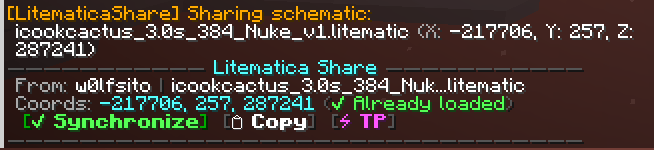
  4. One-Click Sync: The recipient clicks the interactive card in chat to instantly load and snap the schematic into place.

✨ Features

👥 1. Smart Sharing & Interactive Chat Cards

  • [✔ Synchronize] Button: Automatically finds the file (even inside subfolders) and applies exact coordinates, rotation, and mirror settings.
  • [📋 Copy] Button: Copies the sync command straight to your clipboard.
  • [⚡ TP] Button: Quick teleport to the schematic origin (/tp).
  • Responsive Layout: Adapts borders and long filenames to your chat width without breaking into extra lines.

🛡️ 2. Privacy & Clan/Faction Channels

  • Configure custom prefixes (e.g., /ff, @, /clan chat, /t) to share only in private channels and prevent coordinate leaks in global chat.

🎮 3. Keyboard Positioning Controls

  • Directional Nudge: Move schematics Forward, Backward, Left, Right, Up, or Down by 1 block relative to where you look.
  • Snap to Player: Instantly move the schematic origin to your current position.
  • Quick Rotate & Mirror: Rotate 90° or flip the schematic with a single keypress.

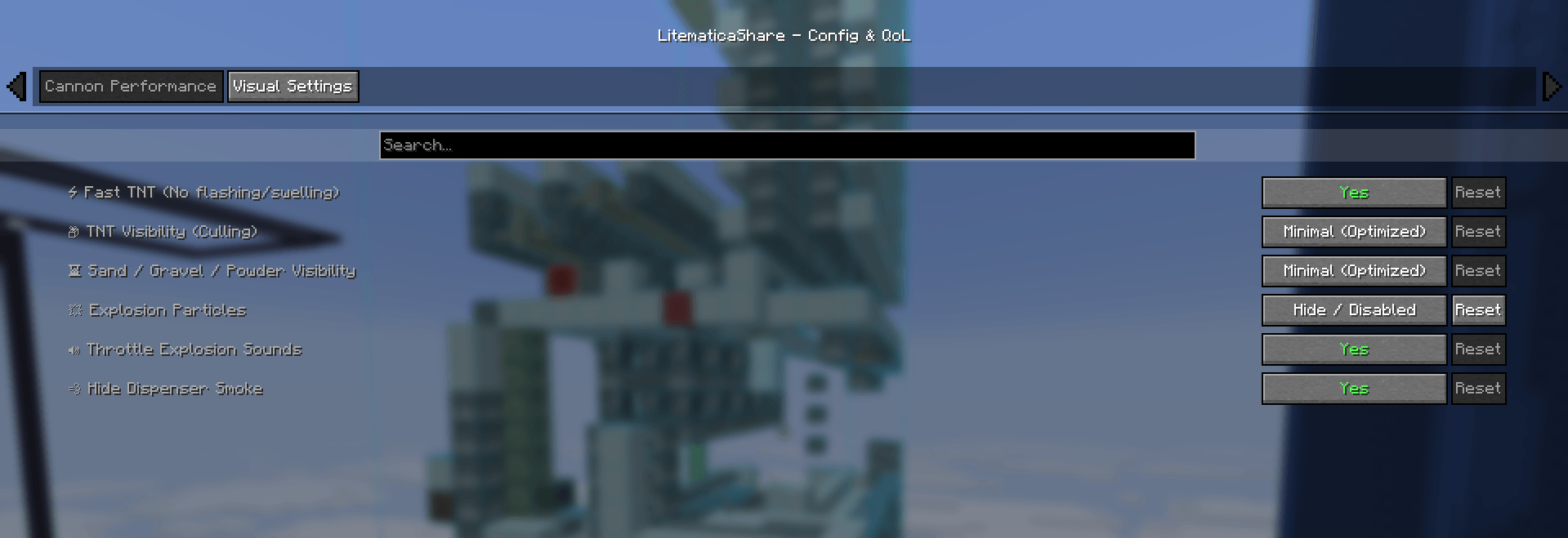
⚡ 4. Cannon & FPS Performance (Anti-Lag)

  • Fast TNT: Removes swelling & white flashing animations to save massive CPU/GPU performance.
  • TNT & Sand Culling: Renders only 1 entity per cluster/column during cannon shots.
  • Audio & Particle Limiters: Prevents sound freezes and disables dispenser smoke.

⌨️ Commands & Keybinds

Command / Keybind Description
Y or /liteshare share Share current schematic placement to chat/channel
/liteshare replace <from> <to> Instantly swap blocks in your active schematic (e.g. /liteshare replace obsidian crying_obsidian)
/liteshare search <name> Quick search for schematic files in your folders
/liteshare list List all currently loaded schematics in Litematica
/liteshare apply <data> Manually apply shared schematic placement data
(Alias) /litesync All commands can also be executed with /litesync
Nudge / Move / Rotate Bindable hotkeys in Minecraft Controls options

📦 Dependencies

LitematicaShare-67.67.67-v2.jar
MC 1.21, Client, 1.20.2, Fabric, 1.21.8, 1.20.5, 1.21.5, 1.21.4, 1.20.1, 1.20, 1.20.6, 1.21.1, 1.21.6, 1.21.3, 1.21.7, 1.20.4, 1.20.3, 1.21.2, 1.21.9, 1.21.10, 1.21.11
Release 2026-08-31 Get
LitematicaSync-67.67.67.jar
MC 1.21, Client, 1.20.2, Fabric, 1.21.8, 1.20.5, 1.21.5, 1.21.4, 1.20.1, 1.20, 1.20.6, 1.21.1, 1.21.6, 1.21.3, 1.21.7, 1.20.4, 1.20.3, 1.21.2, 1.21.9, 1.21.10, 1.21.11
Release 2026-07-11 Get
Advertisement Remove ads with Premium →

You Might Also Like