AI-Generated Content Disclosure
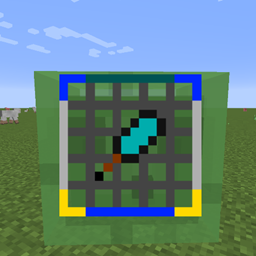
All content included in this mod (textures, models, code, sounds, etc.) is entirely generated by AI tools. The displayed images are actual in-game screenshots that accurately reflect the mod's effects, but all visual elements within them are AI-generated. If you have any questions, feel free to leave a comment.
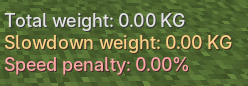
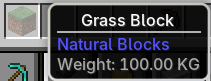
KG Weight adds a configurable item weight system for Minecraft Forge 1.20.1. You can assign KG weights to different items. Items in the player's inventory, armor, offhand, expanded backpacks, and certain extended slots are all counted, and movement speed is reduced based on the carried weight.
ITEM_HANDLER extended slots, and items inside containers (internal inventories) are all counted.K by default to open the edit interface, allowing you to drag the position, resize, and adjust transparency.The mod provides three slowdown strategies:
stage: Stage mode – for every full interval of KG, a slowdown increment is applied.linear: Linear mode – each additional KG reduces movement speed by a fixed amount.segmented: Segmented linear mode – different weight ranges can have different slowdown intensities.The speed limiting method can also be switched:
simple: Default method, only adjusts the player's movement speed attribute, offering better compatibility.complex: Additionally restricts horizontal speed in the air, used to reduce extra displacement from sprint-jumping.The mod adds 5 levels of Load Needles that temporarily reduce effective weight. Load Needles do not use vanilla potion effects; at most one needle is active at a time. Using a Load Needle of any level will completely replace the current needle's effect and remaining duration, and the message "Potion used" will be displayed.
Default effects:
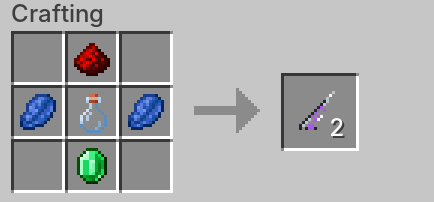
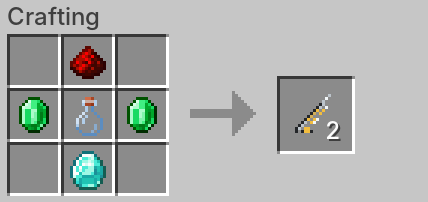
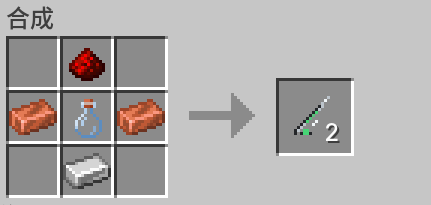
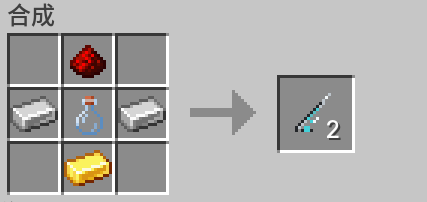
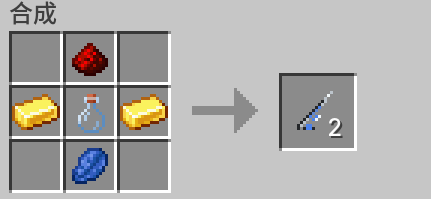
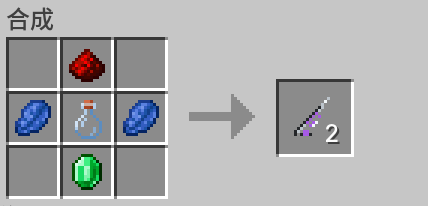
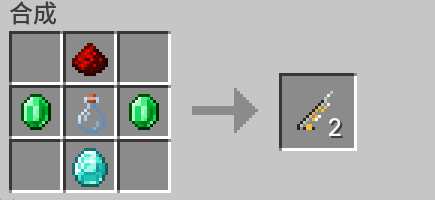
Recipes primarily use minerals and glass bottles:
Load Needle effects, duration, and use time can be adjusted with commands.
All management commands require permission level 2.
/kgweight help
/kgweight setheld <kg> [affectsSlowdown]
/kgweight queryheld
/kgweight slowdownheld <true|false>
/kgweight mode <stage|linear|segmented>
/kgweight speedlimit <simple|complex>
/kgweight needle list
/kgweight needle set <level> <reductionKg> <durationSeconds> [useSeconds]
/kgweight player query <player>
/kgweight player slowdown <player> <true|false>
/kgweight nbtignore list
Chinese alias:
/重量For complete instructions, see the Full Usage Guide provided below.
ITEM_HANDLER, this mod will attempt to count them.Environment:
Installation:
kgweight-3.0.0.jar into the mods folder of both client and server./kgweight help or /重量 to view in-game command help.ITEM_HANDLER capability, attempting compatibility when other mods directly expand the player inventory.Compatibility notes:
ITEM_HANDLER or Curios slots.HUD adjustments and some slowdown/speed limit configurations can be done through the UI, without entering commands.
Default key:
KThe UI has three tabs:
stage, linear, and segmented modes, and adjust the corresponding KG stages, step sizes, and slowdown percentages.simple and complex, and adjust the complex mode's max speed factor, min speed factor, and curve.Description:
config/kgweight-hud.json.simple on the "Speed Limit" page.If K conflicts with another mod, you can change the "Open KG Weight Settings" key in Minecraft's controls.
(The speed limit modes and their logic, as well as Load Needle customization, are now also available via the UI.)
All management commands require permission level 2 (singleplayer with cheats enabled, or multiplayer server OP).
Main command:
/kgweightChinese alias:
/重量Complete list:
/kgweight help
/kgweight setheld <kg> [affectsSlowdown]
/kgweight slowdownheld <true|false>
/kgweight queryheld
/kgweight removeheld
/kgweight clear
/kgweight status
/kgweight player query <player>
/kgweight player slowdown <player> <true|false>
/kgweight mode <stage|linear|segmented>
/kgweight speedlimit <simple|complex>
/kgweight speedcap <maxFactor> <minFactor> <curve>
/kgweight slowdown <stageKg> <slowdownPerStage>
/kgweight linear <stepKg> <slowdownPerStep>
/kgweight segment list
/kgweight segment set <index> <endKg> <stepKg> <slowdownPerStep>
/kgweight segment remove <index>
/kgweight segment reset
/kgweight needle list
/kgweight needle set <level> <reductionKg> <durationSeconds> [useSeconds]
/kgweight needle usetime <level> <useSeconds>
/kgweight nbtignore list
/kgweight nbtignore add <rule>
/kgweight nbtignore remove <rule>
/kgweight nbtignore resetPercentage parameters are uniformly entered as decimals:
0.01 means 1%0.05 means 5%0.20 means 20%/kgweight setheld <kg> [affectsSlowdown]Sets the single item weight for the main hand item.
Examples:
/kgweight setheld 12.5
/kgweight setheld 12.5 false
/kgweight setheld 12.5 true
Description:
affectsSlowdown is omitted, it defaults to true, contributing to this mod's slowdown.affectsSlowdown=false makes it cosmetic weight only, displayed but not contributing to this mod's slowdown.<kg> to 0 is equivalent to removing the current main hand item's weight rule./kgweight queryheldQueries the weight rule matching the main hand item, whether it affects slowdown, the stable key, and stable NBT.
/kgweight removeheldRemoves the weight rule matching the current main hand item.
/kgweight slowdownheld <true|false>Toggles whether the existing weight rule for the main hand item contributes to this mod's slowdown, without changing the weight value.
/kgweight clearClears all item weight rules in the current world. Slowdown mode, Load Needle configurations, and NBT ignore rules are not cleared.
/kgweight statusView your current total weight, slowdown weight, effective slowdown weight, current world slowdown configuration, and the number of NBT ignore rules.
/kgweight player query <player>View an online player's weight.
Example:
/kgweight player query SteveOutputs:
/kgweight player slowdown <player> <true|false>Sets whether a specific online player is affected by this mod's slowdown.
Examples:
/kgweight player slowdown Steve false
/kgweight player slowdown Steve true
Description:
false: Weight is still counted and displayed, but this mod will not apply slowdown to the player.true: Restores this mod's slowdown.The mod has three slowdown modes:
stage: Stage mode – for every full interval of KG, a slowdown increment is applied.linear: Linear mode – continuous linear slowdown based on total weight.segmented: Segmented linear mode – different weight ranges use different linear slowdown rules.Final movement speed is kept at a minimum of 5%, meaning a maximum reduction of 95%.
/kgweight mode <stage|linear|segmented>Switches the slowdown mode.
/kgweight slowdown <stageKg> <slowdownPerStage>Configures stage mode.
Example:
/kgweight mode stage
/kgweight slowdown 100 0.05
Meaning: for every full 100 KG, reduce movement speed by 5%.
/kgweight linear <stepKg> <slowdownPerStep>Configures linear mode.
Example:
/kgweight mode linear
/kgweight linear 10 0.01
Meaning: for every additional 10 KG, reduce movement speed by 1%.
/kgweight segment set <index> <endKg> <stepKg> <slowdownPerStep>Configures segmented mode.
Example:
/kgweight mode segmented
/kgweight segment set 1 100 10 0.01
/kgweight segment set 2 200 10 0.02
/kgweight segment set 3 350 10 0.04
Meaning:
Other segment commands:
/kgweight segment list
/kgweight segment remove <index>
/kgweight segment reset/kgweight speedlimit <simple|complex>simple: Default method, only slows via the player MOVEMENT_SPEED attribute, better compatibility.complex: On top of attribute slowdown, additionally caps horizontal speed on both client and server to limit extra horizontal displacement from sprint-jumping.If parkour, jumping, double-jump, or movement mods behave abnormally, it is recommended to use:
/kgweight speedlimit simple/kgweight speedcap <maxFactor> <minFactor> <curve>Sets the horizontal speed cap coefficients for complex mode.
Formula:
horizontal cap = current movement speed attribute × (minFactor + (maxFactor - minFactor) × current slowdown multiplier ^ curve)Default:
/kgweight speedcap 2.35 1.00 1.00The mod provides 5 Load Needle items:
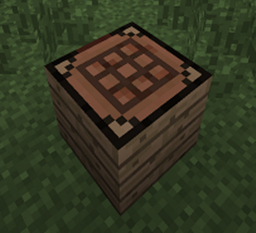
kgweight:load_needle_1kgweight:load_needle_2kgweight:load_needle_3kgweight:load_needle_4kgweight:load_needle_5All recipes are shaped crafting in a crafting table, primarily using minerals and glass bottles; each craft produces 2 needles:
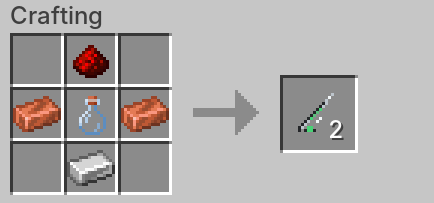
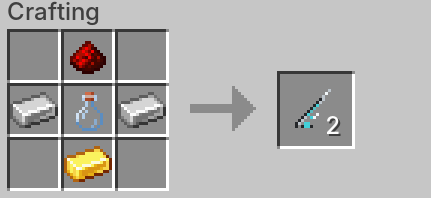
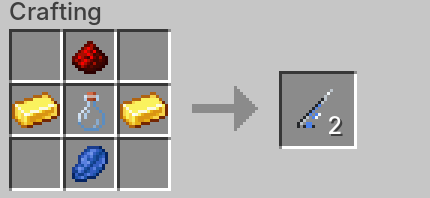
Default effects:
Rules:
Commands:
/kgweight needle list
/kgweight needle set <level> <reductionKg> <durationSeconds> [useSeconds]
/kgweight needle usetime <level> <useSeconds>This mod no longer uses full NBT directly as the weight key. Instead, it uses a "stable NBT fingerprint":
GunFireMode, SelectedFireMode, FireMode, ShootMode by default, preventing weight rule invalidation when switching between full-auto and semi-auto.Exp, Level, KillCount, ShotsFired by default, adapting to guns from mods like Zhuoyu Frontline that write dynamic progression NBT.Aim, Aiming, ADS, Scoped, Zooming by default, preventing weight rules from temporarily failing while aiming down sights.The current version provides additional handling for TaCZ modified guns:
/kgweight setheld <kg>.affectsSlowdown setting./kgweight setheld <kg> [affectsSlowdown] again to write a new stable key.NBT ignore rule format:
contains:ammo – ignores fields whose path contains ammo.name:Damage – ignores fields whose name exactly equals Damage.path:tag.gun.current_round – ignores the exact full path.Commands:
/kgweight nbtignore list
/kgweight nbtignore add <rule>
/kgweight nbtignore remove <rule>
/kgweight nbtignore reset
remove supports Tab auto-completion for existing rules.
Gun mod troubleshooting flow:
/kgweight queryheld./kgweight queryheld again./kgweight nbtignore add current_round
/kgweight nbtignore add Exp
/kgweight nbtignore add Level
/kgweight nbtignore add Aiming
/kgweight setheld <kg>TaCZ attachment weight example:
# Hold the gun body and set its base weight
/kgweight setheld 4.5

# Hold an attachment (scope, muzzle, grip, etc.) and set its weight
/kgweight setheld 0.8
When that attachment is installed, the gun's total weight will automatically increase by 0.8 KG.
Language file paths:
src/main/resources/assets/kgweight/lang/zh_cn.json
src/main/resources/assets/kgweight/lang/en_us.json
You can modify:
If overriding via a resource pack, place files using the same path inside the resource pack.
人工智能生成内容披露
本模组包含的所有内容(贴图、模型、代码、音效等)均完全由AI工具生成。展示图片为游戏内实际截图,能真实反映模组效果,但其中的所有视觉元素皆为 AI 产物。如有疑问,欢迎留言交流。**
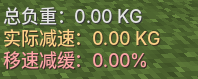
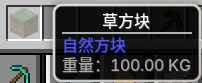
KG重量为 Minecraft Forge 1.20.1 添加了可配置的物品重量系统。你可以给不同物品设置 KG 重量,玩家背包、护甲、副手、拓展背包和部分扩展槽位中的物品都会参与统计,并根据负重降低移动速度。
ITEM_HANDLER 扩展槽位、物品内部背包都会计入重量。K 打开编辑界面,可拖动位置、调整大小和透明度。模组提供三种减速策略:
stage:阶段模式,每满一定 KG 增加一次减速。linear:线性模式,每增加一定 KG 降低一定移速。segmented:分段线性模式,不同重量范围可设置不同减速强度。限速方式也可切换:
simple:默认方式,只调整玩家移动速度属性,兼容性更好。complex:额外限制空中水平速度,用于减少疾跑跳跃带来的额外位移。模组添加 5 个等级的负载针,可以临时减少有效负重。负载针不使用原版药水效果,同一时间最多只有一针生效;任意等级负载针使用完成后都会直接替换当前针剂效果和剩余时间,并提示“药剂已使用”。
默认效果:
配方主要使用矿物和玻璃瓶:
负载针效果、持续时间和使用时间都可以用指令调整。
所有管理指令需要 2 级权限。
/kgweight help
/kgweight setheld <kg> [affectsSlowdown]
/kgweight queryheld
/kgweight slowdownheld <true|false>
/kgweight mode <stage|linear|segmented>
/kgweight speedlimit <simple|complex>
/kgweight needle list
/kgweight needle set <level> <reductionKg> <durationSeconds> [useSeconds]
/kgweight player query <player>
/kgweight player slowdown <player> <true|false>
/kgweight nbtignore list
中文别名:
/重量完整说明请查看下文提供的 完整使用说明。
ITEM_HANDLER,本模组会尝试统计。适用环境:
安装方式:
kgweight-3.0.0.jar 放进客户端和服务端的 mods 文件夹。/kgweight help 或 /重量 查看游戏内指令帮助。ITEM_HANDLER 能力,尽量兼容玩家背包被其他模组直接扩容的情况。兼容说明:
ITEM_HANDLER 或 Curios 槽位。HUD 调整和部分减速/限速配置可以通过 UI 完成,不必输入指令。
默认按键:
KUI 分为三个选项卡:
stage、linear、segmented,并调整对应 KG 阶段、步长和减速百分比。simple、complex,并调整 complex 的最大限速系数、最小限速系数和曲线。说明:
config/kgweight-hud.json。simple。如果 K 和其他模组冲突,可以在 Minecraft 控制设置里修改“打开KG重量设置”按键。
(现已UI化限速模式和每个模式下的限速逻辑以及负载针的自定义)
所有管理指令需要 2 级权限,也就是单人开启作弊或多人服务器 OP。
主指令:
/kgweight中文别名:
/重量完整列表:
/kgweight help
/kgweight setheld <kg> [affectsSlowdown]
/kgweight slowdownheld <true|false>
/kgweight queryheld
/kgweight removeheld
/kgweight clear
/kgweight status
/kgweight player query <player>
/kgweight player slowdown <player> <true|false>
/kgweight mode <stage|linear|segmented>
/kgweight speedlimit <simple|complex>
/kgweight speedcap <maxFactor> <minFactor> <curve>
/kgweight slowdown <stageKg> <slowdownPerStage>
/kgweight linear <stepKg> <slowdownPerStep>
/kgweight segment list
/kgweight segment set <index> <endKg> <stepKg> <slowdownPerStep>
/kgweight segment remove <index>
/kgweight segment reset
/kgweight needle list
/kgweight needle set <level> <reductionKg> <durationSeconds> [useSeconds]
/kgweight needle usetime <level> <useSeconds>
/kgweight nbtignore list
/kgweight nbtignore add <rule>
/kgweight nbtignore remove <rule>
/kgweight nbtignore reset
百分比参数统一用小数填写:
0.01 表示 1%0.05 表示 5%0.20 表示 20%/kgweight setheld <kg> [affectsSlowdown]设置主手物品的单件重量。
示例:
/kgweight setheld 12.5
/kgweight setheld 12.5 false
/kgweight setheld 12.5 true
说明:
affectsSlowdown 时默认 true,参与本模组减速。affectsSlowdown=false 时仅作为装饰重量显示,不参与本模组减速。<kg> 填 0 等同于移除当前主手物品重量规则。/kgweight queryheld查询主手物品当前匹配到的重量规则、是否参与减速、稳定 key 和稳定 NBT。
/kgweight removeheld移除主手物品当前匹配的重量规则。
/kgweight slowdownheld <true|false>切换主手物品已有重量规则是否参与本模组减速,不改变重量数值。
/kgweight clear清空当前世界所有物品重量规则。减速模式、负载针配置和 NBT 忽略规则不会被清空。
/kgweight status查看自己当前总重量、计入减速重量、有效减速重量、当前世界减速配置和 NBT 忽略规则数量。
/kgweight player query <player>查看在线玩家的重量。
示例:
/kgweight player query Steve输出内容:
/kgweight player slowdown <player> <true|false>设置指定在线玩家是否受本模组减速影响。
示例:
/kgweight player slowdown Steve false
/kgweight player slowdown Steve true
说明:
false:仍然统计和显示重量,但本模组不会对该玩家施加减速。true:恢复本模组减速。模组有三种减速模式:
stage:阶段模式,每满一段重量增加一次减速。linear:线性模式,按总重量连续线性减速。segmented:分段线性模式,不同重量范围使用不同线性减速规则。最终移速最低保留 5%,也就是最多降低 95%。
/kgweight mode <stage|linear|segmented>切换减速模式。
/kgweight slowdown <stageKg> <slowdownPerStage>配置 stage 模式。
示例:
/kgweight mode stage
/kgweight slowdown 100 0.05
含义:每满 100 KG 降低 5% 移速。
/kgweight linear <stepKg> <slowdownPerStep>配置 linear 模式。
示例:
/kgweight mode linear
/kgweight linear 10 0.01
含义:每增加 10 KG 降低 1% 移速。
/kgweight segment set <index> <endKg> <stepKg> <slowdownPerStep>配置 segmented 分段线性模式。
示例:
/kgweight mode segmented
/kgweight segment set 1 100 10 0.01
/kgweight segment set 2 200 10 0.02
/kgweight segment set 3 350 10 0.04
含义:
其他分段指令:
/kgweight segment list
/kgweight segment remove <index>
/kgweight segment reset/kgweight speedlimit <simple|complex>simple:默认方式,只通过玩家 MOVEMENT_SPEED 属性减速,兼容性更好。complex:在属性减速基础上额外限制客户端和服务端水平速度上限,用于限制疾跑跳跃带来的额外水平位移。如果跑酷、跳跃、二段跳或移动类模组出现异常,建议使用:
/kgweight speedlimit simple/kgweight speedcap <maxFactor> <minFactor> <curve>设置 complex 模式水平限速系数。
公式:
水平上限 = 当前移速属性 × (minFactor + (maxFactor - minFactor) × 当前减速倍率 ^ curve)默认:
/kgweight speedcap 2.35 1.00 1.00模组提供 5 个负载针物品:
kgweight:load_needle_1kgweight:load_needle_2kgweight:load_needle_3kgweight:load_needle_4kgweight:load_needle_5合成配方均为工作台有序合成,主要使用矿物和玻璃瓶;每次合成产出 2 根:
默认效果:
规则:
指令:
/kgweight needle list
/kgweight needle set <level> <reductionKg> <durationSeconds> [useSeconds]
/kgweight needle usetime <level> <useSeconds>本模组不再直接用完整 NBT 作为重量 key,而是使用“稳定 NBT 指纹”:
GunFireMode、SelectedFireMode、FireMode、ShootMode 等开火模式动态字段,避免全自动/半自动切换导致重量规则失效。Exp、Level、KillCount、ShotsFired 等经验、等级、击杀、射击、命中、使用次数统计字段,适配卓驭前线这类会写入动态成长 NBT 的枪械。Aim、Aiming、ADS、Scoped、Zooming 等开镜、瞄准、缩放临时字段,避免开镜期间重量规则暂时失效。当前版本会对 TaCZ 改装枪械做额外处理:
/kgweight setheld <kg>。affectsSlowdown 设置。/kgweight setheld <kg> [affectsSlowdown],写入新的稳定键。NBT 忽略规则格式:
contains:ammo:忽略路径中包含 ammo 的字段。name:Damage:忽略字段名正好等于 Damage 的字段。path:tag.gun.current_round:忽略完整路径等于该值的字段。指令:
/kgweight nbtignore list
/kgweight nbtignore add <rule>
/kgweight nbtignore remove <rule>
/kgweight nbtignore reset
remove 支持 Tab 自动补全当前已有规则。
枪械模组排查流程:
/kgweight queryheld。/kgweight queryheld。/kgweight nbtignore add current_round
/kgweight nbtignore add Exp
/kgweight nbtignore add Level
/kgweight nbtignore add Aiming
/kgweight setheld <kg>TaCZ 配件重量示例:
# 手持枪械本体,设置枪本体重量
/kgweight setheld 4.5

# 手持瞄具、枪口、握把等配件,设置配件重量
/kgweight setheld 0.8
安装该配件后,枪械总重量会自动增加 0.8 KG。
语言文件路径:
src/main/resources/assets/kgweight/lang/zh_cn.json
src/main/resources/assets/kgweight/lang/en_us.json
可修改: