Set the working area of Just Dire Things machines by drawing a box in the world.
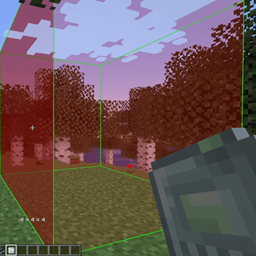
Just Dire Things machines (Block Breakers, Block Placers, Clickers, Sensors, Droppers and others) take their area as a radius plus an offset, typed into the GUI one number at a time. Just Dire Areas adds the Area Selector. You draw the box you want in the world, then right-click the machine and the mod works out the radius and offset for you.
| Action | Input |
|---|---|
| Set corner 1, then corner 2 | Right-click a block |
| Set a corner in mid-air | Ctrl + Right-click |
| Change mid-air distance | Ctrl + Scroll |
| Move the hovered face of a finished box | Ctrl + Scroll |
| Apply the box to a machine | Right-click the machine |
| Load a machine's area | Sneak + Right-click the machine |
| Clear the selection | Sneak + Right-click elsewhere |
Hold Shift over the item to see these controls in game. The Ctrl key can be changed in the controls menu under Just Dire Areas.
Install it on both the client and the server.
This is an unofficial addon for Just Dire Things by Direwolf20. It is not affiliated with or endorsed by Direwolf20. Please report Area Selector bugs here and not to Just Dire Things.
I play with this mod added to ATM10-Aeronautics modpack. Feel free to use my mods in your modpack, just don't forget to give proper credit.
I run these mods together: