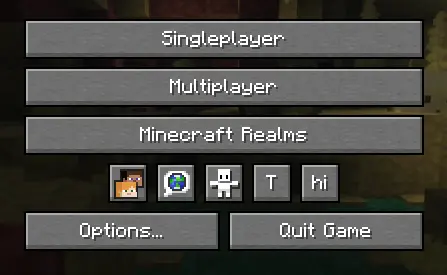
API for easily adding buttons to the Icon Buttons row in the title menu and pause menu
build.gradlerepositories {
maven {
url "https://api.modrinth.com/maven"
}
}
dependencies {
implementation "maven.modrinth:iconbuttonsapi:${project.iconbuttonsapi_version}+mc-${project.minecraft_version}"
}gradle.propertiesAdd the following lines to your gradle.properties file and replace the values with your target versions:
iconbuttonsapi_version=1.0.0fabric.mod.jsonDon't forget to declare the dependency in your fabric.mod.json so Fabric Loader can verify it at runtime:
"depends": {
    ...
    "iconbuttonsapi": ">=1.0.0"
}The main entry point of the API is the IconButtons class. It provides methods to easily add any AbstractWidget (like buttons, sliders, etc.) to the Minecraft Title Screen or Pause Menu rows.
You can register buttons to stay visible permanently or control their visibility dynamically using a BooleanSupplier.
public class ExampleModClient implements ClientModInitializer {
    public static final String MOD_ID = "iconbuttonsapi";
    public static final Logger LOGGER = LoggerFactory.getLogger(MOD_ID);
    public static boolean willShow = true;

    @Override
    public void onInitializeClient() {
        Button buttonHi = Button.builder(
                Component.literal("hi"),
                b -> {
                    LOGGER.info("Hi!");
                }
        ).size(IconButtons.getButtonWidthAndHeight(), IconButtons.getButtonWidthAndHeight()).build();
        Button buttonToggleShow = Button.builder(
                Component.literal("T"),
                b -> {
                    willShow = !willShow;
                }
        ).size(IconButtons.getButtonWidthAndHeight(), IconButtons.getButtonWidthAndHeight()).build();

        IconButtons.addTitleScreenButton(buttonHi, () -> willShow);
        IconButtons.addPauseScreenButton(buttonHi, () -> willShow);

        IconButtons.addTitleScreenButton(buttonToggleShow);
        IconButtons.addPauseScreenButton(buttonToggleShow);
    }
}X and Y) for your widgets. The API calculates and applies positioning automatically, arranging your buttons into a neat row.IconButtons.getButtonWidthAndHeight() (returns 20) for the correct size to ensure your icons fit perfectly alongside vanilla icons.