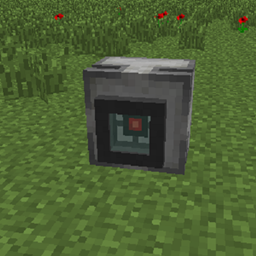
HTTP Block adds two configurable redstone blocks that allow Minecraft to communicate with external HTTP services. The HTTP Sender can send JSON POST requests when powered by redstone, while the HTTP Receiver continuously polls an HTTP endpoint and emits a redstone pulse whenever it detects a new event. This makes it easy to exchange data between Minecraft and any application capable of sending or receiving HTTP requests, regardless of the programming language or framework used.
POST request when it receives a redstone rising edge.Right-click the block to configure it.
The HTTP endpoint that will receive the request.
Example:
http://localhost:8000/event
The raw JSON body that will be sent with the request.
Example:
{ "message": "Hello" }
POST request only when redstone changes from OFF to ON.Content-Type: application/json.Right-click the block to configure it.
The endpoint to poll for events.
Example:
http://localhost:8000/event
Note: The endpoint must return JSON matching the Event Format described below. The receiver expects that structure to detect new events correctly.
Displays the message from the most recently received event.
hash with the last one it received.The receiver expects the endpoint to return JSON in the following format:
{
    "timestamp": 1750412345,
    "message": "Hello",
    "hash": "6a8f6c5d..."
}
| Field | Description |
|---|---|
timestamp |
Unix timestamp of the event. |
message |
Text shown in the receiver GUI. |
hash |
Unique identifier for the event. A new hash triggers a pulse. |
hash is used to detect new events.
A simple Python Example is shown below.The HTTP Receiver expects an endpoint that returns events in the format shown above. Below is a minimal FastAPI relay implementation that satisfies the required API.
from fastapi import FastAPI
from pydantic import BaseModel
import hashlib
import time
import uvicorn

app = FastAPI()

latest_event = {
    "timestamp": 0,
    "message": "",
    "hash": "",
}


class EventIn(BaseModel):
    message: str


@app.post("/send_event")
async def create_event(data: EventIn):
    global latest_event
    message = str(data.message)
    timestamp = int(time.time())
    event_hash = hashlib.sha256(f"{timestamp}:{message}".encode()).hexdigest()
    latest_event = {
        "timestamp": timestamp,
        "message": message,
        "hash": event_hash,
    }
    return {"success": True}


@app.get("/get_event")
async def get_event():
    return latest_event


if __name__ == "__main__":
    uvicorn.run(app, host="0.0.0.0", port=9000)
Install the required packages:
pip install fastapi uvicorn
Run the relay:
python relay.py
Then configure your blocks:
http://localhost:9000/send_eventhttp://localhost:9000/get_event/http pollrate <ticks>
Sets how often receivers poll their configured URL.
/http pulselength <ticks>
Sets how long receiver pulses last.
/http status
Shows the current configuration and registered sender/receiver counts.
/http reload
Reloads the configuration from disk.