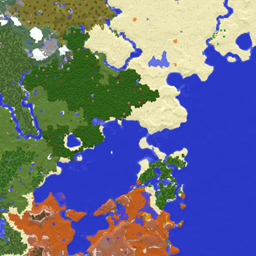
An interactive isometric 3D map for Minecraft 1.20.1 / Forge. Press M to see the chunks loaded around you as a rotatable, zoomable diorama, rendered inside a Minecraft-style GUI (dirt background, inset viewport frame, tooltip-style panels). Client-side only -- safe to join vanilla or modded servers that don't have it installed.
Features
- M key (rebindable) opens the full-screen 3D map
- Loaded chunks render as a diorama using vanilla map colors, with relief shading, altitude tint, and water-depth shading
- Mouse controls: drag to rotate (15 to 90 degree tilt), right-drag / Shift+drag to pan, wheel to zoom
- Projection toggle (P): isometric (orthographic) or perspective
- Y-slice slider (also up/down and PgUp/PgDn): cut the world horizontally -- slicing underground reveals cave floors in cross-section; the Nether opens pre-sliced below the roof
- Markers: you = cyan arrow + light pillar, other players = white with nametags, hostile mobs = red, other entities = yellow
- Hover any column for its coordinates / block / biome / chunk; click to copy coordinates (
x y z, paste straight into /tp)
- Chunk-border grid (G), radius slider (4-16 chunks, defaults to your render distance), compass, refresh (R), Home to reset the view
- Fully localized in English and Japanese
Install
Drop hakoniwa-1.1.0.jar into the mods folder of any 1.20.1 Forge instance. Enter a world and press M. No server-side install needed.
Config (config/hakoniwa-client.toml)
| Option |
Meaning |
Default |
| maxRadiusChunks |
Upper bound of the radius slider |
16 |
| defaultRadiusChunks |
Radius on open; 0 = follow render distance (capped at 12) |
0 |
| showEntities |
Show mob markers on open |
true |
| orthographic |
Start in isometric projection |
true |
| chunkGrid |
Show chunk borders on open |
true |
Known limitations
- Terrain is a snapshot taken when the map opens (player/mob markers stay live). Press R to refresh after the world changes.
- The view shows "what's visible from above" unless you use the Y-slice -- interiors and overhangs only appear via a slice.
- Chunks not loaded on the client (e.g. server-limited view distance) render as holes.
日本語
プレイヤーの周りに読み込まれているチャンクを、アイソメトリック風の俯瞰3Dジオラマとして眺められるインタラクティブ3DマップMODです。Minecraft 1.20.1 / Forge 用、クライアント専用(サーバー側の導入は不要・どのサーバーに入っても安全)。GUIはバニラ準拠の見た目(設定画面と同じ土テクスチャ背景、インベントリ枠風の彫り込みビューポート、ツールチップ風の情報パネル)。
できること
- Mキー(変更可)で全画面の3Dマップを開く
- 読み込み済みチャンクが「箱庭(ジオラマ)」として表示される——色はバニラ地図と同じブロック色プラス起伏の陰影プラス高度による明暗、水は深さで色が変化
- マウス操作: ドラッグ=回転(見下ろし角15°から真上90°)、右ドラッグ/Shift+ドラッグ=平行移動、ホイール=ズーム
- 投影切替(P): アイソメ(等角・遠近感なし)⇔ 遠近
- 高度カット(Yスライス): スライダーか上下矢印/PgUp/PgDn で世界を水平に輪切り。地下にスライスすると洞窟の床が断面として見える。ネザーでは最初から天井の下でカットされた状態で開く
- マーカー: 自分=水色の矢印+光の柱、他プレイヤー=白(名前つき)、敵Mob=赤、その他=黄
- ホバーで座標・ブロック名・バイオーム・チャンク座標を表示、クリックで座標をコピー(
x y z 形式、/tp にそのまま貼付可)
- チャンク境界グリッド(G)、範囲スライダー(半径4から16チャンク、初期値は描画距離連動)、コンパス、再読込(R)、Homeで視点リセット
- 日本語・英語 完全対応
導入
hakoniwa-1.1.0.jar を 1.20.1 Forge の mods フォルダに入れるだけ。ワールドに入って M キーで開きます。サーバー側の導入は不要です。
設定(config/hakoniwa-client.toml)
| 項目 |
意味 |
初期値 |
| maxRadiusChunks |
範囲スライダーの上限(チャンク) |
16 |
| defaultRadiusChunks |
開いたときの半径。0=描画距離に追従(上限12) |
0 |
| showEntities |
Mobマーカーを最初から表示 |
true |
| orthographic |
最初からアイソメ投影 |
true |
| chunkGrid |
最初からチャンク境界を表示 |
true |
既知の割り切り
- 地形は開いた瞬間のスナップショット(プレイヤー・Mobマーカーは常にライブ)。地形が変わったら R で再読込。
- 表示は「上から見えている面」ベース——高度カットしない限り、洞窟や建物内部は映らない。
- 未読込チャンク(マルチで描画距離がサーバー制限される場合など)は穴として表示される。