Loading...
Beta Modpages Unclaimed

God Apples +

Adds More apples and enchanted varients.

0 Likes
4634 Downloads
Created by Phantom_PXL

Description

WELCOME ALL TO TE REVAMPED GOD APPLES MOD. This mod aims to add verious OP apples into the game. This mod is aimed to improve the vanilla game play. ATM this mod only adds a few items and recipes but more are to come soon.


Recipes-

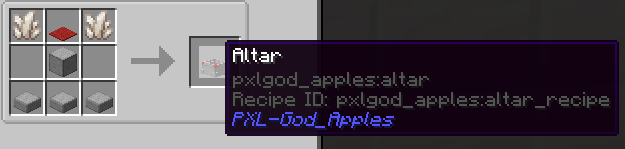


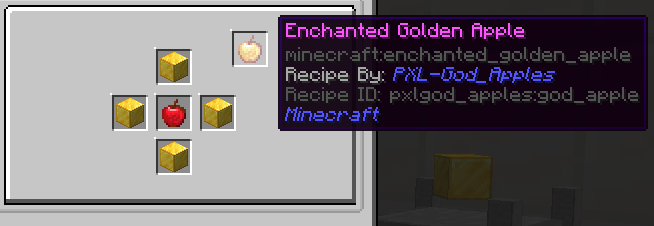
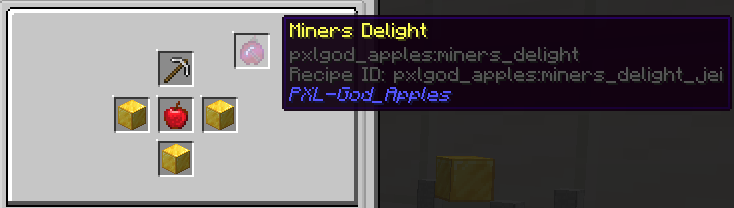
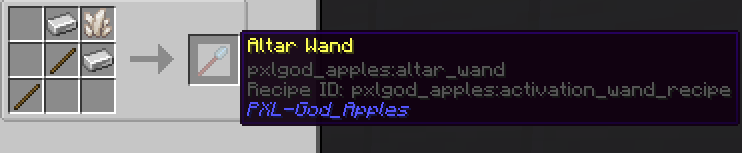
All god apple recipes are made with the new infusion altar. To create a god apple just put a regular apple in the altar and required items onto the pedestals and then right click the altar with the altar want and BOOM god apple. JEI integration is included so just check the recipe in jei if you froget what ingredents are needed.

Altar setup-
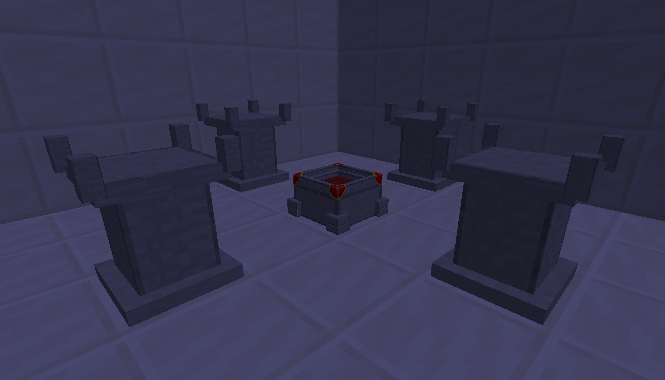
Altar set up is Altar in center with 1 pedestal on n.s.w.e with one block spacing(WARNING.... Altar setup may change in the future and may include more complex altar setups.) To Verify Altar setup just shift right click with a empty hand and it will tell you if its correct.

Earlier version of mod only included God apple recipe and no altar. All stated above is only included in V0.01 and later.

Allowed-To use in modpacks and personal use
Not-Allowed- Distribute thru 3ds party or modify files

ATTENTION--- UPDATE IN PROGRESS. MASSIVE CONTENT UPDATE COMING IN THE NEXT FEW WEEKS.

Get the best hosting experience with BisectHosting and save 25% off for new customers using PXL. 


AD Become Premium to remove Ads!

What means Verified?

  • Compatibility: The mod should be compatible with the latest version of Minecraft and be clearly labeled with its supported versions.
  • Functionality: The mod should work as advertised and not cause any game-breaking bugs or crashes.
  • Security: The mod should not contain any malicious code or attempts to steal personal information.
  • Performance: The mod should not cause a significant decrease in the game's performance, such as by causing lag or reducing frame rates.
  • Originality: The mod should be original and not a copy of someone else's work.
  • Up-to-date: The mod should be regularly updated to fix bugs, improve performance, and maintain compatibility with the latest version of Minecraft.
  • Support: The mod should have an active developer who provides support and troubleshooting assistance to users.
  • License: The mod should be released under a clear and open source license that allows others to use, modify, and redistribute the code.
  • Documentation: The mod should come with clear and detailed documentation on how to install and use it.

AD Become Premium to remove Ads!

How to Install

1

Download Forge & Java

Download Forge from the offical Site or here. If you dont have Java installed then install it now from here. After Downloading Forge you can run the file with Java.

2

Prepare

Lounch Minecraft and select your Forge istallation as Version this will create a Folder called Mods.

3

Add Mods

Type Win+R and type %appdata% and open the .minecraft Folder. There will you find your Folder called Mods. Place all Mods you want to play in this Folder

4

Enjoy

You are now Ready. Re-start your Game and start Playing.

More Mods like this

AppleSkin

Adds some useful information about food/hunger to the HUD

Cooking for Blockheads

Adds a cooking book and multiblock kitchens that only shows recipes you can make with what you currently have in your inventory.

Pam's HarvestCraft

A farming mod that adds 60+ new crops, 36 new fruit trees, 17 new fish, simple beekeeping, and over 1100 new foods and items!

Aquaculture 2

Spices up fishing with a number of new biome specific fish, recipes, and more!

Spice of Life: Carrot Edition

A mod based around food that rewards the player instead of punishing them for discovering new foods!

Croptopia

[Fabric/Forge] Adds over 250 new foods, 58 crops and 26 trees to your world!

Abnormals Delight

Fills content gaps and ties together Abnormals mods and Farmer's Delight!