*** If you have installed 18.5.3/19.5.3/20.6.2 and the game crashes when you load it, please delete your /config/impactful-common.toml as well as the original mod, and install the latest hotfix version, or manually replace uchigatana with tachi and replace katana with uchigatana in the "weapon_categories_setting" option in impactful-common.toml ***
Modern action games have made many attempts to make player feel the force in every punches. Impactful is one of these attempts brings hit stop and screen shake to Epic Fight.

Version after 20.11, need to setup resoucepack and datapack. example for 20.11.1
For visual effects of screen shake and radial blur just need to setup resoucepack in client side.
you can custom the visual effect deponds on items in resoucepack. "modid/item_skin/item_registryname.json". just like how to custom trails
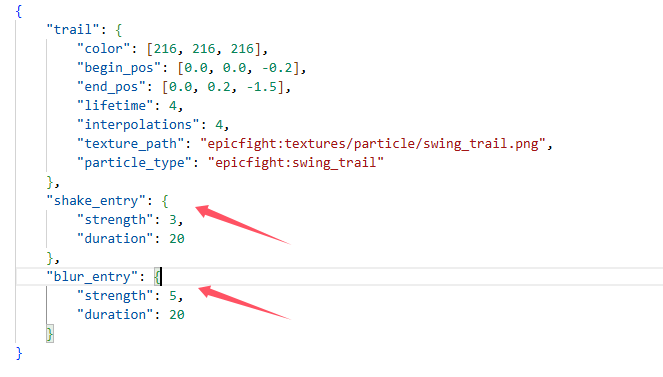 or you can custom the visual effect deponds on animation in resoucepack. "modid/animmodels/animations/biped/combat/visual_effct/animation_registryname.json"
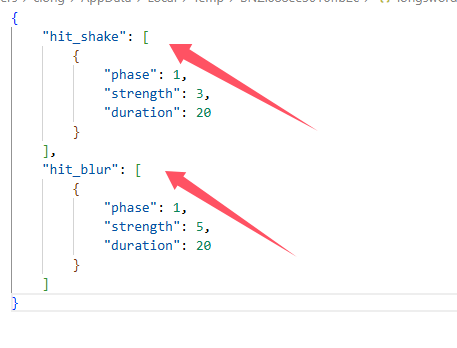
For hit stop need to setup resoucepack and datapack in both side.
custom hit stop setting deponds on item capabilities in datapack "modid/capabilities/weapons/item_registryname.json". just like how to custom weapon capability
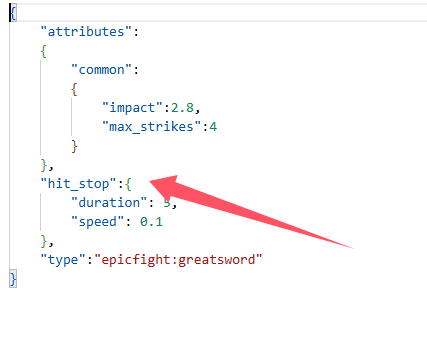
custom hit stop setting deponds on animation
"modid/animmodels/animations/biped/combat/hit_stop/animation_registryname.json"
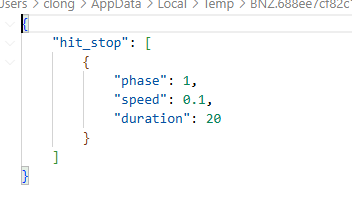
When playing on the server, animation setting of hit stop must setup in server side as a datapack, and setup in client side as a resoucepack.
When singleplayer, just need to setup as a resourcepack
Version before 20.11, only need to set the configuration file impactful-common.toml and impactful-client.toml