Mineuniverse
Resource Packs
Connected Reinforced Glass textures for SecurityCraft

Connected Reinforced Glass textures for SecurityCraft

RESOURCE PACK
Works only with SecurityCraft and a CTM mod installed!
by Redstone_Dubstep
Download Claim this project
Add a badge to your pageLink to Connected Reinforced Glass textures for SecurityCraft from a README, website or forum post.
Preview: Badge

Badges update automatically and link to the resource pack page on MineUniverse.

674,244 downloads
0 likes
0 followers
Updated Oct 14, 2026
0 hypes
Follow0
16x Mod Support
Advertisement Remove ads with Premium →

Connected Reinforced Glass Textures

Mostly discontinued - occasional work might still happen - contributions welcome

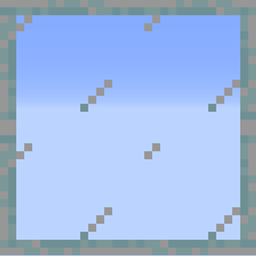
This resource pack connects the Reinforced Glass (pane) textures from the mod SecurityCraft to each other, using the CTM feature.

How to use it:

  1. Download the resource pack for your minecraft version.

  2. Make sure that you've installed SecurityCraft and OptiFine (1.19.4 and below) or CTM/Fusion (1.20.1 and above) with the right minecraft versions into the mod folder.

  3. Put the resource pack into the "resourcepack" folder of Minecraft.

  4. Have fun with your huge reinforced windows that look much better now!

Regarding Reinforced Glass Panes: With Fusion, they only have partially connected textures, and with CTM they don't connect at all. This is because these libraries don't allow for easy customization of glass pane models. Sorry about that!

If you have any further questions/issues, please use the comment section below.

Connected_Reinforced_Glass_Textures(26.1.2).zip
MC 26.1.2, 26.2
Release 2026-08-12 Get
Connected_Reinforced_Glass_Textures(1.20.1).zip
MC 1.20.1
Release 2026-08-06 Get
Connected_Reinforced_Glass_Textures(1.21).zip
MC 1.21, 1.20.1, 1.20.6, 1.20.4
Release 2024-07-22 Get
Connected_Reinforced_Glass_Textures(1.19.4).zip
MC 1.19.4, 1.19.2, 1.20.1
Release 2023-05-16 Get
Connected_Reinforced_Glass_Textures(1.18.2).zip
MC 1.18.2
Release 2022-03-19 Get
Connected_Reinforced_Glass_Textures(1.12.2).zip
MC 1.12.2
Release 2021-05-10 Get
Connected_Reinforced_Glass_Textures(1.16.2).zip
MC 1.16.5, 1.16.2
Release 2020-08-16 Get
Connected_Reinforced_Glass_Textures(1.16.1).zip
MC 1.16.1
Release 2020-07-30 Get
Connected_Reinforced_Glass_Textures(1.14.4).zip
MC 1.14
Release 2020-05-29 Get
Connected_Reinforced_Glass_Textures(1.15.2).zip
MC 1.15.2, 1.15.1
Release 2020-05-29 Get

Requirements & install

How to use this resource pack in Minecraft
Resolution
16x
Minecraft
1.19.2 – 26.2
Install folder
.minecraft/resourcepacks

How to install resource packs

  1. Download the resource pack .zip file (do not extract it).
  2. In Minecraft open Options → Resource Packs → Open Pack Folder.
  3. Drop the .zip into the resourcepacks folder (.minecraft/resourcepacks).
  4. Move the pack to the Selected column and click Done.
Browse more: 16x resource packs 32x resource packs 64x resource packs 128x resource packs 256x resource packs 512x+ resource packs Resource Packs for 26.2 All resource packs

More from Redstone_Dubstep

Advertisement Remove ads with Premium →

You Might Also Like