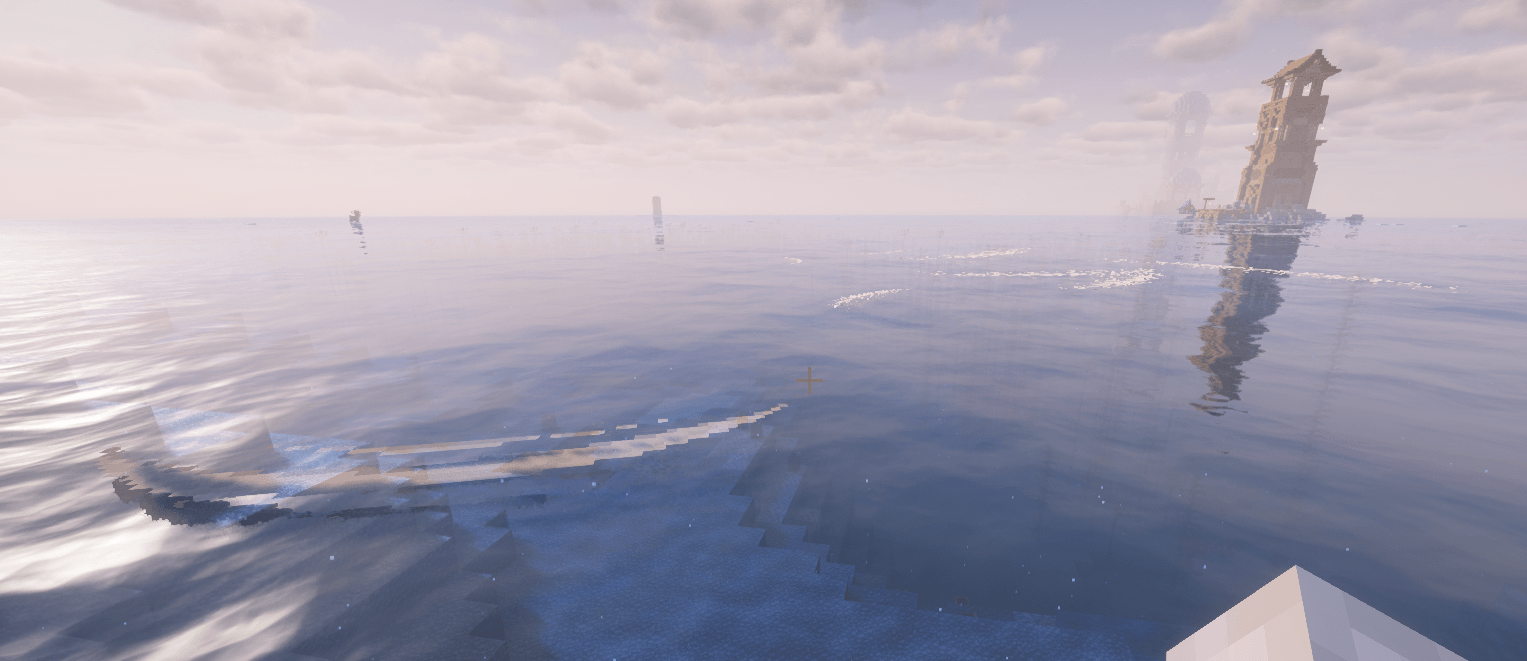
Coastal Waves Fabric Port is an unofficial Fabric port of Coastal Waves for Minecraft 1.20.1.
It adds animated waves near shorelines, complete with breaking sounds, sea foam, entity interactions, shoreline deposits, and bioluminescent effects, while preserving the configuration options and datapack support of the original mod.
· Animated Coastal Waves — Generates small, medium, and large waves that move toward nearby shorelines and break along the coast.
· Wave Sounds and Sea Foam — Includes multiple breaking-wave sounds and visual foam effects for more immersive beaches and oceans.
· Dynamic Wave Conditions — Wave behavior is affected by environmental conditions such as rain and thunderstorms.
· Entity Interaction — Waves can push nearby entities, with configurable interaction behavior, force, and update frequency.
· Shoreline Deposits — Breaking waves can occasionally deposit configured blocks along the coast.
· Bioluminescent Waves — Wave appearance can change depending on time, weather, environmental conditions, noise, and the configured bioluminescence settings.
· Configurable Spawning — Customize how frequently waves spawn, how many are generated, how far from the player they can appear, how far they can spawn from shorelines, and which part of the surrounding area is used for spawning.
· Performance Options — Includes biome and shoreline caching, incremental cache processing, active-wave limits, spawn-attempt limits, distance-based wave cleanup, optimized interaction checks, and other safeguards designed to reduce unnecessary server work while preserving the visual appearance of the waves.
· Datapack Support — Biomes, fluids, shoreline blocks, deposited blocks, and entity interactions can be customized through tags.
· Familiar Configuration — The Fabric port retains the Coastal Waves 1.6.1 configuration option names to make migration from the Forge version easier.
· Client and Server — The mod must be installed on both the client and server.
Install Fabric Loader for Minecraft 1.20.1.
Install Fabric API.
Place Coastal Waves Fabric Port in the mods folder.
Install the mod on both the client and server when playing multiplayer.
Launch Minecraft.
The main configuration file is located at:
.minecraft/config/waves-common.toml
Additional wave and deposit settings are located at:
.minecraft/config/waves/waves.json
Close Minecraft before manually editing these files. Restart the game or server after changing the configuration.
· waveSpawnFrequency — Controls how often the mod performs a wave spawning sequence. Lower values cause spawning sequences to happen more frequently.
· waveSpawnAmount — Controls the base amount of wave spawning performed during each sequence. Increasing this value generally produces more waves.
· waveEqualSpawnDistribution — Controls how strongly the number of spawn attempts scales with render distance. When enabled, larger render distances allow the spawning system to cover a larger area.
· waveSearchDistance — Controls how far the mod searches when looking for a suitable shoreline for a wave.
· waveSpawnDistance — Controls the general distance around the player in which wave spawn positions can be selected.
· waveSpawnDistanceFromShoreMin — Defines the minimum distance a wave can spawn from the shoreline.
· waveSpawnDistanceFromShoreMax — Defines the maximum distance a wave can spawn from the shoreline.
· waveSpawningFOVLimit — Limits wave spawning to the configured field of view around the player, helping keep waves concentrated in the area the player can see.
· waveEntityInteraction — Enables or disables waves interacting with nearby entities.
· waveInteractionUpdateFrequency — Controls how often active waves perform their entity-interaction check. Lower values check more frequently, while higher values reduce the frequency of these checks.
· waveSpriteCount — Controls the number of visual sprite elements used by the wave effect.
Wave sounds, foam, colors, animation, bioluminescence, and other visual properties can also be adjusted through the available configuration and wave settings.
· useCaches — Enables the biome and shoreline caches used to avoid repeatedly performing the same expensive searches.
· cacheUpdateFrequency — Controls how frequently cached data is updated.
· cacheResetFrequency — Controls how frequently cache data is reset or rebuilt.
· parallelProcessing — Enables the mod's optional parallel processing for calculations that can safely be performed outside the main game logic.
The performance system also provides additional safeguards for large render distances and multiplayer environments:
· maxActiveWavesPerPlayer — Maximum number of active waves allowed for one player's surrounding area. Default: 48.
· maxActiveWavesPerDimension — Maximum total number of active waves allowed in a dimension. Default: 128. This prevents multiple players from causing unlimited wave accumulation.
· maxSpawnAttemptsPerSequence — Maximum number of spawn attempts performed during a single wave spawning sequence. Default: 96. The original render-distance-based spawning calculation is still used, but this option prevents very high render distances from producing excessive spawn work.
· waveCleanupDistance — Removes waves when they are outside this distance from all players and are therefore unlikely to contribute to the visible scene. Default: 96.0 blocks.
· waveInteractionPlayerDistance — Distance used as a preliminary check before performing expensive entity-interaction searches. If no player is close enough, the interaction query is skipped. Default: 48.0 blocks.
These performance limits are additional safeguards. They do not replace the normal wave spawning configuration or intentionally reduce the visual quality of the waves.
The configuration system allows you to balance the mod according to your preferences:
· Want more frequent waves? Adjust waveSpawnFrequency.
· Want more waves per spawning sequence? Adjust waveSpawnAmount.
· Want waves to appear across a larger area? Adjust waveSpawnDistance, waveSearchDistance, and the shoreline distance settings.
· Want waves to remain mainly in front of the player? Adjust waveSpawningFOVLimit.
· Want more or less entity interaction? Configure waveEntityInteraction and waveInteractionUpdateFrequency.
· Want to tune cache behavior? Use useCaches, cacheUpdateFrequency, and cacheResetFrequency.
· Want additional performance protection for high render distances or multiplayer? Use the active-wave, spawn-attempt, cleanup-distance, and interaction-distance settings.
· Minecraft 1.20.1
· Fabric Loader 0.14.0 or newer
· Fabric API 0.92.11+1.20.1 or a newer compatible version
· Java 17
· Installation on both the client and server
The original Forge-specific Weather2 integration is not included because it depends on Forge implementations that are not available in this Fabric port.
Vanilla rain, thunderstorms, and bioluminescence-related wave behavior remain available.
This is an independent and unofficial Fabric port of Coastal Waves.
· Original Coastal Waves project
· Original Coastal Waves source code
This port is not an official Fabric release by the original author.
Coastal Waves Fabric Port was ported to Fabric and is maintained by zClashTM.
The original Coastal Waves mod was created by Verph.
Please do not contact Verph or the original Coastal Waves project for support, bug reports, or questions about this Fabric port.
Coastal Waves Fabric Port is distributed under the BSD 2-Clause License.
The original copyright notice is retained as required by the license.