Mineuniverse
Log in Register
Mods

Client Sort

Versatile and easy inventory sorting.
by NotRyken
Download Claim this project
11,482,902 downloads
0 likes
Updated Jun 30, 2026
0 hypes

ClientSort

Versatile and easy inventory sorting.

Operations

Sort Sort

  • Press the Sort button, or hover over the inventory with your mouse and press the keybind (default: middle mouse button).
  • When activated, items are sorted by their position in the creative inventory search tab. Alternative sort orders can be used by holding down a modifier key while sorting.
    • Shift - descending order of quantity.
    • Control - alphabetical order.
    • Alt - ascending order of item ID.

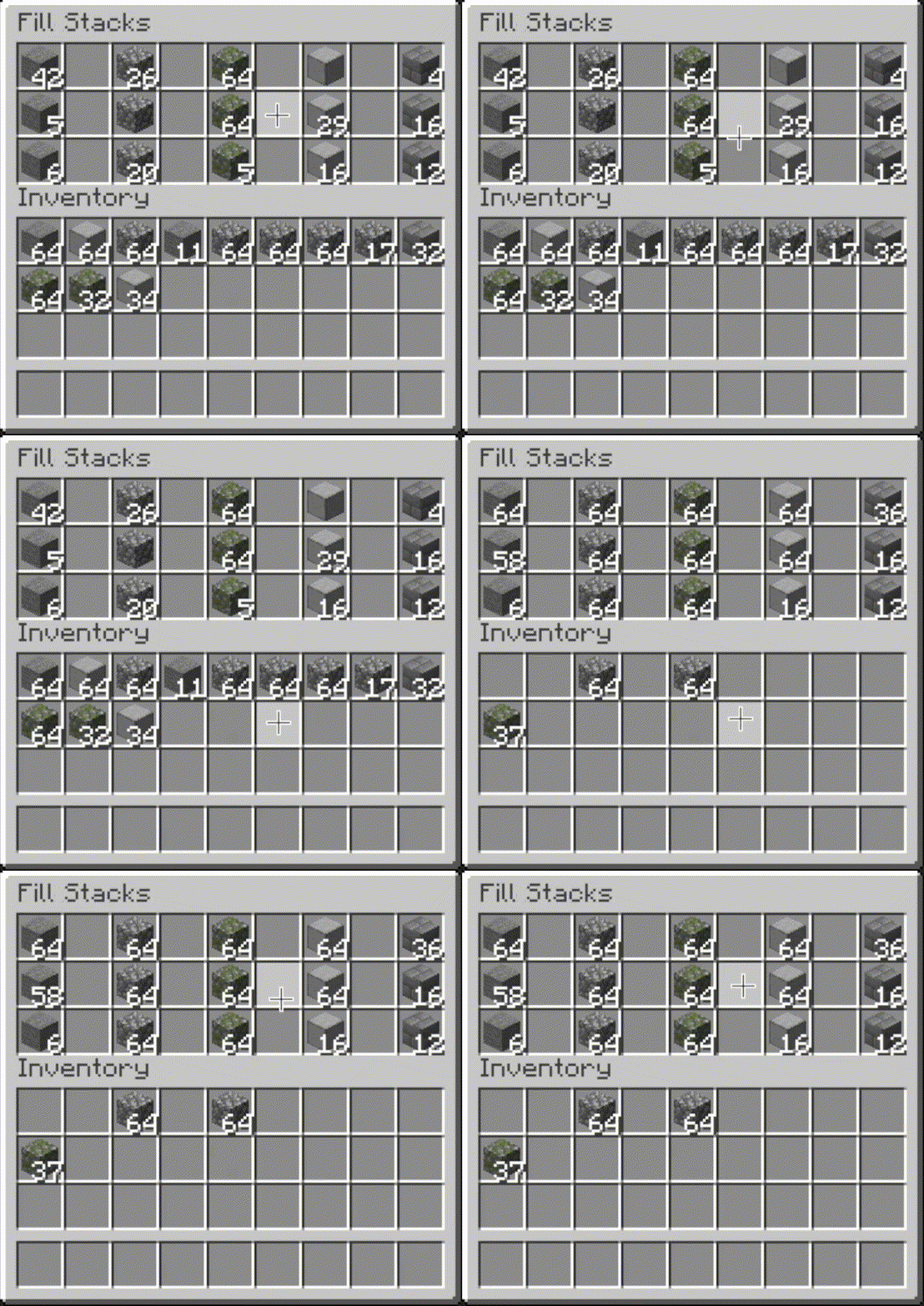
Fill Stacks Fill Stacks

  • Press the Fill Stacks button, or hover over the inventory that you want to move items out of and press the keybind (default: unbound).
  • When activated, partial stacks in the other inventory are topped-up using items in the origin inventory.
  • This button is disabled on the player inventory by default, but can be enabled via the editor (see below).

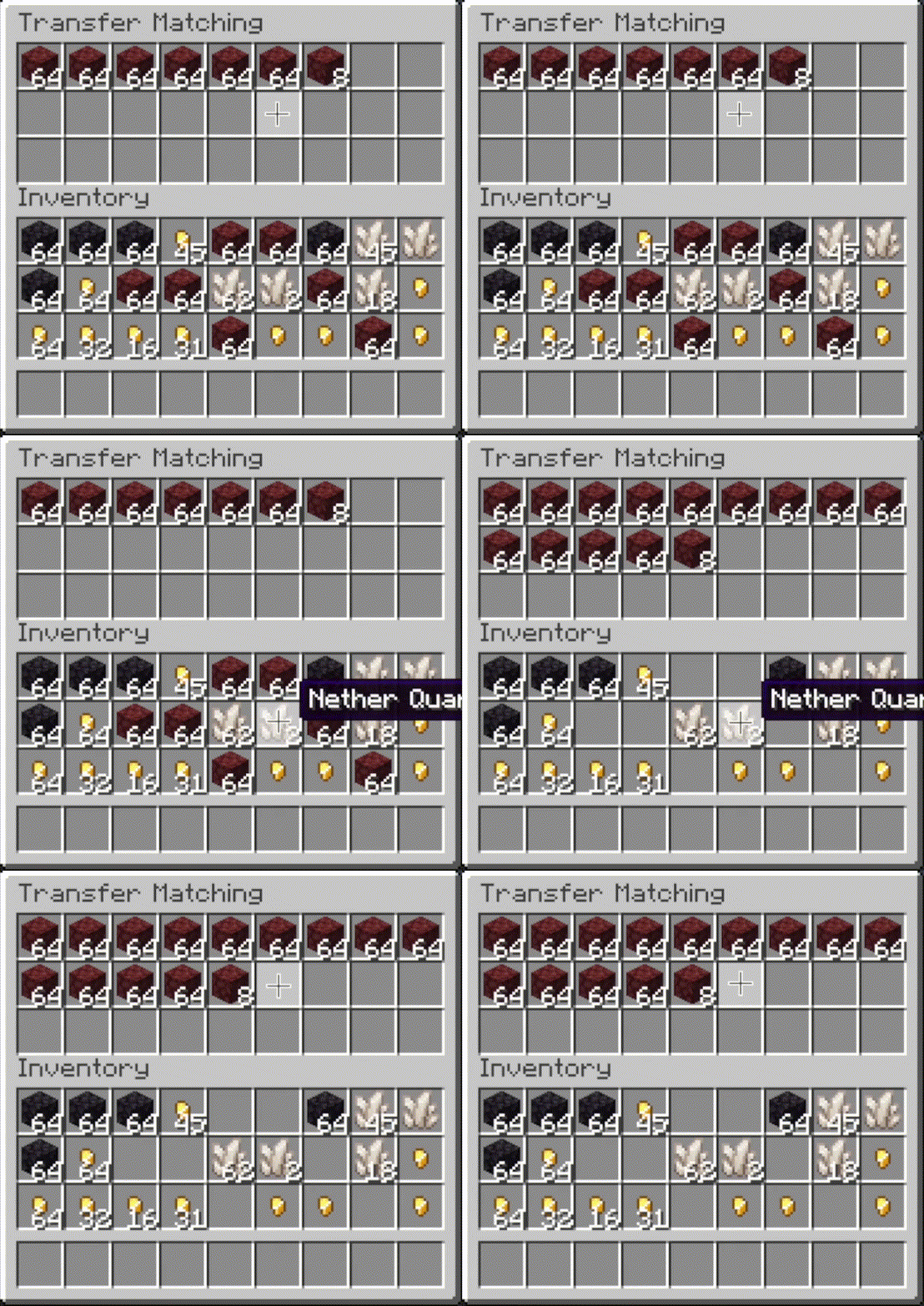
Transfer Matching Transfer Matching

  • Press the Transfer Matching button, or hover over the inventory that you want to move items out of and press the keybind (default: unbound).
  • When activated, the other inventory is restocked using items in the origin inventory. No new item types are added to the other inventory.

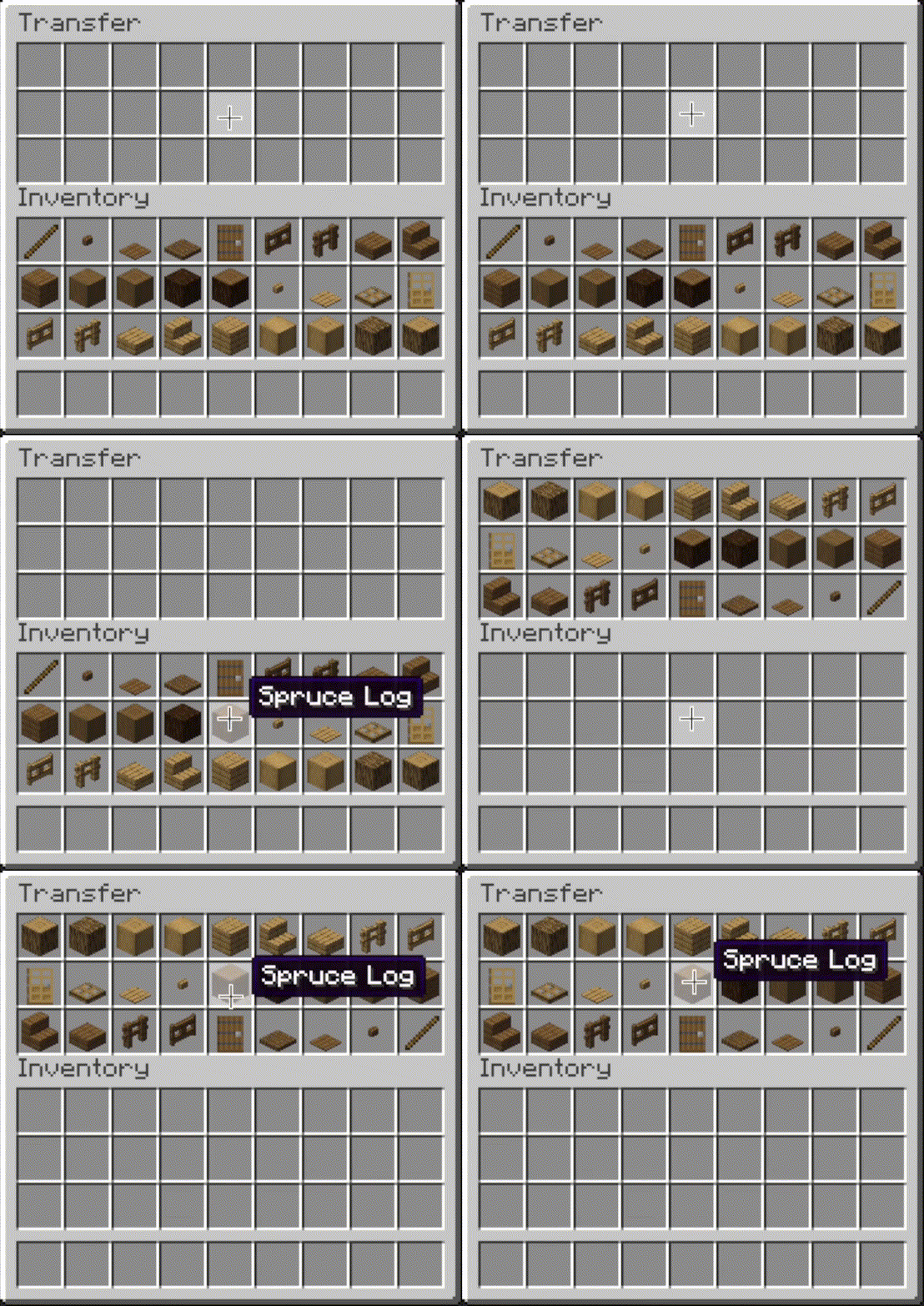
Transfer Transfer

  • Press the Transfer button, or hover over the inventory that you want to move items out of and press the keybind (default: unbound).
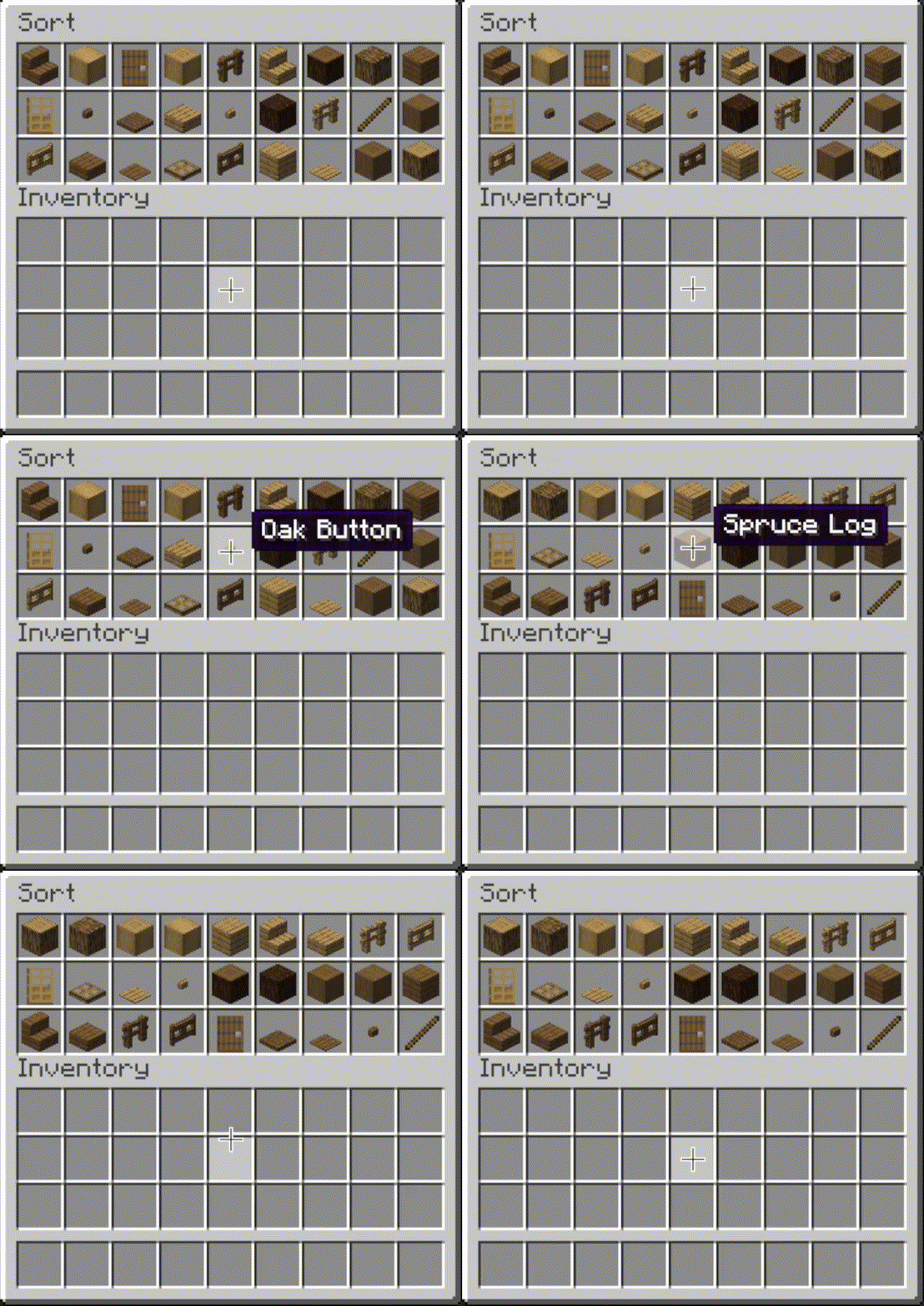
  • When activated, as many items as possible are moved from the origin inventory to the other inventory.
Sort demo Stack fill demo Transfer matching demo Transfer demo

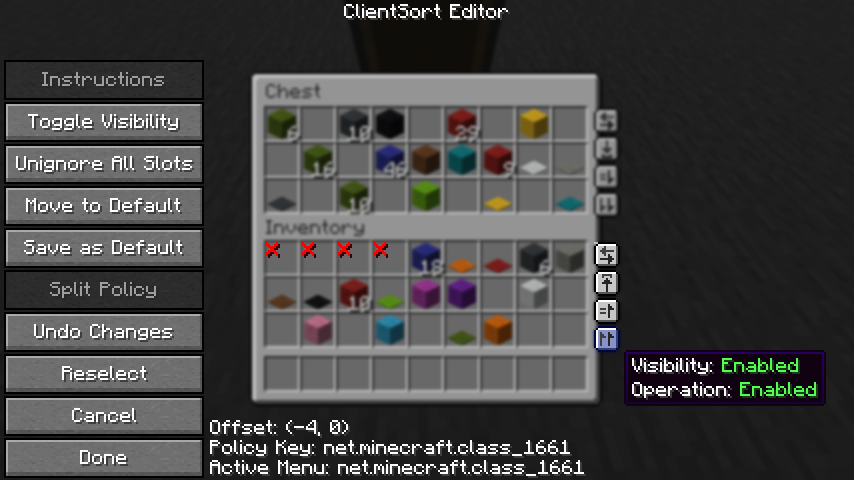
Editor

  • The editor can be opened in two ways:
    • If a trigger button is visible, right-click on it.
    • Otherwise, bind the Open Editor keybind (unbound by default) and press it while viewing an inventory.
  • When you've opened the editor, hover over Instructions for more information.
  • Note: fill and transfer buttons are only shown if set to show on both the player inventory and the container, so you can easily hide them everywhere by hiding them on just the player inventory.

Editor

Client-Side Policies

  • ClientSort uses a policy system to determine when to allow operations, when to show the trigger buttons, and when to ignore slots. The policy can be configured either via the editor screen or via the Policies tab of the mod options.
  • Read the in-game instructions for more information on editing policies.

Server-Side Policies

  • If installed on a dedicated server, ClientSort uses policies to automatically disable server-accelerated operations when it detects an incorrect state (such as item duplication).
  • The policy list is stored in the clientsort-server.json config file, which can be manually edited and reloaded using the /clientsort reload command.

Serverside policies are not synced to clients, so if a client attempts to perform a server-accelerated operation that the server does not allow, a warning message will be shown to the client. The player can then opt to add a client-side policy to disable the operation entirely, disable server acceleration, or enable automatically falling back to client operations.

Serverside Config File

{
  "options": {
    // Whether validation and automatic blacklisting should be enabled when the mod is used on a
    // dedicated server.
    "validationActiveServer": true,

    // Whether inventories should be blacklisted when the wrong type of item is found in a slot.
    "validateItemType": true,

    // Whether inventories should be blacklisted when the wrong number of items is found in a slot.
    "validateStackSize": true,
    // The minimum difference between expected and actual which should be considered invalid.
    "validateStackSizeThreshold": 32,

    // Whether to always log a message when the result is not exactly as expected (even if
    // validation is disabled, the difference is less than the threshold, etc.)
    "alwaysLogUnexpectedResults": true,

    // The list of policies for different inventory and container types.
    "classPolicies": {
      // An example entry.
      "com.simibubi.create.content.equipment.toolbox.ToolboxMenu": {
        "className": "com.simibubi.create.content.equipment.toolbox.ToolboxMenu",
        "sortEnabled": false,
        "stackFillEnabled": true,
        "transferEnabled": true,
        // Updated automatically when an inventory is blacklisted.
        "lastAutoEditTime": "2025-09-20T14:58:41.1620876+08:00",
        "lastAutoEditReason": "Sort operation failed at slot mapping 12->5: Expected '2 minecraft:spruce_slab' in destination after set, got '0 minecraft:air'!"
      }
    }
  }
}

Installation

Client Required, Server Optional

As the name suggests, ClientSort is fully functional when it is only installed on the client. However, if it is also installed on a server, connected clients with the mod will be able to use server-accelerated (near-instant) operations instead of the normal rate-limited operations.

Dependencies

Fabric: Fabric API, ModMenu, Cloth Config API

Neo/Forge: Cloth Config API

Credits

ClientSort uses code from the following mods, in both modified and unmodified form, in accordance with their respective licenses.

Related Mods

  • Mouse Tweaks - item scrolling, mouse dragging.
  • More Mouse Tweaks - single-click crafting and trading, quick-move and quick-drop.
  • Tweakeroo - hand restock, auto tool-switch, tool break prevention and more.

Contact

Discord Server

GitHub Issues

License

v3.102.5+26.1.2-Fabric
MC Client, Fabric, Server, 26.1, 26.1.1, 26.1.2
Release 2026-07-04 Get
v3.102.5+26.1.2-NeoForge
MC Client, NeoForge, Server, 26.1, 26.1.1, 26.1.2
Release 2026-07-04 Get
v3.103.1+26.2-NeoForge
MC Client, NeoForge, Server, 26.2
Release 2026-07-04 Get
v3.103.1+26.2-Fabric
MC Client, Fabric, Server, 26.2
Release 2026-07-04 Get
v3.102.4+26.1.2-NeoForge
MC Client, NeoForge, Server, 26.1, 26.1.1, 26.1.2
Release 2026-06-19 Get
v3.102.4+26.1.2-Fabric
MC Client, Fabric, Server, 26.1, 26.1.1, 26.1.2
Release 2026-06-19 Get
v3.103.0+26.2-NeoForge
MC Client, NeoForge, Server, 26.2
Release 2026-06-19 Get
v3.103.0+26.2-Fabric
MC Client, Fabric, Server, 26.2
Release 2026-06-19 Get
v2.2.2+1.20.1-Fabric
MC Fabric, 1.20.1, 1.20
Release 2026-05-31 Get
v2.2.2+1.21.1-NeoForge
MC 1.21.1, NeoForge
Release 2026-05-31 Get
v2.2.2+1.21.1-Fabric
MC 1.21, Fabric, 1.21.1
Release 2026-05-31 Get
v2.2.2+1.21.3-Fabric
MC Fabric, 1.21.4, 1.21.3, 1.21.2
Release 2026-05-31 Get
v2.2.2+1.21.3-NeoForge
MC 1.21.4, 1.21.3, NeoForge
Release 2026-05-31 Get
v2.2.2+1.21.5-Fabric
MC Fabric, 1.21.5
Release 2026-05-31 Get
v2.2.2+1.21.5-NeoForge
MC 1.21.5, NeoForge
Release 2026-05-31 Get
v2.2.2+1.21.8-Fabric
MC Fabric, 1.21.8, 1.21.6, 1.21.7
Release 2026-05-31 Get
v2.2.2+1.21.8-NeoForge
MC 1.21.8, NeoForge
Release 2026-05-31 Get
v2.2.2+1.21.10-Fabric
MC Fabric, 1.21.9, 1.21.10
Release 2026-05-31 Get
v2.2.2+1.21.10-NeoForge
MC NeoForge, 1.21.9, 1.21.10
Release 2026-05-31 Get
v2.2.2+1.21.11-Fabric
MC Fabric, 1.21.11
Release 2026-05-31 Get
v2.2.2+1.21.11-NeoForge
MC NeoForge, 1.21.11
Release 2026-05-31 Get
v3.2.3+26.1.2-Fabric
MC Client, Fabric, Server, 26.1, 26.1.1, 26.1.2
Release 2026-05-31 Get
v3.2.3+26.1.2-NeoForge
MC Client, NeoForge, Server, 26.1, 26.1.1, 26.1.2
Release 2026-05-31 Get
v2.2.2+1.20.1-Forge
MC 1.20.1, Forge
Release 2026-05-31 Get
v3.2.2+26.1.2-Fabric
MC Fabric, 26.1, 26.1.1, 26.1.2
Release 2026-04-16 Get
v3.2.2+26.1.2-NeoForge
MC NeoForge, 26.1, 26.1.1, 26.1.2
Release 2026-04-16 Get
v3.1.1+26.1.1-Fabric
MC Fabric, 26.1, 26.1.1, 26.1.2
Release 2026-04-02 Get
v3.1.1+26.1.1-NeoForge
MC NeoForge, 26.1, 26.1.1, 26.1.2
Release 2026-04-02 Get
v3.0.0+26.1-Fabric
MC Fabric, 26.1, 26.1.1
Release 2026-03-28 Get
v3.0.0+26.1-NeoForge
MC NeoForge, 26.1, 26.1.1
Release 2026-03-28 Get
v3.0.0-beta.2+26.1-NeoForge
MC NeoForge, 26.1
Beta 2026-03-24 Get
v3.0.0-beta.2+26.1-Fabric
MC Fabric, 26.1
Beta 2026-03-24 Get
v3.0.0-beta.1+26.1-rc-2-NeoForge
MC NeoForge, 26.1-snapshot
Beta 2026-03-22 Get
v3.0.0-beta.1+26.1-rc-2-Fabric
MC Fabric, 26.1-snapshot
Beta 2026-03-22 Get
v2.2.1+1.20.1-Fabric
MC Fabric, 1.20.1, 1.20
Beta 2026-02-18 Get
v2.2.1+1.21.1-Fabric
MC 1.21, Fabric, 1.21.1
Beta 2026-02-18 Get
v2.2.1+1.21.1-NeoForge
MC 1.21.1, NeoForge
Beta 2026-02-18 Get
v2.2.1+1.21.3-NeoForge
MC 1.21.4, 1.21.3, NeoForge
Beta 2026-02-18 Get
v2.2.1+1.21.3-Fabric
MC Fabric, 1.21.4, 1.21.3, 1.21.2
Beta 2026-02-18 Get
v2.2.1+1.21.5-Fabric
MC Fabric, 1.21.5
Beta 2026-02-18 Get
v2.2.1+1.21.5-NeoForge
MC 1.21.5, NeoForge
Beta 2026-02-18 Get
v2.2.1+1.21.8-Fabric
MC Fabric, 1.21.8, 1.21.6, 1.21.7
Beta 2026-02-18 Get
v2.2.1+1.21.8-NeoForge
MC 1.21.8, NeoForge
Beta 2026-02-18 Get
v2.2.1+1.21.10-Fabric
MC Fabric, 1.21.9, 1.21.10
Beta 2026-02-18 Get
v2.2.1+1.21.10-NeoForge
MC NeoForge, 1.21.9, 1.21.10
Beta 2026-02-18 Get
v2.2.1+1.21.11-NeoForge
MC NeoForge, 1.21.11
Beta 2026-02-18 Get
v2.2.1+1.21.11-Fabric
MC Fabric, 1.21.11
Beta 2026-02-18 Get
v2.2.1+1.20.1-Forge
MC 1.20.1, Forge
Beta 2026-02-18 Get
v2.2.0+1.20.1-Fabric
MC Fabric, 1.20.1, 1.20
Beta 2026-02-13 Get
v2.2.0+1.20.1-Forge
MC 1.20.1, Forge
Beta 2026-02-13 Get

More from NotRyken

NoCapes
964
Here 'n' There
9,189
ModListMemory
880,037
Claim Points
7,375
Sign Copy
3,805
TMC Framework
2,634

You Might Also Like

Liberty's Villagers
Quality of Life and AI improvements for Villagers
9,968,428
No More Pop-ups
A Minecraft mod to remove in-game pop-ups
996,708
BetterRandomSourceConcurrencyCrash
Improved logging of crashes caused by mods accessing RandomSources from the wrong thread
99,371
Exit Confirmation
Often accidentally closed Minecraft? This mod might help!
99,067
NoDynamicFps
Adds an option to disable Vanilla's Dynamic FPS implementation
99,004
Immersive Crafting
Adds crafting recipes to immersive portals
9,998