Overhauls the game's 13-year-old text formatting syntax.
This mod allows you to use markdown-like syntax to format your text in Minecraft:
*italic text* → italic text**bold text** → bold text***bold + italic*** → bold + italic__underline__ → underline~~strikethrough~~ → strikethroughExamples:
this **is** bold → this is boldthis __underline *is* multiple things__→ this is multiple thingsThe terminating set of symbols is optional, e.g. **hello will still be bold.
If you put a star at the start of the name of an item in an anvil, it will cancel out the italics.
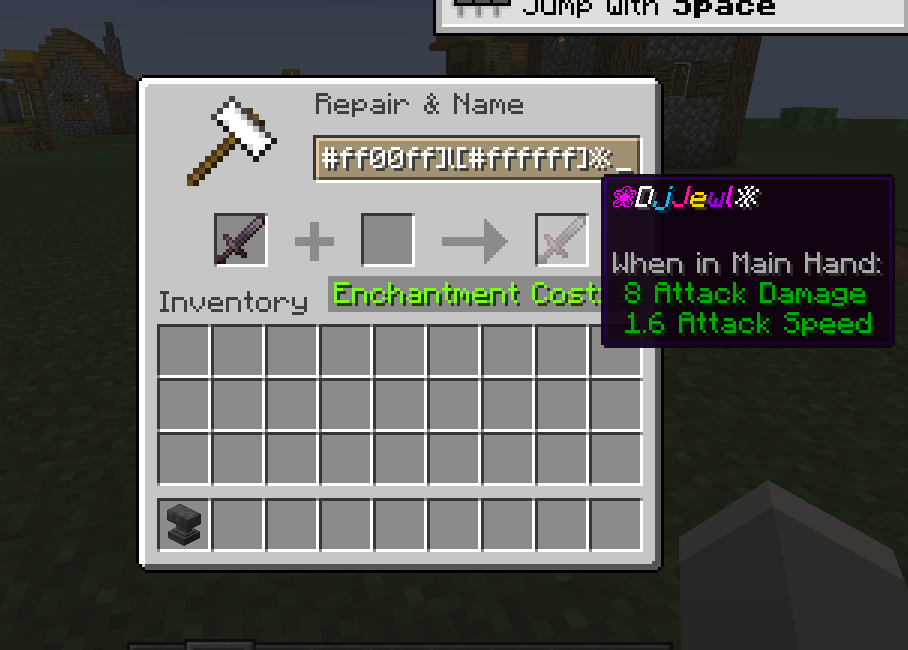
This mod allows you to colour your text with custom colours:
[#ff0000]red text → red text[#ff00FF]pink text → pink text**[#00ff00]bold green text** or [#00ff00]**bold green text** → bold green textThe codes are case-insensitive.
You can create smooth gradients between two colours using this syntax:
[gradient:#RRGGBB:#RRGGBB:text]
Examples:
[gradient:#FF0000:#0000FF:This is a gradient!] → text transitions from red to blue***[gradient:#FFAA00:#00AAFF:Bold Italic Gradient!]*** → gradient text with bold + italic stylesGradient text works with markdown-like formatting, so you can combine bold, italic, underline, etc.
This feature has been replaced by new syntax but still works.
You can use named colours instead of the normal single letters:
The names are case-insensitive.
To use the dark version of the colour (except white and black), put d, dark or deep before or after the name. You can optionally use a space or underscore between the name and the prefix/suffix.
Examples:
§[dark_blue], §[deepblue], §[blue d], §[dblue] → dark blue text§[gold] → gold text (dark yellow also supported)You can also use:
§[s] → strikeout text§[b] → bold text§[o] → obfuscated text§[u] → underlined text§[r] → resetFormat options can be chained without needing multiple §s.
Example:§[red][u][i]text → red, underlined, italic text
Note: Colours should always come first. Minecraft resets some styles when a colour code is applied.
< > around player names for a clean, modern chat look, regardless of texture or language packs.To use on servers:
§ codes in chat.Otherwise, the server may kick you when using formatting.