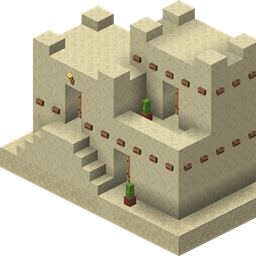
BLADE’s Portable Island gives every player their own private, persistent island dimension — a personal space you can build, customize, travel to, and invite friends to visit.
Craft an Island Anchor to unlock your Island, use the Island Wand to manage it and transport mobs, and build your Island into your own private home away from the Overworld.
Every player can unlock their own personal Island.
Your Island is:
/island or /isThe Island Anchor is the key to unlocking your private Island.
Craft an Island Anchor and Right-Click with it outside your Island to activate it.
Once activated:
/island and /is are permanently unlocked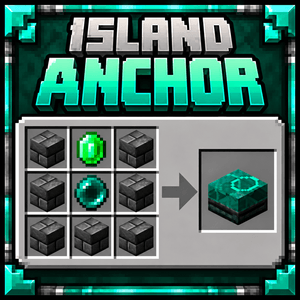
🏝️ Island's Spawn Anchor
Every private Island has an Island Spawn Anchor that acts as the Island's main arrival and return point.
The Island owner can relocate it using the Island Wand:
Shift + Right-Click the floor with the Island Wand
The Spawn Anchor also controls the Island's time:
Right-Click Island Anchor with hand: Set Day
Shift + Right-Click Island Anchor with hand: Set Night
Only the Island owner can control these functions.
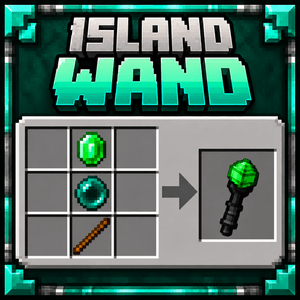
The Island Wand is used to manage your Island and transport mobs.
While on your Island:
Shift + Right-Click the floor
Your Island Spawn Anchor will move to the selected location.
Outside your Island:
Shift + Right-Click a friendly mob
The mob will be transported to your Island Mob Anchor.
While on your Island, use the same action on a mob to send it back to your saved Overworld return location.
Hostile mobs cannot be transported to your Island.
Most aquatic mobs are also prevented from being transported, with Axolotls allowed as an exception.
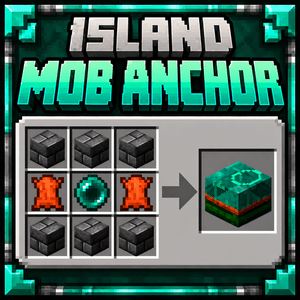
The Island Mob Anchor determines where mobs transported with the Island Wand arrive.
Place it anywhere on your private Island.
Only one Island Mob Anchor can exist on an Island at a time.
💬 Island Commands
Once your Island Anchor has been activated, you can use:
/island
or the shorter:
/is
After standing still for 3 seconds, you'll be transported directly to your private Island.
Moving during the countdown cancels the teleport.
Using the command while already on your Island returns you to the exact location you came from, including your original dimension, position, and facing direction.
You can temporarily open access to your Island for other players.
Use:
/island anchor
or:
/is anchor
After the countdown, a temporary Island Anchor is created at your location.
The Anchor remains active for 10 seconds, allowing other players to use it to visit your permanent private Island.
Players near an active Anchor can see its remaining lifetime on their HUD.
When the Island owner leaves their private Island, visiting guests are automatically returned home.
BLADE's Portable Island uses its own HUD notification system rather than filling chat with status messages.
Important events such as:
/Islandappear prominently near the top of the screen.
Other information—including teleport countdowns, temporary Anchor timers, mob transportation messages, and warnings—is displayed in a stacked HUD.
BLADE's Portable Island is designed to give players a private building space without replacing normal Minecraft progression.
Your Overworld remains your main world. Your Island becomes your personal retreat, base, storage area, building project, or whatever else you decide to make it.
Unlock it. Build it. Bring your mobs. Invite your friends.