Badges update automatically and link to the mod page on MineUniverse.
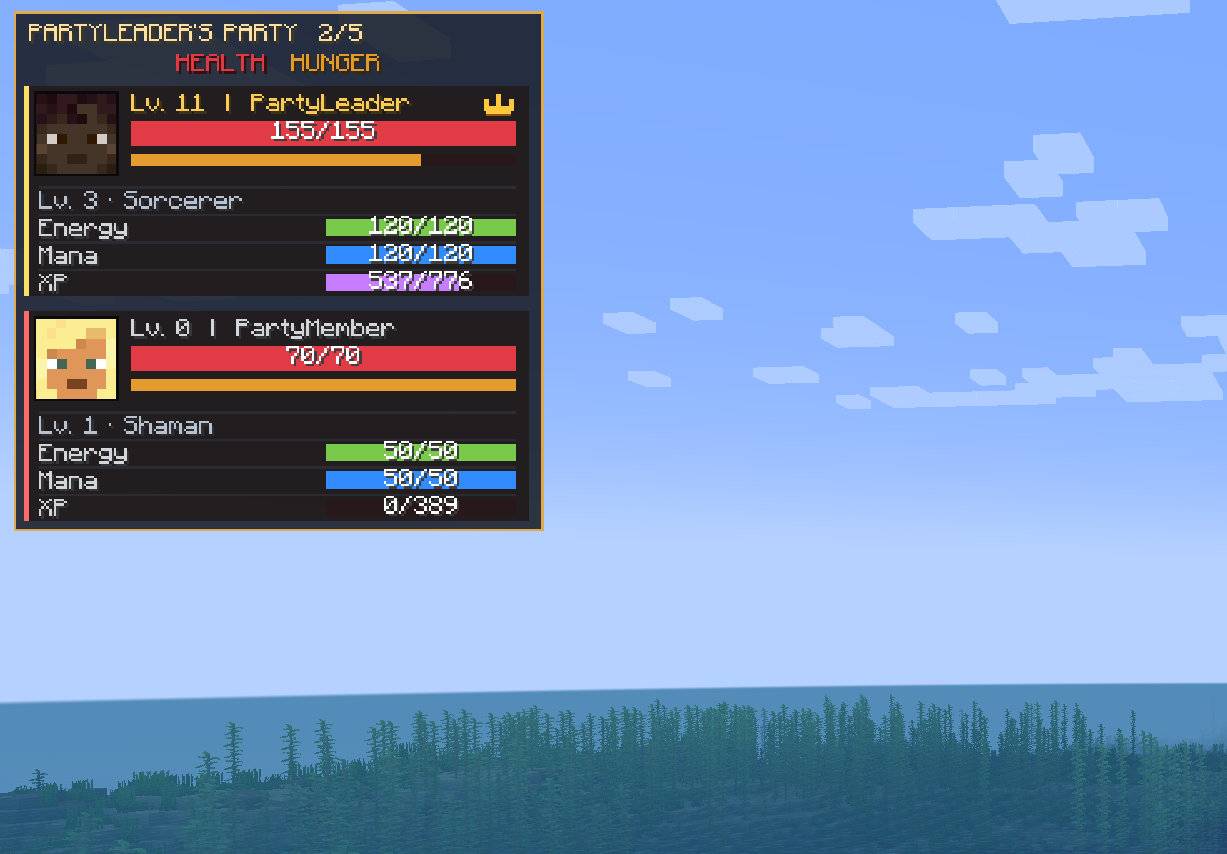
Connect Better Party with Mine and Slash and display useful RPG information directly in the party HUD.
This add-on was created after a player requested a better way to use Better Party together with Mine and Slash.
Better Party remains responsible for the party, while this add-on connects its members to Mine and Slash combat, experience sharing, health, and character resources.
The add-on can display the following Mine and Slash information for party members:
Resources that do not exist for a character are not displayed. For example, the Magic Shield bar remains hidden when that character has no Magic Shield capacity.
Your own displays and the displays of your teammates are completely independent.
For example, you can hide your own mana bar while keeping the mana bars of your teammates visible. You can also do the opposite.
Separate settings are available for:
These settings are personal and do not change the HUD configuration of other players.
Better Party's normal red health bar displays the effective Mine and Slash health value.
A character with 145/145 Mine and Slash health is therefore displayed as 145/145 instead of the vanilla 20/20.
No additional health row is added, so the same value is not displayed twice.
The additional Mine and Slash values can be arranged in any order.
The default order is:
The order is personal and affects only your own screen.
Health and hunger remain Better Party core rows and are not affected by this setting.
Members of the same Better Party are recognized as teammates by the Mine and Slash integration.
Better Party's Friendly Fire option determines whether party members can damage each other through Mine and Slash combat.
Mine and Slash experience sharing follows Better Party's XP settings.
The native Mine and Slash RPG overlay can be hidden automatically while you are inside a Better Party.
This is useful when the same health, mana, energy, experience, and Magic Shield information is already visible in the Better Party HUD.
This option affects only your own screen. The native overlay returns after leaving the party.
The server configuration is created inside the world's server configuration folder:
world/serverconfig/better_party_mine_and_slash-server.toml
Server owners can configure:
Made by MrStilu2k6
If you find a bug or have an idea for an improvement, feel free to leave a comment on the project page.
If you enjoy the add-on and want to support my work, you can leave a small tip through PayPal.