Ever crafted something and wished you could take it apart again? Bent's Uncrafting Table lets you do exactly that — and it gives you full control over what you get back.
This is not a simple "reverse the recipe" mod. It's a custom uncrafting workbench that remembers how you want each item uncrafted, saves that choice, and then processes stacks of items automatically.
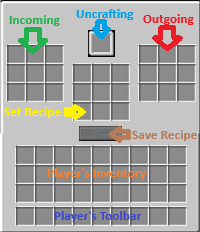
Place the Uncrafting Table, right-click it, and you'll see three panel areas:
Incoming (left) — the 3×3 grid where you put items to be uncrafted. This is your input storage.
Uncrafting (center) — the single slot where the machine processes one item at a time.
Outgoing (right) — the 3×3 grid where the uncrafted components appear.
Set Recipe (middle 3×3) — the preview grid that shows what the machine will produce. If you want to remove an item showing in the set recipe grid just left click on it. Add what ever you want to the grid and this will be what you recieve for the uncrafting.
When you first insert a new type of item, the machine pauses and shows you the default recipe in the preview grid. You can:
Leave it as-is and click Save to accept the default recipe.
Edit the grid — remove items you don't want by left clicking on them, or add items from your inventory to customize what you receive.
Empty the grid completely and click Save to make that item pass through unchanged.
Once saved, the machine remembers your choice. Next time you feed it that item, it uncrafts automatically.
Not sure where something goes? Click the ? button in the top-right of the machine's GUI. A built-in instruction screen will show you exactly what each slot does and how to use the machine.
Custom recipe editor — decide exactly what each item uncrafts into
Automatic stacking — pulls up to 64 items at a time into the center slot
Batched uncrafting — handles recipes that need multiple items (like rails → iron ingots + sticks)
Pass-through mode — save an empty recipe to have the machine move items unchanged
Enchanted book extraction — uncrafting an enchanted item also produces an enchanted book with those enchantments
Directional automation — hoppers and pipes can insert into the input slots and extract from the output slots. The center slot is player-only.
Global config — recipes are saved to config/bents_uncrafting_table_recipes.json and shared across all machines in all worlds
JEI and recipe book support — the crafting recipe for the table itself appears in both
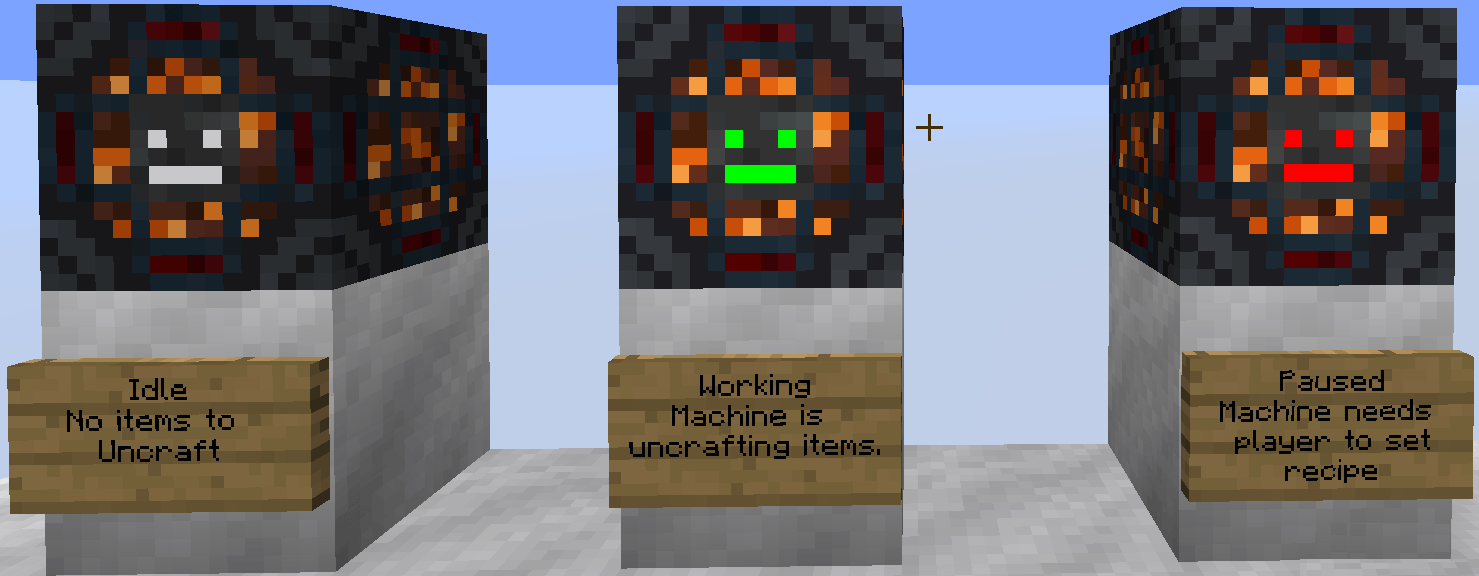
Custom eye indicators — glowing green eyes while the machine is working, red while it's paused waiting for your input
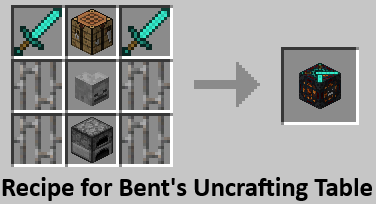
To craft the Uncrafting Table:
Diamond Sword  |  Crafting Table  |  Diamond Sword
Iron Bars      |  Skeleton Skull  |  Iron Bars
Iron Bars      |  Furnace         |  Iron Bars
Once you have a Furnace in your inventory, the recipe will unlock in your recipe book.
Some modded items (like EnderIO's Dark Steel Upgrades) use NBT data to distinguish between different subtypes of the same item. By default, the machine treats these as one item. If you want each subtype to have its own recipe, you can whitelist them in the config file.
Open config/bents_uncrafting_table_recipes.json and look at the top two sections:
nbt_read_items — list individual item registry names
nbt_read_mods — list entire mod IDs to enable NBT reading for all their items
The Dark Steel Upgrade is already in the list by default, with a couple of placeholder entries showing the format. Delete or add entries as needed.
Please leave a comment to let me know any problems or changes you would like me to make.
You can use this in your modpack or server.
By Bentblade