Mineuniverse
Mods
Adaptive Music Control

Adaptive Music Control

MOD
Choose which Minecraft music can play in each game mode and dimension.
by celeryyyyyyy
Download Claim this project
519 downloads
0 likes
0 followers
Updated Oct 14, 2026
0 hypes
Follow0
CreativeMode Utility & QoL
Advertisement Remove ads with Premium →

Adaptive Music Control

Known issue: Enabling “Biome and environment music” in the “Menu” tab causes a crash. To fix it, you need to manually edit the config file(config/creativemusicinsurvival-webui.json).

Choose which Minecraft music can play in each game mode and dimension.

Usage

  1. Start Minecraft.
  2. Open http://127.0.0.1:56001/.
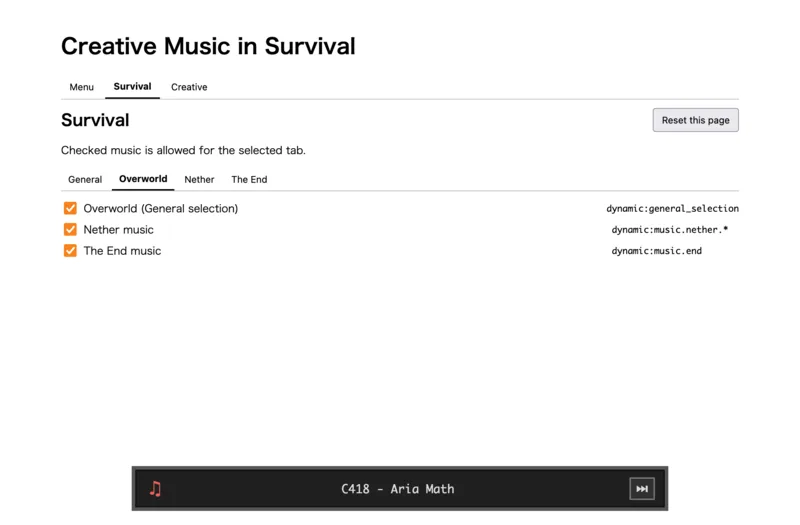
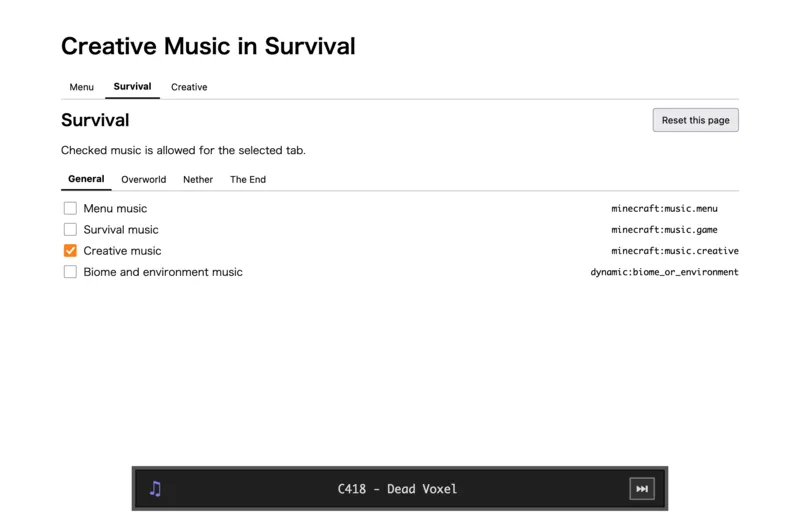
  3. Select a game mode and dimension, then choose the music.

Changes are applied immediately. Reset this page restores the selected tab's default settings.

The bottom player shows the current track. Use the next button to reroll it.(26.1.2 or later only.) 26.x Survival/General 26.x Survival/Overworld
creativemusicinsurvival-26.2-neoforge-v1.0.1.jar
MC Client, NeoForge, 26.2
Release 2026-06-21 Get
creativemusicinsurvival-26.2-fabric-v1.0.1.jar
MC Client, Fabric, 26.2
Release 2026-06-21 Get
creativemusicinsurvival-26.1.2-neoforge-v1.0.1.jar
MC Client, NeoForge, 26.1.2
Release 2026-06-21 Get
creativemusicinsurvival-26.1.2-fabric-v1.0.1.jar
MC Client, Fabric, 26.1.2
Release 2026-06-21 Get
creativemusicinsurvival-1.21.1-fabric-v1.0.1.jar
MC Client, Fabric, 1.21.1
Release 2026-06-21 Get
creativemusicinsurvival-1.20.1-fabric-v1.0.1.jar
MC Client, Fabric, 1.20.1
Release 2026-06-21 Get
creativemusicinsurvival-1.20.1-forge-v1.0.1.jar
MC Client, 1.20.1, Forge
Release 2026-06-21 Get
creativemusicinsurvival-1.21.1-neoforge-v1.0.1.jar
MC Client, 1.21.1, NeoForge
Release 2026-06-21 Get

More from celeryyyyyyy

Advertisement Remove ads with Premium →

You Might Also Like