Mineuniverse
Data Packs
Tree Dweller

Tree Dweller

DATA PACK
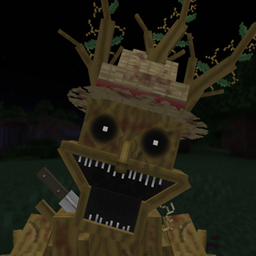
A datapack that adds Tree Dweller, a humanoid tree-like creature that stalks players in Minecraft forests.
by _6McM6_
Download Claim this project
6 downloads
0 likes
Updated Oct 14, 2026
0 hypes
Adventure Fantasy
Advertisement Remove ads with Premium →

Description:
Tree Dweller is a humanoid tree-like being that lives in all common forests in Minecraft. If the player hears tense music, it means Tree Dweller is nearby. If the music stops, it means it has left.

However, if the music changes to a more hostile track, it means Tree Dweller has spotted the player and is now stalking them. In this state, Tree Dweller is invisible and emits smoke particles. It sometimes takes the form of a deformed tree. The player must avoid getting close to it. If the player detects it in its tree form, they must not look at it directly. During this phase, the player should stay as far away as possible until enough time passes and Tree Dweller disappears.

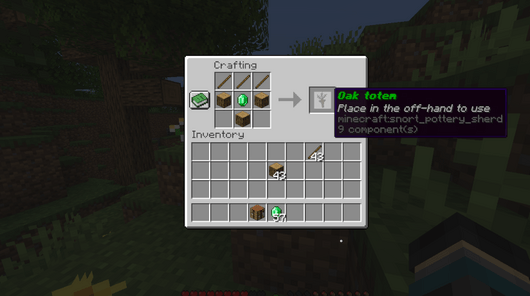
If the player gets too close or looks at it while it is in tree form, Tree Dweller will transform into its hunting mode and try to catch the player. The player must get a long distance away from the humanoid for it to disappear. The player can also craft a new totem using an emerald, wood, and a stick. Using this totem while Tree Dweller is hunting will immobilize it for a short time, allowing the player to get away so it can disappear.
How to Install:
1. Open your world folder inside: .minecraft/saves
2. Once inside, open the datapacks folder and drag the file named "Tree dweller data pack 1.21.0.zip" into it.
3. Also drag the file "Tree dweller data pack 1.21.0.zip" into the .minecraft/resourcepacks folder.
4. Launch Minecraft and activate the resource pack.
5. Enter your world and run the command: 

/reload
Tree dweller data pack 1.21.0.zip
MC 1.21
Release 2026-10-06 Get

Requirements & install

How to use this data pack in Minecraft
Mods needed
None, works in vanilla
Minecraft
1.21
Install folder
saves/<world>/datapacks

How to install data packs

  1. Download the data pack .zip file (do not extract it).
  2. New world: click Data Packs on the world creation screen and drop the .zip in. Existing world: open .minecraft/saves/<world>/datapacks.
  3. Put the .zip into the datapacks folder of the world (servers: world/datapacks).
  4. Run /reload in game (or rejoin the world) and check it with /datapack list.
Browse more: Data Packs for 1.21 All data packs

More from _6McM6_

Advertisement Remove ads with Premium →

You Might Also Like