Mineuniverse
Data Packs
The Ancient Ruins

The Ancient Ruins

DATA PACK
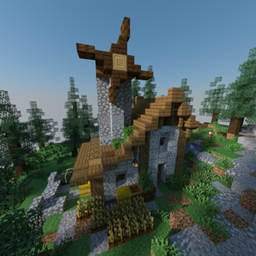
Survive in The Ancient Ruins, a dense jungle-like biome with low food, more hostile mobs, and deadly terrain. Explore hidden ruins, face ambushes, and fight to survive. Use single biome world and select "The Ancient Ruins".
by HollowStudio
Download Claim this project
Add a badge to your pageLink to The Ancient Ruins from a README, website or forum post.
Preview: Badge

Badges update automatically and link to the data pack page on MineUniverse.

175 downloads
0 likes
0 followers
Updated Oct 14, 2026
0 hypes
Follow0
Adventure Fantasy Miscellaneous
Advertisement Remove ads with Premium →

The Ancient Ruins is a survival-focused datapack that introduces a brand new custom biome inspired by the Jungle biome, but twisted into something much more challenging. With extremely dense vegetation, low visibility, and tangled terrain, this biome tests your survival skills like never before.

This unforgiving environment features:

  • Thick, dark foliage and massive twisted trees that make movement and visibility difficult.
  • Fewer passive mobs like cows, pigs, and sheep – making food scarce and forcing strategic survival.
  • More hostile mobs, including increased spawn rates at all times of day, and the occasional unique ambush.
  • Ruined structures hidden deep in the jungle, full of loot – but also traps and powerful enemies.
  • Custom advancements to reward your progress as you overcome each challenge of the wild.

This datapack is meant to be played in a Single Biome World. When creating your world, go to "More Options" → "World Type" → select Single Biome, and choose the biome "The Ancient Ruins".

Prepare for a brutal journey. Will you uncover the secrets of the ruins, or become just another lost soul in the jungle?

0.1
MC 1.21.6-snapshot, 1.21.5, 1.21.4, 1.21.5-Snapshot, 1.21.7, 1.21.6
Release 2025-06-30 Get

Requirements & install

How to use this data pack in Minecraft
Mods needed
None, works in vanilla
Minecraft
1.21.4 – 1.21.7
Install folder
saves/<world>/datapacks

How to install data packs

  1. Download the data pack .zip file (do not extract it).
  2. New world: click Data Packs on the world creation screen and drop the .zip in. Existing world: open .minecraft/saves/<world>/datapacks.
  3. Put the .zip into the datapacks folder of the world (servers: world/datapacks).
  4. Run /reload in game (or rejoin the world) and check it with /datapack list.
Browse more: Data Packs for 1.21.7 All data packs

More from HollowStudio

Advertisement Remove ads with Premium →

You Might Also Like