Mineuniverse
Data Packs
Simply Swords | Epicfight Repair

Simply Swords | Epicfight Repair

DATA PACK
this is Epic Fight | Simply Swords EpicFied 2 Repair Data Packs
by XPTiaouong
Download Claim this project
Add a badge to your pageLink to Simply Swords | Epicfight Repair from a README, website or forum post.
Preview: Badge

Badges update automatically and link to the data pack page on MineUniverse.

588 downloads
0 likes
0 followers
Updated Oct 14, 2026
0 hypes
Follow0
Mod Support Utility
Advertisement Remove ads with Premium →

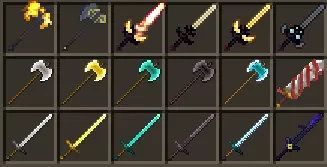
This is a fix packet for simple sword and epic battles.

Fixed the weapon attack mode of Epic Fight | Simply Swords EpicFied 2

in the higher version EpicFight : Resurrection.

All weapons have been completely repaired and attacks have been optimized.
The operating environment is:

Epic fight 20.9.7version;

EpicFight : Resurrection 20.9.7 (0.1.31)version.

The use prefix is:

Epic Fight | Simply Swords EpicFied 2 1.2.

Function

Fixed multiple weapons unable to use special epic battle moves.

It is recommended to use a global loading module to ensure proper repair.


Simply Swords | epicfight Repair V2.zip
MC 1.20.1
Release 2026-02-24 Get

Requirements & install

How to use this data pack in Minecraft
Mods needed
None, works in vanilla
Minecraft
1.20.1
Install folder
saves/<world>/datapacks

How to install data packs

  1. Download the data pack .zip file (do not extract it).
  2. New world: click Data Packs on the world creation screen and drop the .zip in. Existing world: open .minecraft/saves/<world>/datapacks.
  3. Put the .zip into the datapacks folder of the world (servers: world/datapacks).
  4. Run /reload in game (or rejoin the world) and check it with /datapack list.
Browse more: Data Packs for 1.20.1 All data packs

More from XPTiaouong

Advertisement Remove ads with Premium →

You Might Also Like