Mineuniverse
Data Packs
Server Scythes

Server Scythes

DATA PACK
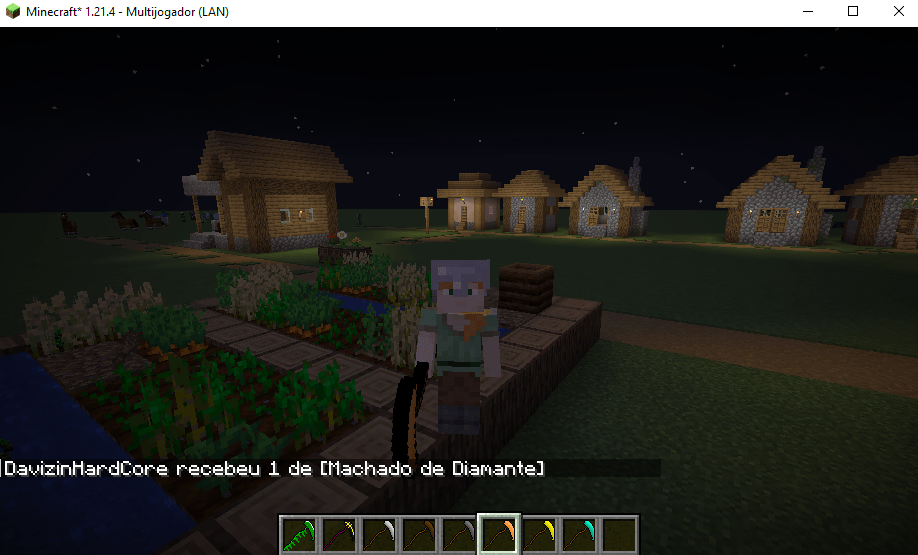
A resource pack that adds textures for scythes and axes with custom model data!
by daviminecraft
Download Claim this project
283 downloads
0 likes
Updated Oct 14, 2026
0 hypes
Adventure Fantasy Mod Support Utility
Advertisement Remove ads with Premium →

This Resource Pack was originally made for my Server Scythes plugin, but you can use it safely in your mods/plugins.

Custom data IDs(SSPTPE-1.1.2):

wooden_axe: 

wooden_scythe = 458882387
stone_axe:

stone_scythe = 432111223
copper_scythe = 312312334
golden_axe:

golden_scythe = 345382772
iron_axe:

iron_scythe = 1398139821
diamond_axe:

diamond_scythe = 234328237
netherite_axe:

netherite_scythe = 735298487
leaf_scythe = 132121111

example command:
/give @a minecraft:netherite_axe[minecraft:custom_model_data={floats:[132121111]}] -- 132121111 = leaf_scythe 735298487- netherite_scythe

Custom data IDs(SSPTPE-1.1):

wooden_axe:

wooden_scythe = 1
stone_axe:

stone_scythe = 1
copper_scythe = 2
golden_axe:

golden_scythe = 1
iron_axe:

iron_scythe = 1
diamond_axe:

diamond_scythe = 1
netherite_axe:

netherite_scythe = 1
leaf_scythe = 1

example command:
/give @a minecraft:netherite_axe[minecraft:custom_model_data={floats:[2.0]}] -- 2.0 = leaf_scythe 1.0 - netherite_scythe


SSPTPE-v1.1.zip
MC 1.21.6-snapshot, 1.21.8, 1.21.5, 1.21.4, 1.21.5-Snapshot, 1.21.6, 1.21.7, 1.21.9-snapshot, 1.21.9, 1.21.10, 1.21.11-snapshot, 1.21.11
Release 2025-12-12 Get
SSPTPE-v1.1.2.zip
MC 1.21.6-snapshot, 1.21.8, 1.21.5, 1.21.4, 1.21.5-Snapshot, 1.21.6, 1.21.7, 1.21.9-snapshot, 1.21.9, 1.21.10, 1.21.11-snapshot, 1.21.11
Release 2025-12-12 Get
SSPTPE-v1.1.3.zip
MC 1.21.6-snapshot, 1.21.8, 1.21.5, 1.21.4, 1.21.5-Snapshot, 1.21.6, 1.21.7, 1.21.9-snapshot, 1.21.9, 1.21.10, 1.21.11-snapshot, 1.21.11
Release 2025-12-12 Get

Requirements & install

How to use this data pack in Minecraft
Mods needed
None, works in vanilla
Minecraft
1.21.6 – 1.21.11
Install folder
saves/<world>/datapacks

How to install data packs

  1. Download the data pack .zip file (do not extract it).
  2. New world: click Data Packs on the world creation screen and drop the .zip in. Existing world: open .minecraft/saves/<world>/datapacks.
  3. Put the .zip into the datapacks folder of the world (servers: world/datapacks).
  4. Run /reload in game (or rejoin the world) and check it with /datapack list.
Browse more: Data Packs for 1.21.11 All data packs

More from daviminecraft

Advertisement Remove ads with Premium →

You Might Also Like