Mineuniverse
Data Packs
Random Recipes

Random Recipes

DATA PACK
Random Recipes is a Data Pack designed to create a unique survival experience by shuffling every single crafting recipe in the game.
by 63Ander
Download Claim this project
1,268 downloads
0 likes
Updated Oct 14, 2026
0 hypes
Adventure Miscellaneous
Advertisement Remove ads with Premium →

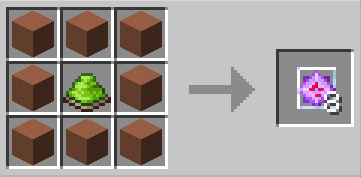
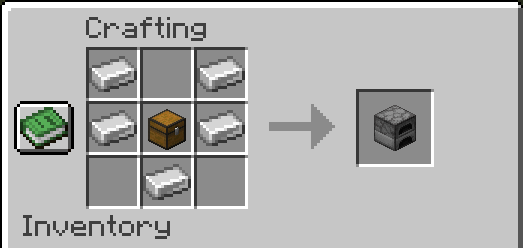
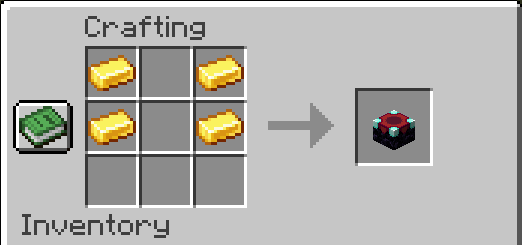
Forget everything you know about Minecraft. Are you tired of the same old survival progression? Do you want to spice up your next playthrough? Random Recipes is a Data Pack designed to create a unique survival experience by shuffling every single crafting recipe in the game.

🛠️ How it works

This Data Pack changes the output of crafting tables, furnaces, and more. The logic is simple: expect the unexpected.

🎲 Want a fresh Randomization?

The version available for download here acts as a "Curated Seed". If you have already beaten this one, or want to generate your own unique recipes, visit our official generator:

👉 Generate a NEW Random Pack here

📺 Video Showcase

My partner released a YouTube video where he challenges himself with the randomized recipes in Hardcore mode: please check it out and support him! He is really passionate and his content is entertaining. (it's in French, but YouTube probably has a dubbing option):

Embed Removed: https://www.youtube-nocookie.com/embed/kOHBnK-sOws

📥 Installation

  1. Download the .zip file.
  2. Open your Minecraft world folder.
  3. Place the file into the datapacks folder.
  4. Type /reload in-game or restart your world.
  5. Enjoy!

🤝 Support & Credits

A BlueStar project created by 63Ander. Thanks to Doggwen for making a video using my datapack. If you enjoy this project, check out our Website and support us!

Random_Recipes_1.21.10.zip
MC 1.21.10
Release 2025-11-25 Get

Requirements & install

How to use this data pack in Minecraft
Mods needed
None, works in vanilla
Minecraft
1.21.10
Install folder
saves/<world>/datapacks

How to install data packs

  1. Download the data pack .zip file (do not extract it).
  2. New world: click Data Packs on the world creation screen and drop the .zip in. Existing world: open .minecraft/saves/<world>/datapacks.
  3. Put the .zip into the datapacks folder of the world (servers: world/datapacks).
  4. Run /reload in game (or rejoin the world) and check it with /datapack list.
Browse more: Data Packs for 1.21.10 All data packs

More from 63Ander

Advertisement Remove ads with Premium →

You Might Also Like