Mineuniverse
Data Packs
Pan's End Palette

Pan's End Palette

DATA PACK
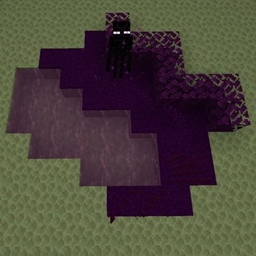
This datapack changes the end biomes to use purple colors for water, grass, leaves and more!
by pancake_0_0_0
Download Claim this project
26 downloads
0 likes
Updated Oct 14, 2026
0 hypes
Adventure Utility
Advertisement Remove ads with Premium →

Pan's End Palette

Pan's End Palette is a lightweight datapack that transforms the End dimension by giving its plants and water a purple appearance. It achieves this by overriding the vanilla End biomes.

Features

- Changes End plants and water to purple variants

- Works entirely server-side — players do not need to install anything

- Compatible with both singleplayer worlds and multiplayer servers

Compatibility

Because this datapack replaces vanilla End biomes, it may conflict with mods or datapacks that:

- Add new End biomes

- Modify existing End biome settings

- Replace vanilla End generation

Mods that only add new biomes may still work, but the purple palette changes will only apply to the vanilla End biomes.  

Version Support & Updates

I will try to keep Pan's End Palette updated with new Minecraft versions. However, if an update is not available yet, the datapack may still continue to work depending on Minecraft changes.

Versions older than 1.16 will not be supported, as Minecraft does not provide the required biome support.

Feedback & Support

Have a question, suggestion, or found a bug?

Feel free to report it or share feedback in the Discord server.

Pan's End Palette.zip
MC 1.21.2-Snapshot, 1.21, 1.21.6-snapshot, 1.20.2-Snapshot, 1.20.5-Snapshot, 1.21.1-Snapshot, 1.20.2, 1.21.8, 1.20.5, 1.21.5, 1.21.4, 1.21.5-Snapshot, 1.20.1, 1.20, 1.20.6
Release 2026-07-28 Get

Requirements & install

How to use this data pack in Minecraft
Mods needed
None, works in vanilla
Minecraft
1.21 – 1.21.8
Install folder
saves/<world>/datapacks

How to install data packs

  1. Download the data pack .zip file (do not extract it).
  2. New world: click Data Packs on the world creation screen and drop the .zip in. Existing world: open .minecraft/saves/<world>/datapacks.
  3. Put the .zip into the datapacks folder of the world (servers: world/datapacks).
  4. Run /reload in game (or rejoin the world) and check it with /datapack list.
Browse more: Data Packs for 1.21.8 All data packs

More from pancake_0_0_0

Advertisement Remove ads with Premium →

You Might Also Like