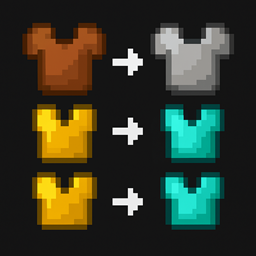
This datapack completely rebalances how armor is obtained in Minecraft by introducing a simple but meaningful progression system.
Instead of crafting Iron, Gold, or Diamond armor in a Crafting Table, players must now upgrade their existing armor through the Smithing Table.
Netherite armor remains 100% vanilla — its recipes and upgrading process are NOT modified.
The following armor types can no longer be crafted in the crafting table:
Iron Armor
Gold Armor
Diamond Armor
Leather armor remains fully craftable.
Netherite crafting and upgrading stays unchanged.
All armor upgrades are done through the Smithing Table, using:
the previous armor tier
1 ingot or gem
1 block of the same material as the “template”
Requires:
Leather armor piece
1 Iron Ingot
1 Iron Block
Requires:
Iron armor piece
1 Gold Ingot
1 Gold Block
Requires:
Gold armor piece
1 Diamond
1 Diamond Block
Diamond armor does NOT upgrade through this datapack.
Netherite armor follows the default Mojang upgrade path, unchanged.
Removes all vanilla crafting recipes for Iron, Gold, and Diamond armor
Adds a clean, balanced progression system through smithing
Keeps Netherite armor vanilla
Survival-friendly and multiplayer-friendly
Works without mods — pure datapack
Easy to understand and perfect for RPG, SMP, or progression-based worlds
Open your world folder
Navigate to:
/datapacks
Place the datapack .zip inside
Launch your world and run:
/reload
Done! Your armor progression system is now active.
Minecraft 1.20+
Compatible with most other datapacks
No issues unless another datapack modifies armor recipes
You may use this datapack on any private or public server
You may modify it for personal use
Do not reupload or redistribute the datapack as your own