Mineuniverse
Data Packs
LD's Fortified Towns And Cities

LD's Fortified Towns And Cities

DATA PACK
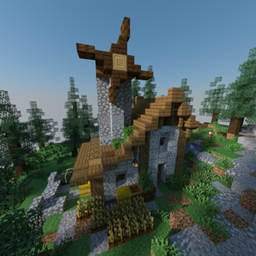
Have you ever wanted properly walled-in villages? Well, this datapack adds in those, and a few more structures. Included are fortified cities, towns with small walls and forts, forlorn castles, cultist monasteries, and lone estates.
by LDGameDev
Download Claim this project
Add a badge to your pageLink to LD's Fortified Towns And Cities from a README, website or forum post.
Preview: Badge

Badges update automatically and link to the data pack page on MineUniverse.

1,420 downloads
0 likes
0 followers
Updated Oct 14, 2026
0 hypes
Follow0
Adventure Fantasy Miscellaneous
Advertisement Remove ads with Premium →

Have you ever wanted properly walled-in villages? Well, this datapack adds in those, and a few more structures.

Current Structures:

Fortress Cities

  • Generates surrounded by walls with garrison and security buildings generating throughout.
  • Has a variety of shops, residences, markets, underground structures, plazas, parks, art galleries, government buildings, etc.
  • Very, very large in size and population - can be used a great place to build or start from.

Picture of generated town by the coast

An image of a fortified town on a hillside

Fortified Towns

  • Contain walls, towers, and rarely a larger fortress with TNT cannons.
  • Includes a variety of custom-designed buildings.
  • Walls are not guaranteed to surround the towns.

An image of a fortified city

An image of a fortified city

Fortified Cities

  • Generates surrounded by walls with small towers for defense.
  • Has a variety of shops, residences, and city buildings.
  • Very large in size and population.

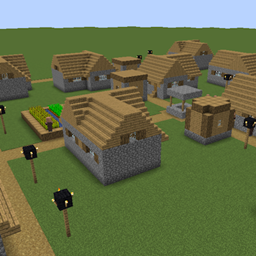
Youthful Villages

  • Communal buildings all connected with paths running through them.
  • Lush and vibrant block pallet with some okay loot.
  • Dark secret hidden underground which you may chance upon at night.

Blockhouse Villages

  • Architecture inspired by blockhouse fortresses.
  • Relatively small village, but good for outposts or small bases.
  • Loot based on its fortress origins.

Image of outside of Lone Estate

Image of inside of Lone Estate

Lone Estate

  • Rare structure inhabited by a lone hermit.
  • Contains a variety of rooms and loot.
  • Harbors a secret.

Outside image of Cultist Monastery

Inside image of Cultist Monastery

Cultist Monastery

  • An uncommon dungeon-like structure with a few buildings surrounding a main monastery building.
  • Defeat the inhabitants to gain a variety of loot.
  • Discover what beliefs seem to guide the cult.

Outside image of Forlorn Castle

Throne room image of Forlorn Castle

Forlorn Castle

  • Very rare and sprawling dungeon structure.
  • Contains lots of loot, a few traps, and several mobs with diamond armor and enchanted swords to challenge players.
  • Contains a small story about the downfall of the past monarchy.

Lost library inside

Lost Library

  • Rare with a mix of enchanted books, custom written books, and various loot to discover.
  • An old archives can be found connected to the library with much more powerful loot, but more dangerous mobs to deal with.
  • Some of the books add more lore to the other structures included.

Compatibility:

From current tests, the included structures do not appear to override vanilla, modded, or other datapack structures so this datapack should be compatible with any other datapacks or mods.

fortified_towns(1.19.2).zip
MC 1.19.2
Release 2026-06-27 Get
fortified_towns(1.20.1).zip
MC 1.20.1
Release 2026-06-27 Get
fortified_towns(1.21.7).zip
MC 1.21.7
Release 2026-06-27 Get
fortified_towns(1.21.9+).zip
MC 1.21.9, 1.21.10, 1.21.11
Release 2026-06-27 Get
fortified_towns.zip
MC 1.19.2
Release 2025-07-04 Get
fortified_towns.zip
MC 1.20.1
Release 2025-07-04 Get
fortified_towns.zip
MC 1.21.7
Release 2025-07-04 Get
fortified_towns.zip
MC 1.20.1
Release 2024-10-24 Get
fortified_towns.zip
MC 1.19.2
Release 2024-10-20 Get

Requirements & install

How to use this data pack in Minecraft
Mods needed
None, works in vanilla
Minecraft
1.19.2 – 1.21.11
Install folder
saves/<world>/datapacks

How to install data packs

  1. Download the data pack .zip file (do not extract it).
  2. New world: click Data Packs on the world creation screen and drop the .zip in. Existing world: open .minecraft/saves/<world>/datapacks.
  3. Put the .zip into the datapacks folder of the world (servers: world/datapacks).
  4. Run /reload in game (or rejoin the world) and check it with /datapack list.
Browse more: Data Packs for 1.21.11 All data packs
Advertisement Remove ads with Premium →

You Might Also Like