Mineuniverse
Data Packs
Dwarfs and Giants - Scale potions

Dwarfs and Giants - Scale potions

DATA PACK
Change the size of yourself and mobs using craftable potions. Large variety of sizes available!
by YolkaJess
Download Claim this project
Add a badge to your pageLink to Dwarfs and Giants - Scale potions from a README, website or forum post.
Preview: Badge

Badges update automatically and link to the data pack page on MineUniverse.
1,881 downloads
0 likes
0 followers
Updated Oct 14, 2026
0 hypes
Follow0
Adventure Fantasy Magic Utility
Advertisement Remove ads with Premium →

A datapack by YolkaJess

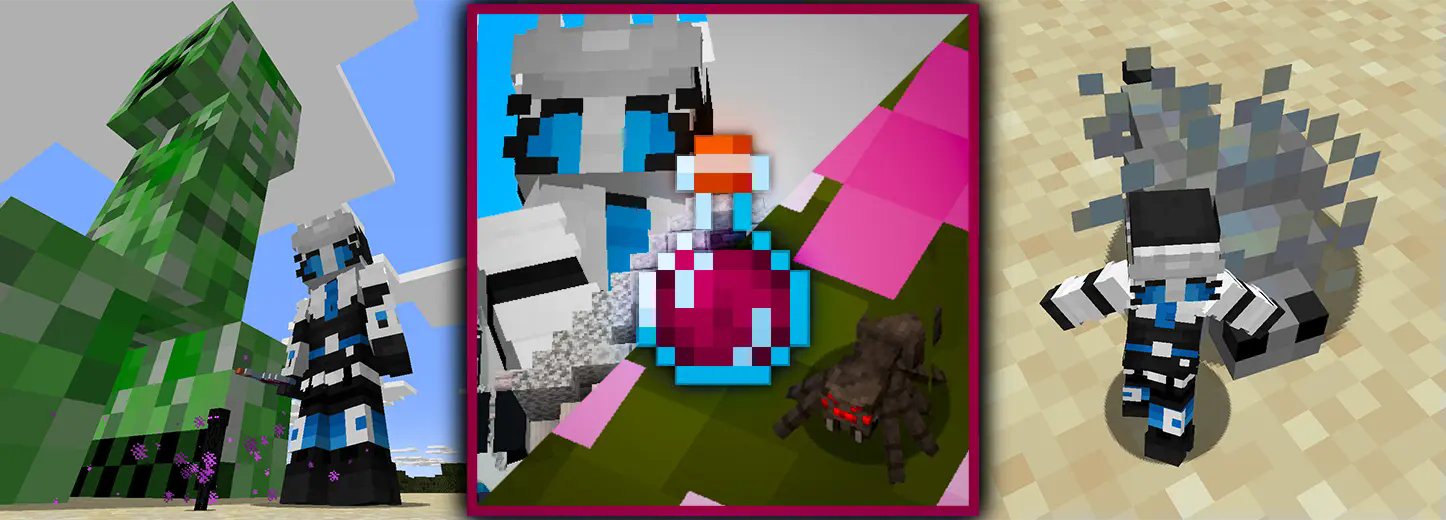
Banner Showcase

Potions to scale yourself and other mobs

This datapack adds survival-friendly craftable potions to scale yourself and other entities, ranging from minimum and maximum sizes allowed by the game.

Changing your own scale will also change jump strength, step height, safe fall distance, block interaction range, entity interaction range, and movement speed. Splashing mobs with potions will only change their size.

Crafting

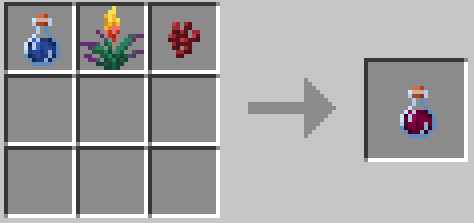
Growth potion to use on yourself.\ Growth potion craft

Splash growth potion to use on entities. (Don't mind it being a lingering potion, it acts as a splash variant.)\ Splash growth potion craft to use on mobs
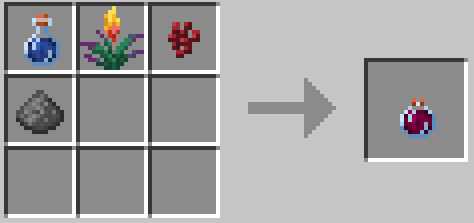
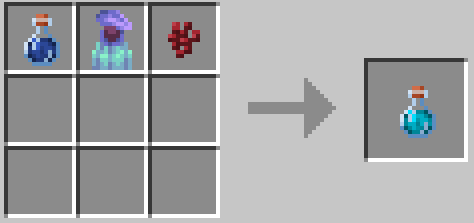
Shrink potion to use on yourself.\ Shrink potion craft

Splash shrink potion to use on entities.\ Splash shrink potion craft to use on mobs
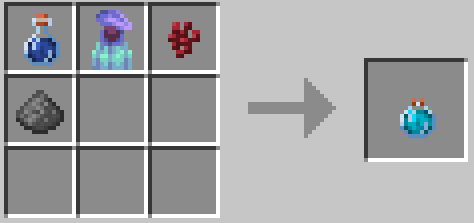
Scale normalization potion to use on yourself.\ Normalize potion craft
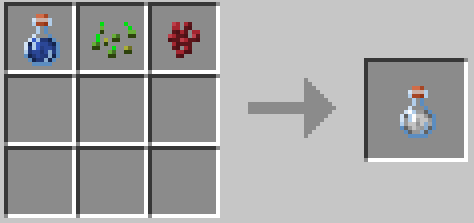
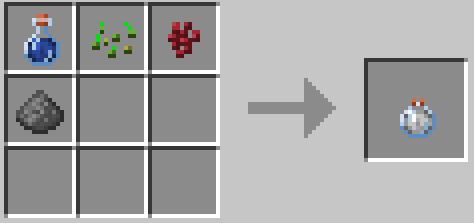
Splash scale normalization potion to use on entities.\ Splash normalize potion craft to use on mobs
Customization

  • You can tweak some settings for the datapack manually by editing its files (for personal use, don't reupload it without permission!).

For example, if you want to change the crafting recipes, you can edit them in

DwarfsAndGiants.zip/data/dwarfsandgiants/recipe/[Potion name]

Then use text editor and recipe generator to modify it.

Files to change the values of different size stages are located in

DwarfsAndGiants.zip/data/dwarfsandgiants/function/[sizechange/mobsizechange]
Issues

  • There are no known compatibily issues. If you find one, let me know.
  • Disabling or deleting the datapack won't break anything in your world.
  • If you have an idea or you want to report an issue, contact me on Discord.
v. 1.0.8
MC 1.21.11-snapshot, 1.21.11
Release 2025-12-24 Get
v.1.0.7
MC 1.21.9, 1.21.10
Release 2025-10-13 Get
v. 1.0.6
MC 1.21.6-snapshot, 1.21.5, 1.21.8, 1.21.9, 1.21.5-Snapshot, 1.21.7, 1.21.6, 1.21.9-snapshot
Release 2025-07-27 Get
v. 1.0.5
MC 1.21.6-snapshot, 1.21.6
Release 2025-06-19 Get
v. 1.0.4
MC 1.21.5, 1.21.5-Snapshot
Alpha 2025-03-17 Get
v. 1.0.2 (Backport for 1.21 - 1.21.1)
MC 1.21, 1.21.1-Snapshot, 1.21-Snapshot, 1.21.1
Release 2025-03-12 Get
v. 1.0.2 (Backport for 1.20.5 - 1.20.6)
MC 1.20.5, 1.20.5-Snapshot, 1.20.6
Release 2025-03-12 Get
v. 1.0.3
MC 1.21.2-Snapshot, 1.21.4, 1.21.3, 1.21.4-Snapshot, 1.21.2
Release 2025-03-12 Get
Dwarfs And Giants v.1.0.2
MC 1.21.4, 1.21.3, 1.21.2
Release 2025-03-11 Get

Requirements & install

How to use this data pack in Minecraft
Mods needed
None, works in vanilla
Minecraft
1.21.6 – 1.21.11
Install folder
saves/<world>/datapacks

How to install data packs

  1. Download the data pack .zip file (do not extract it).
  2. New world: click Data Packs on the world creation screen and drop the .zip in. Existing world: open .minecraft/saves/<world>/datapacks.
  3. Put the .zip into the datapacks folder of the world (servers: world/datapacks).
  4. Run /reload in game (or rejoin the world) and check it with /datapack list.
Browse more: Data Packs for 1.21.11 All data packs

More from YolkaJess

Advertisement Remove ads with Premium →

You Might Also Like