Mineuniverse
Data Packs
Create: Redstone Recipe

Create: Redstone Recipe

DATA PACK
Create Add-on That Adds Redstone Recipe Allowing Player To Automate It. Mixing Quartz, Glowstone And Cinder Flour Yields 2x Redstone Dust.
by Dragonstaler
Download Claim this project
1,147 downloads
0 likes
Updated Oct 14, 2026
0 hypes
Miscellaneous Mod Support Tech Utility
Advertisement Remove ads with Premium →

🌱 About

Create: Redstone Recipe is an add-on for the Create mod, available as both a mod and a datapack. It introduces a new recipe for Redstone, allowing players to renewably get Redstone dust.

📋 Recipe

Result Ingredients Type
2x Redstone 1x Quartz + 1x Glowstone Dust + 1x Cinder Flour Mixing

Tip: Use Just Enough Items(JEI) To View The Recipe In-Game
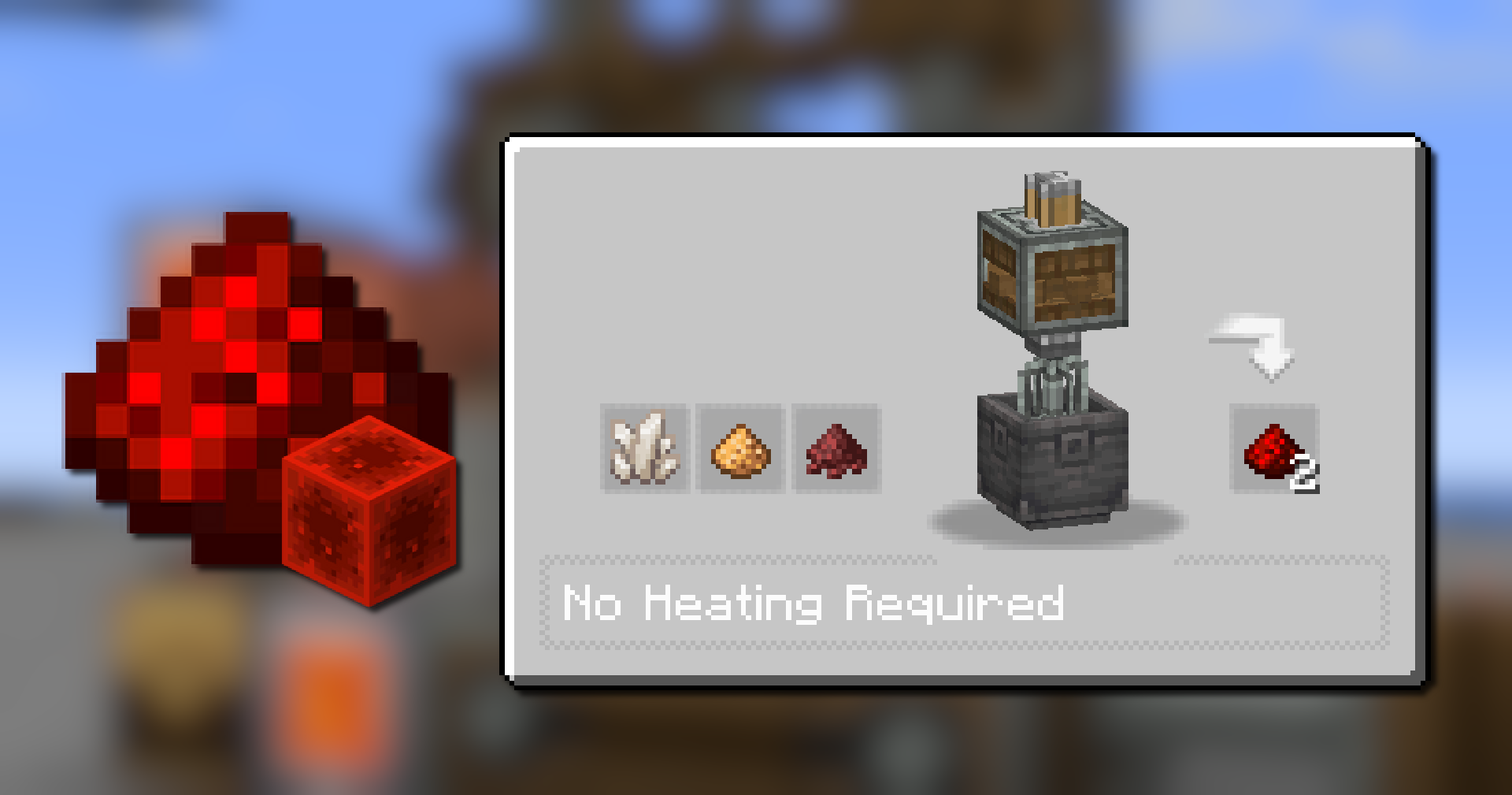
Recipe

🧩 Installation Guide

How to Install the Mod (.jar)

  1. Download the Mod: Get the .jar file.
  2. Drop the File: Drag the downloaded .jar file into the mods folder.

How to Install the Datapack (.zip)

  1. Download: Get the .zip file for the Datapack version.
  2. Open Your World Folder:
  3. Install: Open the datapacks folder and drag the downloaded .zip file inside.

⚙️ Supported Version

Version Loader Support
1.21.1 NeoForge ✅
1.21.1 Forge ❌
1.20.1 Forge/Neoforge Soon™️
1.20.1 Fabric Soon™️


👀 Play with friends
Want to run a flawless modded server? Check out Godlike Host! Setting up a server through them is the absolute best way to support us right now.

Don't just take our word for it—read the community reviews here: Best Minecraft Server Hosting

👉 Click the image below or use this link: Godlike Host to get 50% off your first month!

Create_Redstone_Recipe.zip
MC 1.21.1
Release 2025-11-17 Get

Requirements & install

How to use this data pack in Minecraft
Mods needed
None, works in vanilla
Minecraft
1.21.1
Install folder
saves/<world>/datapacks

How to install data packs

  1. Download the data pack .zip file (do not extract it).
  2. New world: click Data Packs on the world creation screen and drop the .zip in. Existing world: open .minecraft/saves/<world>/datapacks.
  3. Put the .zip into the datapacks folder of the world (servers: world/datapacks).
  4. Run /reload in game (or rejoin the world) and check it with /datapack list.
Browse more: Data Packs for 1.21.1 All data packs

More from Dragonstaler

Advertisement Remove ads with Premium →

You Might Also Like