🌍 Better World Border — A Growing, Player-Driven World Limit
A fully dynamic world border system that expands based on player survival, achievements, and progression. Your world now reacts to how well you play.
🔷 What Is the World Border?
The World Border is Minecraft’s outer limit that defines where players can exist and build.
In this datapack, it becomes an active gameplay mechanic:
- Displayed as a blue-red grid;
- Approaching it causes visual distortion;
- Outside the border the world does not generate, but in this datapack, stepping beyond the border = instant death.
⚙️ What the Datapack Adds
🛡 Two Game Modes
Normal Mode (default):
- Every 2 days of survival → +1 block to the world border.
- The longer you survive, the higher the reward. For example: on day 10 the player receives +5 blocks.
- Rewards are given at 6:00 in-game time.
- If the player dies, the world border shrinks by 30% (shrink happens at the start of the day).
- A timer HUD appears at the top of the screen showing time left until the next border change.
Hardcore Mode
- Rewards are granted every day instead of every two.
- Scaling is the same: Survive 10 days → +10 blocks.
- Death ends the run completely unless cheats are used.
🏆 Achievement Rewards
Completing advancements expands the world border:
- Advancement (frame) → +5 blocks
- Goal → +50 blocks
- Challenge → +100 blocks
Achievement rewards are issued at 21:00 in-game time.
🔄 Resetting the World Border
Players can restore the default border size by crafting a special item.
Reset Recipe:
1 × Dragon Egg
4 × Phantom Membrane
1 × Ominous Bottle (any level)
1 × Nether Star
1 × Echo Shard
1 × Dragon’s Breath
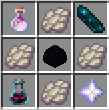
Using the item resets the world border to its original size.







