Loading...
Beta Modpages Unclaimed

Spiky Spikes

Don't step on it! Hurts almost as much as stepping on LEGO... ouch

0 Likes
249533 Downloads
Created by Fuzs

Description

📖 About:

Spiky Spikes adds some really spikey spikes. There are a bunch of tiers, all with unique abilities. So what are you waiting for? Let's go and improve your mob farms!

📚 Contents:

Spiky Spikes brings you 6 Tiers of spikes, all of them are unique.

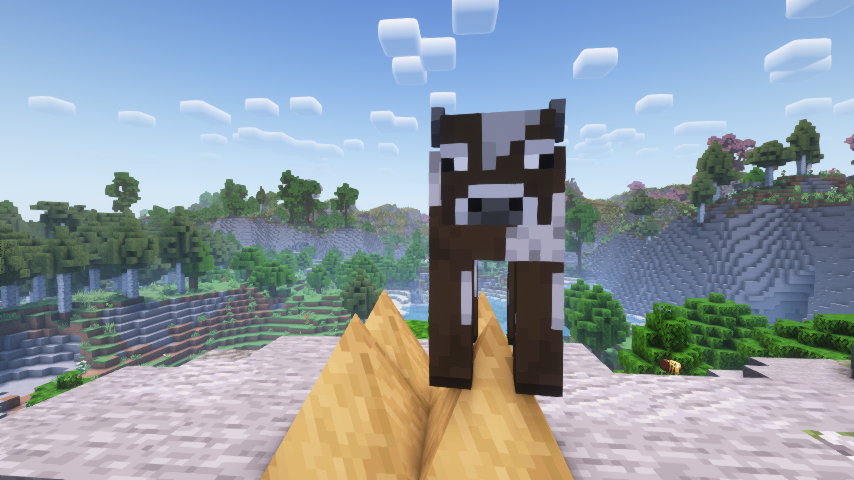
  • Wooden: Slowly damages mobs, but does not deal a killing blow.
  • Stone: Damages and kills mobs, but does not drop any loot or experience.
  • Iron: Damages and kills mobs, only drops normal loot without experience.
  • Golden: Damages and kills mobs, only drops experience without any loot.
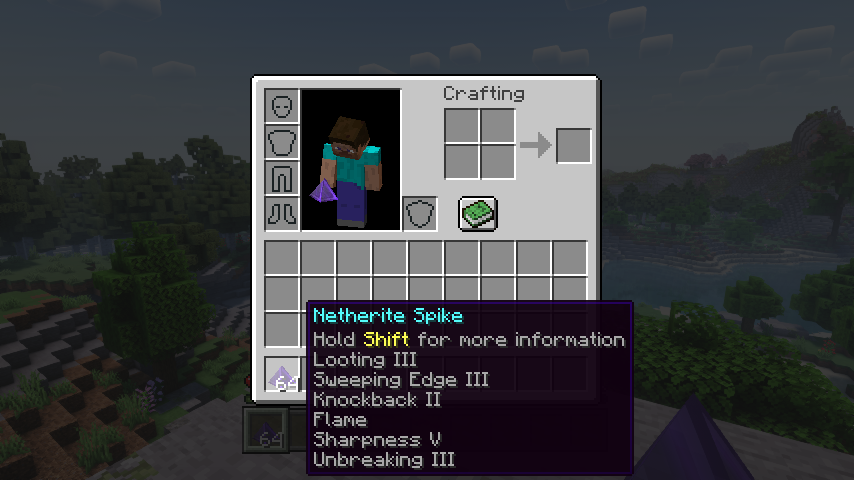
  • Diamond: Deals a lot of damage, mobs drop all loot like when killed by a player. Can use most sword enchantments, apply via an anvil.
  • Netherite: Deals a lot of damage, mobs drop all loot like when killed by a player. Can use most sword enchantments, apply via an anvil. Is resistant to explosions and cannot be destroyed by the wither boss. Deals no damage to players.

Note: Make sure when adding enchantments to diamond and netherite spikes to have all the spikes you want to enchant ready at once. You can apply enchanted books To The Whole Stack, so enchanting more spikes later will needlessly consume more of your precious books.

📷 Media:
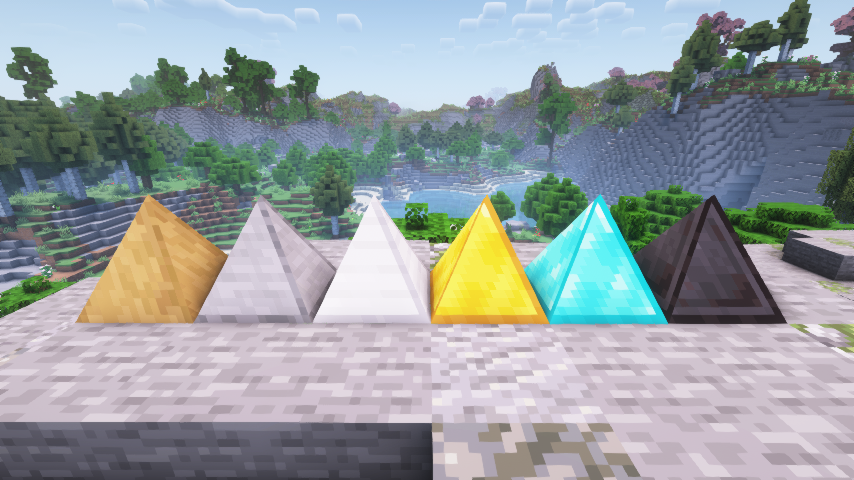
  
Spiky spikes are spikey    Wooden spikes bring mobs down to half a heart
 
  
Even the wither boss isn't safe from netherite spikes    All the enchantments you can put on spikes
 

💡 FAQ:

Q: How do I configure this mod on Forge?
A: Install my Config Menus for Forge mod and do it directly in-game!

Q: How do I configure this mod on Fabric?
A: Editing configs directly in-game has not yet been implemented. Instead when in a world run the /config showfile <modid> command by choosing either CLIENT or SERVER (depending on the mod), then click the file name (ending with .toml) that appears in chat to be able to manually edit the config file in a separate editor. After saving the file, the config will automatically reload in-game after a couple of seconds, so no game restart required.

🏆 Credits:

Developing Spiky Spikes was helped and inspired by:

  • RWTema for inspiring this mod from the spike blocks found in old versions of their Extra Utilities mod
  • XFactHD for introducing me to the dark arts of rendering non-cube shapes in Minecraft

Reddit


AD Become Premium to remove Ads!

What means Verified?

  • Compatibility: The mod should be compatible with the latest version of Minecraft and be clearly labeled with its supported versions.
  • Functionality: The mod should work as advertised and not cause any game-breaking bugs or crashes.
  • Security: The mod should not contain any malicious code or attempts to steal personal information.
  • Performance: The mod should not cause a significant decrease in the game's performance, such as by causing lag or reducing frame rates.
  • Originality: The mod should be original and not a copy of someone else's work.
  • Up-to-date: The mod should be regularly updated to fix bugs, improve performance, and maintain compatibility with the latest version of Minecraft.
  • Support: The mod should have an active developer who provides support and troubleshooting assistance to users.
  • License: The mod should be released under a clear and open source license that allows others to use, modify, and redistribute the code.
  • Documentation: The mod should come with clear and detailed documentation on how to install and use it.

AD Become Premium to remove Ads!

How to Install

1

Download Forge & Java

Download Forge from the offical Site or here. If you dont have Java installed then install it now from here. After Downloading Forge you can run the file with Java.

2

Prepare

Lounch Minecraft and select your Forge istallation as Version this will create a Folder called Mods.

3

Add Mods

Type Win+R and type %appdata% and open the .minecraft Folder. There will you find your Folder called Mods. Place all Mods you want to play in this Folder

4

Enjoy

You are now Ready. Re-start your Game and start Playing.

More Mods like this

Fast Leaf Decay

Makes leaves decay faster when a tree is cut down.

Farming for Blockheads

Adds a seed market with a search bar and a scrolling grid, and more farming utilities.

Forestry

Bringing bees, butterflies and more trees. as well as eco-friendly energy production and mail to Minecraft.

Thermal Cultivation

Thermal gets Agrarian - provides options for farming and related activities!

Serene Seasons

Seasons with changing colors, shifting temperatures, and more!

Botany Pots

Adds pots that you can use to grow crops!

AgriCraft

Agricultural farming extended.

Botany Trees

Allows you to grow trees in small pots.