Introduces an alternative/replacement/addition to the traditional enchanting system. It is heavily inspired by the game "Heroes of Hammerwatch 2".
Each item can be enchanted with a maximum of 2 enchantments, one "prefix" and one "suffix" enchantment.
Every enchantment is either a prefix or a suffix enchantment.
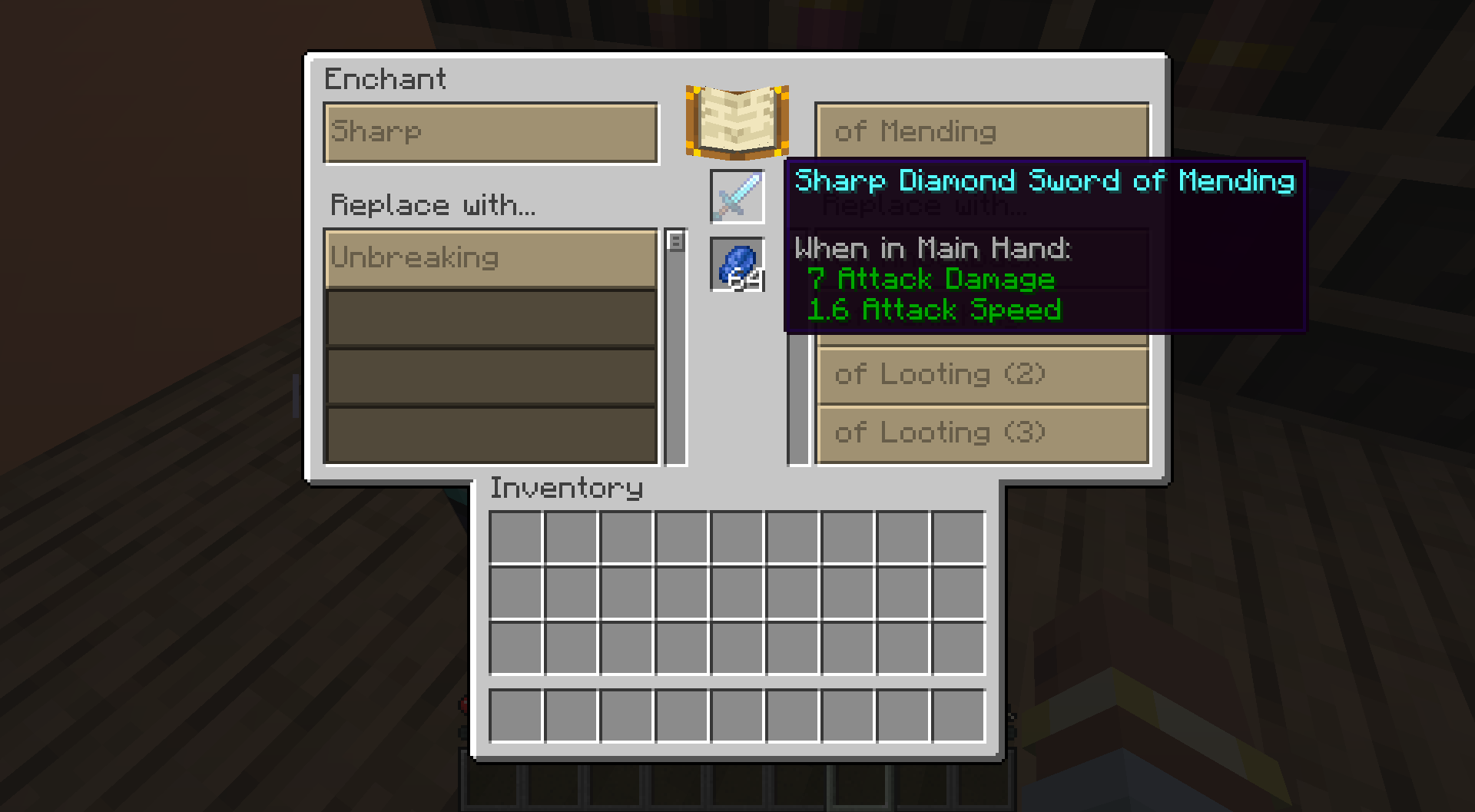
Enchantments are no longer displayed in a list below the item name. Instead the item name is modified.
E.g. an Iron Pickaxe enchanted with Efficiency and Fortune is called "Efficient Iron Pickaxe of Fortune".
(Items can still be renamed, these changes only affect the default name)
This new block allows the player to enchant items in a more controlled way. The table will replace exiting enchantments of the same group (prefix or suffix). Only unlocked enchantments are available for the player to choose from.
Enchantments can be unlocked by three different methods.
The server config allows pairing advancements to specific enchantments. When the player has the advancement when interacting with the RPG Enchanting Table, the corresponding enchantments of the specified level are unlocked.
The server config allows pairing blocks to specific enchantments. When a player interacts with the RPG Enchanting Table, the table searches for these in a configurable radius. When a block from the list is found, the corresponding enchantments of the specified level are unlocked.
When enabled in the server config, the RPG Enchanting Table looks for Chiseled Bookshelves, similar to the second option. When a Chiseled Bookshelf that stores Enchanted Books is found, every of those enchantments is unlocked.
Enchanting costs experience and items.
These items are defined in the server config.
Both item and experience cost are higher when an existing enchantment is replaced.
RPG Enchanting uses the existing enchantment technology, but expects enchantments to be configured a certain way.
Namely, enchantments must be present in one of these enchantment tags: "rpgenchanting:prefix_enchantments" or "rpgenchanting:suffix_enchantments".
RPG Enchanting uses these two enchantment tags for all its logic.
> Note that putting an enchantment into both tags at the same time can lead to unexpected behaviour.
Additionally, the same tag needs to be their "exclusive_set". This ensures that only one enchantment from each group can be present on an item.
> The enchantment tag that includes an enchantment and the tag defined as the "exclusive_set" should be the same.
The item name additions are controlled by localization keys of these formats:
"rpgenchanting.<namespace>.<id>.<level>.prefix"
"rpgenchanting.<namespace>.<id>.<level>.suffix"
E.g. if the "minecraft:efficiency" enchantment is in the "prefix" tag, the localization keys would look like this:
RPG Enchanting comes with several data/resource packs that bring compatibility for vanilla Minecraft and several mods.
The mod Patched is required for full functionality.
These packs include the following:
> Using Patched is not a requirement, the exclusive_set can also be configured the normal way. Using "Patched" ensures compatibility with mods/data packs that modify vanilla enchantments
The resource packs provide the localization for the item name additions.
These features of RPG Enchanting can also be customized:
> item_cost = old_enchantment.anvil_cost * old_enchantment.level * serverConfig.old_enchantment_item_cost_multiplier + new_enchantment.anvil_cost * new_enchantment.level * serverConfig.new_enchantment_item_cost_multiplier
> experience_cost = old_enchantment.min_cost(depends on old_enchantment.level) * serverConfig.old_enchantment_experience_cost_multiplier + new_enchantment.max_cost(depends on new_enchantment.level) * serverConfig.new_enchantment_experience_cost_multiplier
RPG Enchanting adds the "rpgenchanting:show_enchantment_name_additions" data component. When this component is present on an itemStack, the item name is modified with enchantment pre/suffixes.
The RPG Enchanting Table automatically adds this component to items that it enchants.
The RPG Enchanting Table uses the vanilla data component to store enchantments on an item. However, it sets the "show_in_tooltip" flag to false. This avoids redundant display of information.
Enchanted items generated by loot tables will be modified in a similar way. This can be disabled in the server config.