Players can make containers dedicated to only allow approved items.

With this plugin, a player can decide to make a chosen container (chest, furnace, hopper, etc) become dedicated to only a limited list of item types. That container will reject attempts to put unapproved items into it, and if it's a hopper, it will also refuse to "suck" entities out of the world into it if they're not approved item types. The filtering can be controlled on a whitelist basis ( reject everything not explicitly approved) or on a blacklist basis (allow everything not explicitly disapproved).
This plugin is something I wanted on a server I run and I didn't find anything like it so I decided to learn a bit of the Bukkit API and make my own plugin to do it.
The original intent of this plugin was to make donation hoppers triggering redstone comparator mechanisms only when the material being thrown in the hopper is the right type of item. It has a few other uses as well, including making complex sorting machines that push out material into boxes along the way as they fall down a cascade of chests and hoppers.
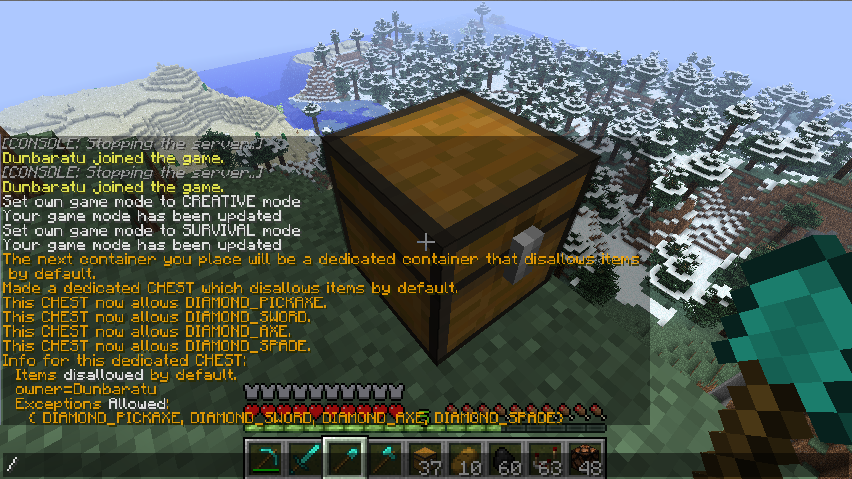
A player wants to make a chest that refuses to hold anything other than diamond tools.
/dedicate next disallow
/dedicate allow
/dedicate allow
/dedicate allow
/dedicate allow
/dedicate info while still looking at chest, giving the information shown in the image below:

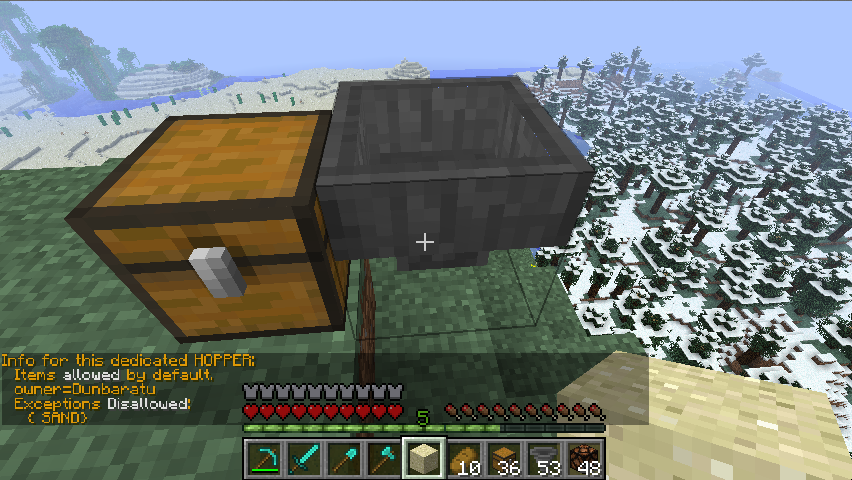
A player wants to make a hopper that allows anything in it other than sand:
/dedicate next allow
/dedicate disallow
/dedicate info and gets the information shown in the screenshot below:

This main page is getting too long, so go here for the full command-line usage on its own separate page:
containerdedication.next - Player is allowed to use the /dedicate next command. Note that players are only allowed to change the filter list for containers that they have previously placed with /dedicate next (can't change other people's containers), so denying this permission also effectively stops the use of the other commands as well.
containerdedication.reload - Player can use the /dedicate reload command.
If you are using a zone protection or anti-grief plugin of some sort, permission to place blocks does effectively become a prerequisite to editing a container's filter rules because of how ContainerDedication requires a container be placed by the same player as the player who's trying to alter its filter rules. If there's a zone of the world map in which you cannot build or destroy blocks, then you can't mess with a container's dedication filter there either since doing so would require breaking and re-placing it the container block. So while this plugin has no specific block protection or anti-grief capabilities, it works well in partnership with plugins that do.
This main page is getting too long, so this list has been moved to a separate page here:
Please be aware that if you want to make any redstone mechanisms using the features of this plugin you should read that page and understand it.
If you want to risk editing the config.yml file directly to create your own dedicated rules behind the scenes without having to fiddle with items in your inventory, or if you want to write software to automatically produce the configurations, you may find this description of the confg.yml file handy: