Default priority values for Render and Server threads depends on the amount of CPU threads you have, specifically more than 4 by Mojang rules. If CPU have more than 4 threads then Render Thread have priority of 10 and Server Thread of 8. Otherwise, thread priority is 5, which is default value for every thread by Java rules. This is a bad thing to have, because Java Virtual Machine does not prioritize game tasks, which is most expensive part of Minecraft process. For example, this may cause lag spikes during world generation on bad CPU. This mod allows to take control of those values by editing config file.
Higher priority for Render Thread - higher FPS and frame stability. Higher priority for Server Thread - more stable tick rate with less delays. But that doesn't mean that you can just set everything at 10. It depends on the problem: if you have low TPS you need to lower render and sound engine threads and increase server thread priority. If you have low frames and spikes you need to lower server and sound engine threads and increase render thread. Additionally there some other threads is running in background with unnecessary priority that can interrupt main game. You can use 'Every other thread' config option to set priority for those. If set to 1 is a good test if performance issues is in thread priorities and usually greatly increases performance on weak PC.
Config menu that can be accessed through main menu, pause screen or pressing F6 (by default) while in-game.
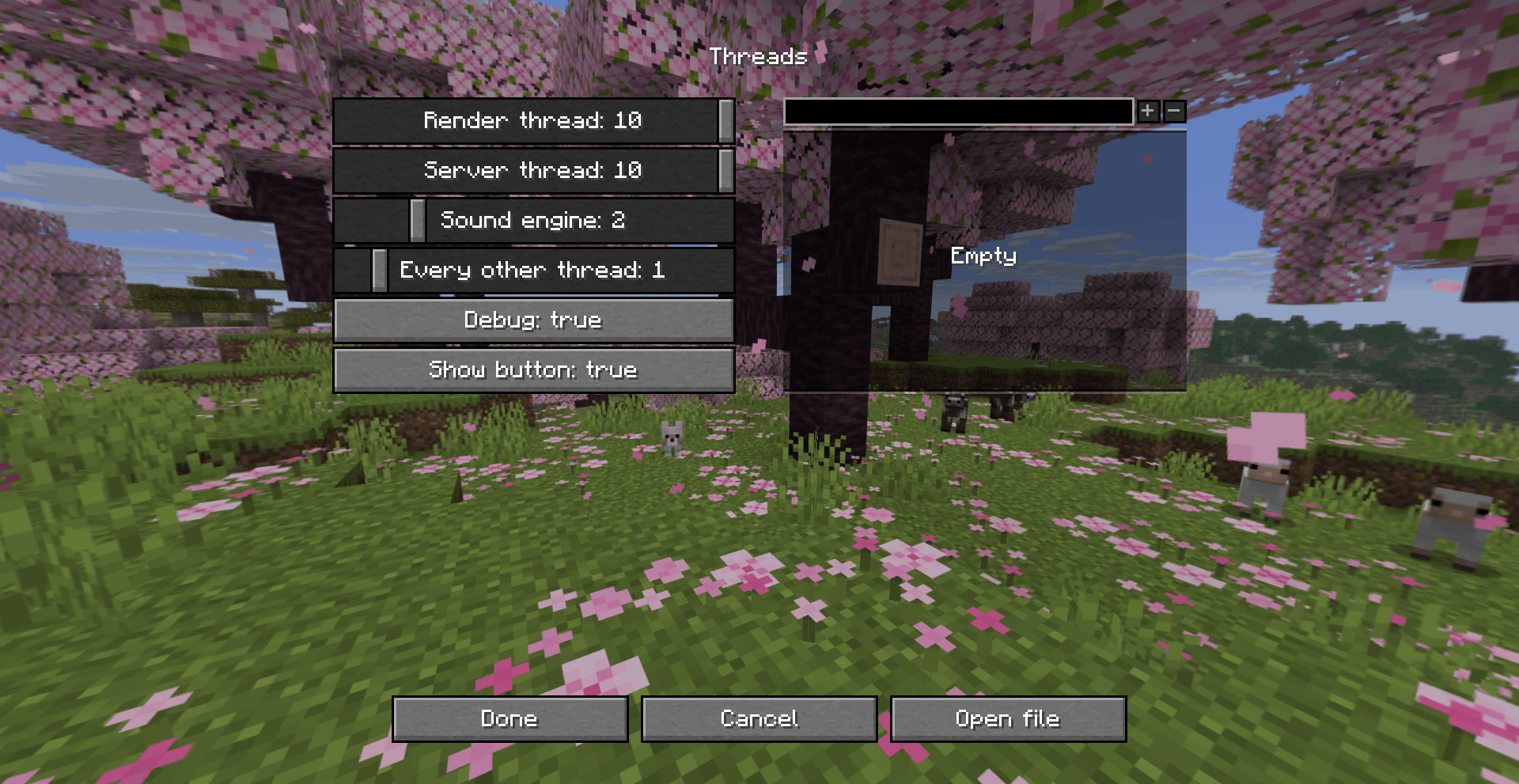
Sliders and buttons have tooltips with useful info. You can see current priority of three main threads in the F3 menu by enabling 'threads' debug entry.
For versions before 1.2
To open config file, run /threads openconfig command.
To apply the changes run /threads reload command or rejoin the world.
threads.json
{
    "renderThreadPriority": 1-10, // Default 5 or 10 if CPU thread count > 4
    "serverThreadPriority": 1-10, // Default 5 or 8 if CPU thread count > 4
    "soundEngineThreadPriority": 1-10, // Default 5
    "everyOtherThreadPriority": 0-10, // Default 0
    "threadBlacklist": [],
    "debug": false // If true logs info about actions with each thread.
}
Legacy config for 1.20.1 Forge version.
Configuration will be applied after world is loaded or config file is changed while world is open.
threads-client.toml
render_thread = Range 1-10. Default is 5 or 10 if cpu thread count > 4.
server_thread = Range 1-10. Default is 5 or 8 if cpu thread count > 4.
sound_engine_thread = Range 1-10. Default is 5.

Default is 0, which means do nothing.
every_other_thread = Range 0-10.
thread_name_blacklist = ["Thread-3"]