Mineuniverse
Log in Register
Mods

Teleport Sign

The Teleport mod is a server-side mod that allows players to link two signs and teleport between them. It is designed for use on multiplayer servers and allows administrators to configure and manage teleport links.
by n3muss
Download Claim this project
561 downloads
0 likes
Updated Jul 6, 2026
0 hypes
Automation Map and Information Player Transport Server Utility

Teleport Mod

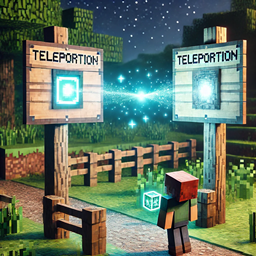
The Teleport Mod is a server-side mod for Minecraft that allows players to link two signs and teleport between them. It is designed for use on multiplayer servers and allows administrators to configure and manage teleport links.

Features

  • Link two wooden signs using obsidian to create a teleport link.
  • Only administrators with a configurable permission level can configure or destroy links.
  • Players can use linked signs to teleport from one point to another.
  • /teleportmod reload command to reload configuration and language files without restarting the server.

Requirements

  • Minecraft 1.21 or later
  • Fabric API

Installation

  1. Place the mod's .jar file in the mods folder of the Minecraft server.
  2. Start the server to generate configuration files.

Configuration

Once the server is started, configuration files will be generated in the config/teleportmod/ folder:

  • config.json: Configuration file where you can set the permission level required to create or destroy teleport links.
  • language.txt: Language file where you can customize the messages shown to players.

Configuring config.json

The config.json file includes a property for the administrator permission level:

{
  "permissionLevel": 4
}
  • permissionLevel: Specifies the minimum permission level required to create or destroy teleport links. The default permission level is 4 (administrator).

Configuring language.txt

The language.txt file allows you to customize the messages players see when using the mod. Here is an example of how it looks:

sign_a_selected=Sign A selected!
teleport_link_set=Teleport link set between A and B!
teleported_to=Teleported to
no_permission_to_destroy=You don't have permission to destroy this sign!
error_already_linked=Error: One of the signs is already linked!

You can edit the messages as you wish, maintaining the key=value structure.

How to Use the Mod

usage

  1. Create a Teleport Link:

    • Equip an obsidian block in the main hand.
    • Right-click on a wooden sign. This will select the first teleport point.
    • Right-click on a second wooden sign to link the two points.
  2. Teleport:

    • Once the link is created, any player can click on one of the signs to be teleported to the other.
  3. Remove a Teleport Link:

    • Administrators can destroy one of the signs to remove the link. Players without the required permission level cannot destroy linked signs.
  4. Reload Configuration:

    • Use the /teleportmod reload command to reload configuration and language files without restarting the server.

Commands

  • /teleportmod reload: Reload the configuration and language files.

Notes

  • Ensure players have the correct permission level to use the mod's administrative features (configurable via config.json).
  • Remember to back up the teleport_links.json file to preserve created teleport links.

teleport-mod-1.4-stable.jar
MC 1.21.2-Snapshot, 1.21, Fabric, 1.21.1-Snapshot, 1.21-Snapshot, 1.21.1, Server
Release 2024-10-06 Get

More from n3muss

Jail Logic
882
Teleport Block
1,167

You Might Also Like

VanillaDeathChest (Fabric)
Places containers when players die that contain their items.
994,762
Weathering with You
Forecast Minecraft weather with a radar or a hat!
98,579
APTweaks: Items (11.x Classic)
Item clustering (fallen blocks, experience orbs, ...) and garbage cleanup.
9,884,514
Styled Nicknames
Simple, but configurable nicknaming mod allowing your server's players (and admins) to change their nickname with full formatting support
989,499
Datapack Commands
A mod massively expanding on Minecraft's commands (including textboards!)
9,986
World Type Lock
Forces players to use a specified World Type!
9,893