Information [17/06/26] - Osmium Version 1.0.0 has finally finished development, varying in supported versions of Minecraft. Designed for Forge users on extremely low-end devices, ones that can't push 100 Frames. Heavily inpired by the Fabric mod 'Sodium'.
Osmium v1.0.0 was single handedly developed by x64 and may have issues, please report them in the discord.
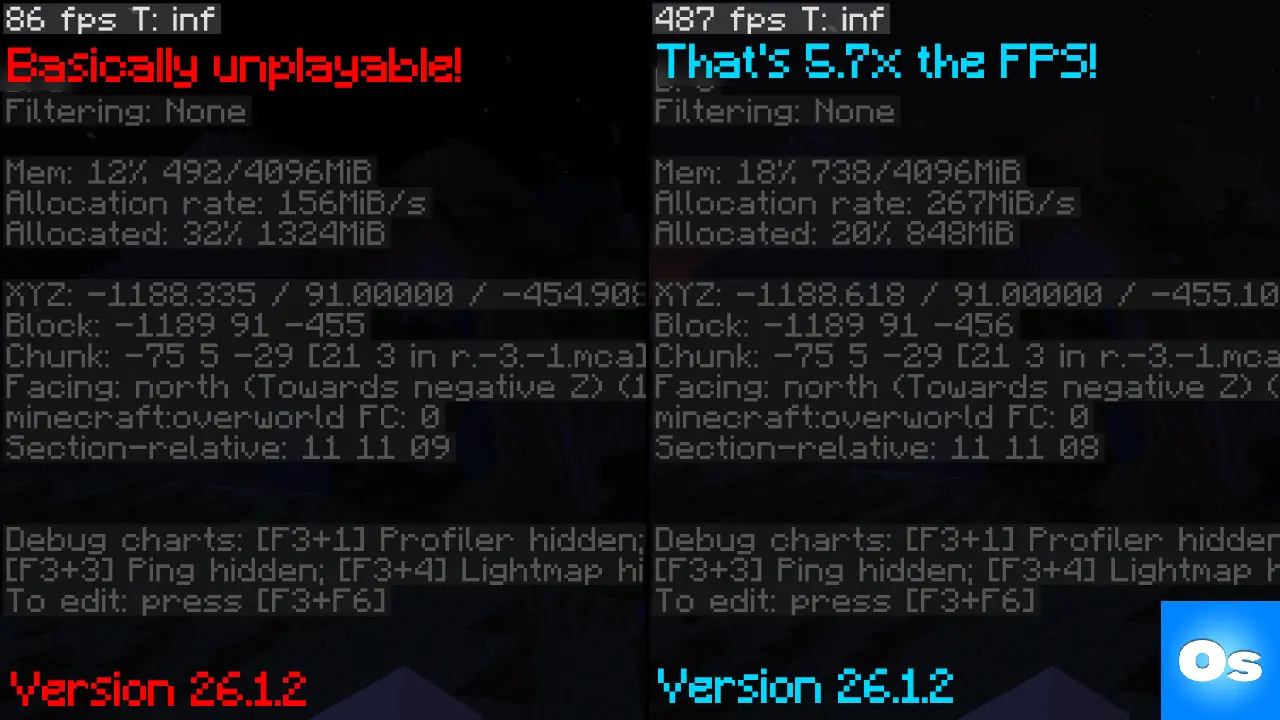 As shown above, low-end devices (even with Vulkan!) may struggle to reun minecraft of default settings. (even when optimized) Leaving them with around ~80 FPS.
Whereas Osmium provides the optimal Minecraft experience at around ~480 FPS Avg. That's 5.663x the FPS base Minecraft performed at with the exact same settings!
Osmium is only available for Forge, as I barley noticed any optimization mods for it. Just find the 'mods' folder that your launcher provides you with, then drag & drop Osmium's .Jar file into it.
How do i know if it's installed? - By going into Settings, you should see a whole new layout. That's how you know.
How do i get more FPS? - You can enable our experimental feature 'Cull entities behind blocks' in Osmium's Culling tab. This will increase your FPS by around 100 by preventing non-visible entities from being rendered.
Osmium also comes in with a built in custom cape changer & uploader! With 3 preset Osmium capes (Normal blue, Vantablack, Red) you can also upload your own capes. Anyone using the Osmium mod can see your cape, vise versa. This is optional and can be disabled in settings.
If the backend is custom, couldn't someone spoof and change my cape? - No. When changing a cape, your client provides crutial data provided by Microsoft including your account's private keys. They are then compared backend along with UUID to confirm authenticity (this data is NOT saved). The only data that's publicly visible is: Your UUID, and Cape (base64 or preset cape)
You can compare your hardware to the hardware used for Osmium's testing & Development.
Osmium is not for redistribution or modification. Requests can be done via the Discord.