Attribute Editor
Edit Item Attributes
This plugin provides a short library for editing item attributes, inaccessible via the Spigot API, along with a nice command based interface.
Purpose
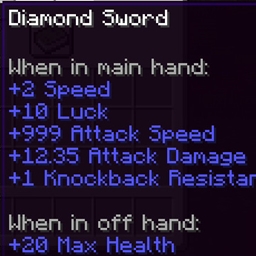
Many properties of Minecraft items are expressed as attributes and can be edited freely. Examples include attack damage, armor, luck, movement speed, and much more. Spigot allows you full access to attributes of entities. However, there is currently no way in the Spigot API to read or edit these attributes on items. This is where AttributeEditor comes in.
Features
With the API, you can list attributes which are assigned to an item. You can also get a listing of the default attributes which apply when no explicit attributes are set. Furthermore, this API provides simple methods to add new attributes to an item, or remove them all. Example:
ItemStack item;
List<ItemAttribute> attrs = ItemAttribute.of(item);
List<ItemAttribute> defs = ItemAttribute.defaultsOf(item);
new ItemAttribute(Attribute.GENERIC_LUCK, EquipmentSlot.HEAD,
    "my.custom.attribute", 10.0,
    Operation.ADD_NUMBER, UUID.randomUUID()).addTo(item);
Beyond the API, there are 3 quick and easy commands to view, add, and remove attributes. I may or may not respond to feature requests.

Compatibility
AttributeEditor currently works ONLY on Spigot version 1.13. It will require a manual update because it accesses NBT data of items using NMS and OBC imports. Don't use this on any earlier version, and use with caution on any later version.
Installation
AttributeEditor requires no configuration and has no plugin dependencies. Simply drop the jar file in your plugins folder and restart your server.
Commands
There is only one command: /attred. Syntax:
- /attred list - List attributes of the item in your hand. If no attributes are set, default attributes will be listed.
- /attred add <attr> <amount> [args] - Add an attribute. With tab completion.
- /attred remove - Remove all set attributes from the item in your hand, effectively resetting the item to its default vanilla values.
Example commands
/attred add generic.attackDamage 12.35 slot=head uuidMost=13 uuidLeast=37 op=ADD_NUMBER name=your.plugin.attackDamage
/attred add generic.attackDamage 12.35
All the properties with an equals sign are optional. If absent, AttributeEditor will set a reasonable value, for example the slot based on item type, or in the case of UUID, pick a random value.
Permissions
There is only one permission for the main command.
- attred.attred - Use the /attred command. (Default op)