This plugin consists of fully reflection, no worrying about updating this plugin to the next version! The only reason to update this plugin is for more cool effects!!!!!
Let's get to the nitty gritty:
Server Owners:
Put this plugin into your plugins folder and there you go, I recommend server owners update this often because this one needs to be at the current/higher version then plugins that use it.
Developers:
Add this plugin to your build path and you can use the class Jinx! This class has a number of functions which will be listed below.
Class Jinx Methods:
JSON Messaging:
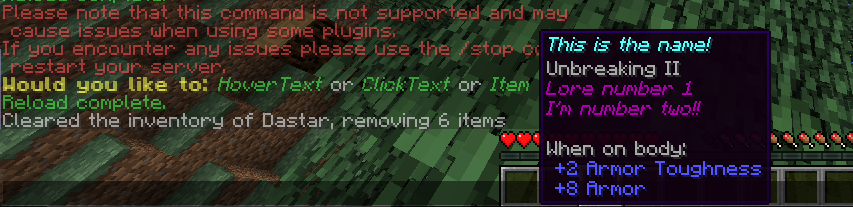
Possibly the biggest thing in this whole plugin, JSON Messaging. It's quite hard to explain like I've done above so I'm just going to show an example with all features with comments:
// These lines are just creating an item, not the Jinx API
ItemStack jsonItem = new ItemStack(Material.DIAMOND_CHESTPLATE);
ItemMeta itemMeta = jsonItem.getItemMeta();
itemMeta.setDisplayName("This is the name!");
itemMeta.setLore(Arrays.asList("Lore number 1", "I'm number two!!"));
itemMeta.addEnchant(Enchantment.DURABILITY, 2, true);
jsonItem.setItemMeta(itemMeta);
// Here is the Jinx API part
JSONMessage msg = Jinx.createJSONMessage("Would you like to: ", "yellow", "bold");
// Creating a default message
msg.append("HoverText", "green", Jinx.createHoverEvent("Put some text here though", "blue"), "italic");
// This is hoverText
msg.append(" or ", "white");
// More regular text
msg.append("ClickText", "green", Jinx.createClickEvent("/say hi", "suggest_command"), "italic");
// This is clickable text
msg.append(" or ", "white");
// More regular text
msg.append("Item", "green", Jinx.createHoverEvent(jsonItem), "italic");
// This is like hoverText but it will show the item we created above!
Jinx.sendJSONMessage(player, msg);
// This finishes it off my sending the player the message