Have you read Mistborn by Brandon Sanderson? If you have then you know what Allomancy is. Allomancy is a power that people from the Mistborn world have, which allows them to burn metals, granting them magical powers. This plugin brings Allomancy to minecraft. All credit for the ideas of Allomancy goes to Brandon Sanderson.
To burn metals, right click with a metal vial in your hand. The first line of the Lore shows the type of vial, while the second shows how many uses are left. The name will still be water bottle. To burn metals, that metal must be turned on for you in the config.
Right click while looking at a block of iron or gold to launch yourself towards that block. Iron is most effective when used at the same time as steel.
Right click while looking at a block of iron to launch yourself away from that block. Both steel and iron have a range of 40.
Left click air to shoot a bunch of coins wherever you're aiming. Important: this does not work at close range!
Gives you night vision for 5 seconds (Total of 320 seconds, if multiplied by 64 uses).
Lets you tell when other people are burning metals for 10 seconds.
Makes certain nearby mobs hostile.
Hides your Allominecy from being detected using bronze for 10 seconds.
Enhances you physically.
Calms down hostile mobs.
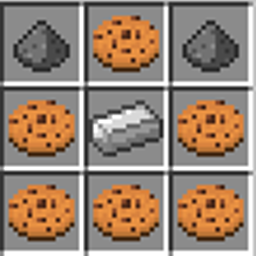
Metal vials may be crafted using the following pattern:
B B B
N
B = Water Bottle N = Gold nugget
Right click using a metal vial to convert it to a specific metal.
Lerasium Bead:
I I I
I N I
I I I
I = Iron ingot N = gold nugget
Right-click using a lerasium bead to open a menu that lets you select a metal to add to your usable metals.
/metal opens up the metal menu to choose a metal. A new vial has 64 uses.
/misting <player> <metal> <true/false> sets whether someone can burn a metal in the config.
Use llamaperm.
Permissions:
Allominecy, metal - metal command
Allominecy, misting - misting command
Config.yml lets you set which metals someone can burn.