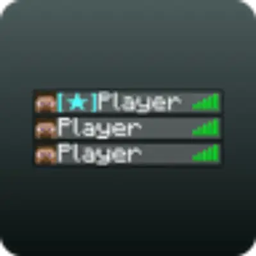
TPH — модификация, позволяющая выделить в табе игры определенных игроков по UUID.

Файл конфигурации находится по пути:
.minecraft\config\tab_player_highlighter.jsonИ выглядит следующим образом:
{
  "onlineMod": false,
  "API_URL": "localhost:3000/get_roles",
  "playersPrefixes": {
  }
}
На место UUID в конфиге мода Tab Player Highlighter вы должны указать необходимые вам идентификаторы игроков и задать им роли. Вы можете указать несколько UUID, чтобы выделить нескольких пользователей в игре. Приведу пример, как это должно выглядеть в вашем файле конфигурации:
{
  "onlineMod": false,
  "API_URL": "localhost:3000/get_roles",
  "playersPrefixes": {
    "uuid1": "§a[Admin]",
    "uuid2": "§a[Moderator]",
    "uuid3": "§a[Helper]",
    ...
    "uuid100": "§a[Cheater]"
  }
}
Также, если включить onlineMod, то при заходе на сервер, префиксы игроков будут браться с API_URL, а playersPrefixes будет игнорироваться. Чтобы онлайн-режим работал правильно ответ от API_URL должен быть в JSON и иметь такой вид:
{
  "players": {
    "6a640b67-87f0-456a-8f4d-a65aeb55f4f4": "[Moderator]",
    "53e45cf5-c017-427a-9e67-7b6f00d47219": "§a[Admin]"
  }
}
Соблюдайте правильную структуру текстового файла и ответа от API, чтобы модификация работала корректно.
TPH is a modification that allows highlighting specific players by UUID in the game's tab list. Here's how it looks:
</details>
The configuration file is located at:
.minecraft\config\tab_player_highlighter.json
And looks like this:
{
  "onlineMod": false,
  "API_URL": "localhost:3000/get_roles",
  "playersPrefixes": {
  }
}
In the Tab Player Highlighter mod config, you need to replace the UUIDs with the player IDs you want to highlight and assign them roles. You can specify multiple UUIDs to highlight multiple players in the game. Here's an example of how your configuration file should look:
{
  "onlineMod": false,
  "API_URL": "localhost:3000/get_roles",
  "playersPrefixes": {
    "uuid1": "§a[Admin]",
    "uuid2": "§a[Moderator]",
    "uuid3": "§a[Helper]",
    ...
    "uuid100": "§a[Cheater]"
  }
}
Also, if you enable onlineMod, when joining a server, player prefixes will be fetched from API_URL, and playersPrefixes will be ignored. For online mode to work correctly, the response from API_URL must be in JSON format and look like this: text
{
  "players": {
    "6a640b67-87f0-456a-8f4d-a65aeb55f4f4": "[Moderator]",
    "53e45cf5-c017-427a-9e67-7b6f00d47219": "§a[Admin]"
  }
}
Make sure to maintain the correct file structure and API response format for the modification to work properly.