Mineuniverse
Log in Register
Plugins

SkyWriter

SkyWriter lets you write your messages in big block letters in the sky!
by _ForgeUser8772298
Download Claim this project
6,509 downloads
0 likes
Updated Jun 30, 2026
0 hypes
Fun General World Editing and Management

SkyWriter

Now with font selection!

Version: v1.1

Tested On: 1.3.1-R2.0

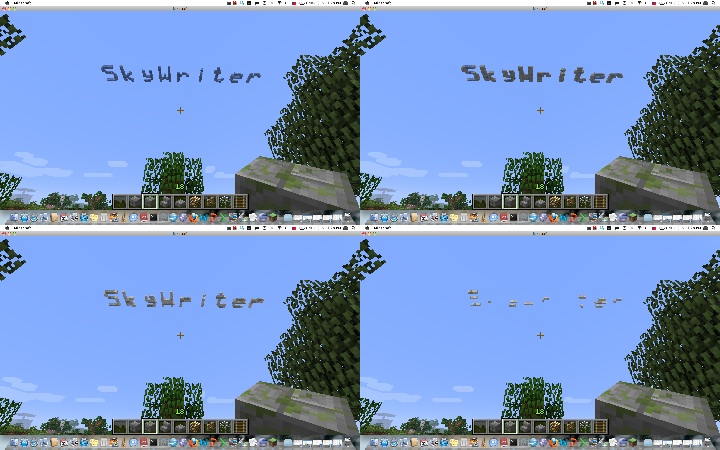
The SkyWriter plugin allows you to write a message in the sky! Initially, the cloud message appears crisp and blue, but as time passes the cloud disperses and changes color until it finally disappears completely.

There is one... well, now there are (sort of) two commands to use Skywriter. Additional features are enabled by adding switches to the command line, unix style.

To write a message, use:

/skywrite [-speed n] [-block b] [-loc x,z] [-upright] [-perm] [-world world] message...

Switch descriptions:

  • n is scaling for the speed of dispersing (i.e. 2 = 2x slower, etc)
  • b is the name or id of the material for the cloud
  • x,z are the x and z coordinates to be drawn at
  • world is the world in which the message is to be drawn (only for console use)
  • -upright draws the message banner style, perpendicular to the ground
  • -perm makes the message permanent (it won't go away when the plugin is stopped)

All the switches can be abbreviated with a single letter, i.e. you can use -s for -speed, etc.

To change the font you are writing with, use:

/skywrite -f fontname

Initially, Skywriter will use its default, built-in (and, some would say, ugly) font. You can change this by setting the font to any of the fonts available on the server system. Note that the font name can, and often does, contain spaces. If you enter a font name that is not available, Skywriter will list the fonts available that start with the same letter.

By default, the start of the words appear where you are looking in the sky, just below the actual Minecraft cloud level. Note that you must be looking up to where you want the message to appear.

The command can also be used from the console, as long as the x,z location of the message is specified.

By default, the cloud messages are formed of different colors of wool. SkyWriter will only replace empty space with a cloud message block, and will erase the cloud message blocks over time until they completely disappear.

Permissions:

  • skywriter.use: Allows you to use the skywrite command
  • skywriter.location: Allows the message to be placed at a specified x,z location
  • skywriter.speed: Allows the speed of message dispersal to be changed
  • skywriter.permanent: Allows the message to be permanent (not disperse)
  • skywriter.material: Allows the block type of the message to be specified

Any suggestions on features are welcome and encouraged!

Source code is on Github

Sky Writer Montage

SkyWriter-v1.1.jar
MC CB 1.3.1-R2.0
Release 2012-09-15 Get
SkyWriter-v1.0.jar
MC CB 1.2.5-R3.0
Release 2012-06-02 Get
SkyWriter-v0.3.jar
MC 1.2.5
Release 2012-04-30 Get
SkyWriter-v0.1.jar
MC 1.2.5
Beta 2012-04-23 Get

You Might Also Like

WorldeditRegions: WorldEdit addon.
Allows you to worldedit only in regions you own.
95,989
FastAsyncVoxelSniper
Terrain creation ingame using 3D brushes
81,988
KFactions
Highly customizable land management for players.
81,391
Democracy
Democracy
9,618
Timber - The Original
Chopping trees easily.
9,186
VineControl
controlling vine length and growth in various ways
9,110