This is an extension plugin to SignShop (which is required). It allows you to link doors with SignShops, and rent the use of that door for a certain amount of time.
Main | SignShopHotel | SignShopGuardian | Features | FAQ | Signs | Permissions | Config | Localization | Developer API | Issues / Suggestions
Step 1: Drop SignShopHotel.jar into your plugins folder (make sure you also have SignShop installed).
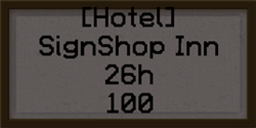
Step 2: Create a sign with the following format:
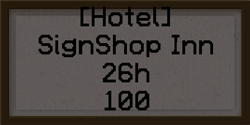
Step 3: Punch a door with redstone (Note: If you are using an Iron door, you have to punch the button or plate near it).
Step 4: Punch the sign with redstone. The sign will change, and the room will be ready to rent.
Optional Step: Add a pressure plate inside of the room so players don't get trapped inside when their time runs out.
| Command | Description |
|---|---|
| /signshophotel boot [player] | If a player is not specified it will boot the renter of the sign you are looking at. If a player is specified, it will boot them from ALL rooms they have rented. |
Please visit our main page to get help, or open up a ticket for SignShopHotel.