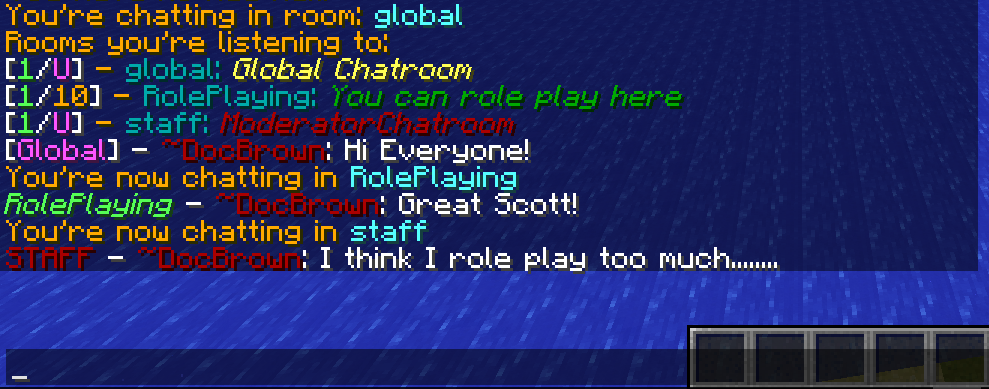
RoomyChat is a plugin for Minecraft that allows you to customize how people talk to each other on your server. Create different rooms where each one has it's own purpose. If you have a role-playing server, perhaps have some rooms specific for the role players so different groups can all role play at the same time. Create a chat room for your admins and your staff to chat privately in. Also features a robust permission system that will allow you to deny entering or exiting a chat-room on a group or person basis.
Upcoming Features: Chat Room Admins (add and kick players from chat rooms)
Alias room names (instead of typing /chat join roleplaying; /chat join rp)
Tab completion for room names as well
Spy on chat rooms for admins
Join all chat rooms
Set Up
Summary of set up
Stop the Server
Put the JAR file in your plugins folder
Start the Server
In-Game Commands
Player Commands:
/chatView main chat room and all other rooms you’re listening too.
/chat rooms View all available chat rooms to join
/chat join {room} Join a chat room
/chat set {room} Set a chat room as the one to speak in
/chat leave {room} Stop listening/chatting in a chat room
/chat help Get help with all available commands
OP Player Commands
/chat create {room} Create a chat room
/chat delete {room} Delete a chat room
/chat adddef {room} Add a room to the default set that players join when they log in
/chat remdef {room} Removes a room from the default set that players join when they log in
/chat setprefix {room} {prefix} Sets the prefix for a room
/chat setlimit {room} Sets the maximum amount of players in a chat room
/chat setdescription {room} Sets the description of a room
/chat config Change various config options listed below
Configuration
Configuration File
Configuration can be found in the RoomyChat folder, in the conf.yml file
Summary of Options:
update_check:
Acceptable values: true, false
Controls whether or not to check for updates at startup
global:
Acceptable values: true, false
If true, there will be a global chat room that anyone can join
global_default:
Acceptable values: true, false
If true, when people join the server they’ll automatically join the global chat room
Ignored if global is false.
world_rooms:
Acceptable values: true, false
If true, a chat room will be created for each world that exists
world_switching:
Acceptable values: true, false
If true, when a player switches worlds, they’ll switch chat rooms
Ignored if world_rooms is set to false.
on_join:
Acceptable values: global, world, and last_room
Defines what chat room players will be put in when they join the server
Global is the global room (ignored if global is set to false)
World is the world the player is currently in (ignored if world_rooms is set to false)
Last_room will put the player in the last room they were in.
max_limit:
Acceptable values: Any valid number
This limits how many people can be in a chat room
Anything less than 0 will be counted as unlimited
default_limit:
Acceptable values: Any valid number
This is the default limit used when creating a new chat room
Anything less than 0 will be counted as unlimited
If set to greater than max_limit, it will be lowered automatically
default_prefix:
Acceptable values: any string
Variables allowed:
$room : name of the room
$num : number of people in the chat room
$limit : max number of people allowed in the chat room
Also accepts ampersand color codes
This is the default prefix given to a chat room when its created
default_description:
Acceptable values: any string
Variables allowed:
$room : name of the room
$num : number of people in the chat room
$limit : max number of people allowed in the chat room
Also accepts ampersand color codes
This is the default description given to a chat room when its created
logging_level:
Acceptable values: debug, none
This will control how much information gets spammed to the console when RoomyChat is running.
In this example default players are allowed to join all world, global, and role-playing chat rooms
Staff members will have full permissions to control aspects of RoomyChat but not the Admins chat room, They will also be unable to leave the staff chat room, so they're forced to see those messages.
Admins will be able to do everything and join every chat room.