Mineuniverse
Log in Register
Plugins

Robbot | Discord Logs

This plugin makes logging your minecraft server easy!!
by robbotMC
Download Claim this project
18 downloads
0 likes
Updated Jun 30, 2026
0 hypes
Admin Tools Chat Related Developer Tools Informational World Editing and Management

Robbot | Discord logs

This plugin is the easiest way to set up logs for your Minecraft server. It’s simple, fast, and ready to use right away.

How to Set Up Place the .jar file in your server’s plugins folder.

Start your server. After it loads, a new folder called RBDiscord will appear.

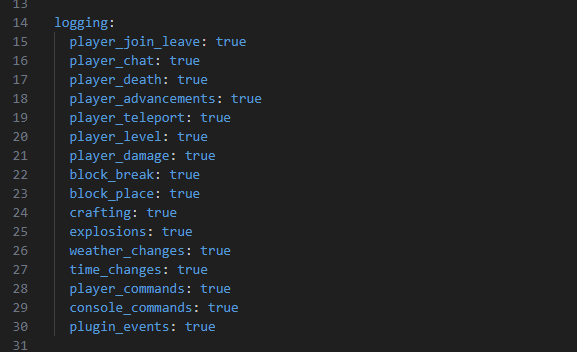
Open that folder and edit the configuration file inside to add your webhook and any other settings you need.

Restart your server, and your logs will now be fully connected.

Commands /rbdiscord — Shows a list of available commands

/rbdiscord test — Tests whether your webhook is working correctly

/rbdiscord reload — Reloads the plugin configuration

rbdiscord.jar
MC 1.21.2, 1.21, 1.21.3, 1.21.8, 1.21.4, 1.21.5, 1.21.7, 1.21.1, 1.21.6, 1.21.9, 1.21.10, 1.21.11
Release 2026-02-17 Get

More from robbotMC

Robbot | Lifesteal
77
Robbot | Gui Creator
7
Robbot | Adminpanel
57
Robbot | disablecommands.
19
Robbot | NPC spawner
178

You Might Also Like

WorldGuard Custom Flags
97,851
HoloAPI
Advanced and powerful holographic displays
93,959
Minequery
Minequery
91,099
SQLibrary
SQLibrary aims to streamline driver wrappers in Java for every database engine
85,675
WolfyUtilities
Utils and APIs: Config, Language and Inventory API, Protection Utils: WorldGuard, LWC, PlotSquared
84,728
DisguiseTester
Experiment with disguises!
9,677