Due to a lack of bandwidth in the development team, we've unfortunately had to halt progress on this project, we appreciate your understanding.
We recommend alternatives such as e4mc for a similar featureset.
Thanks you for your support :)
Kind regards, Alujjdnd/Flooflez
Read more here
Ngrok LAN is a Fabric mod that enables you to share your singleplayer world with your friends across the globe, all via clicking on the new "Open Public Server" button! This mod uses Ngrok, a free service to ease the creation of servers, to "tunnel" your connection to the internet, and will generate a link for your friends to connect to after you click on "Open Public Server".
The mod requires the following mods:
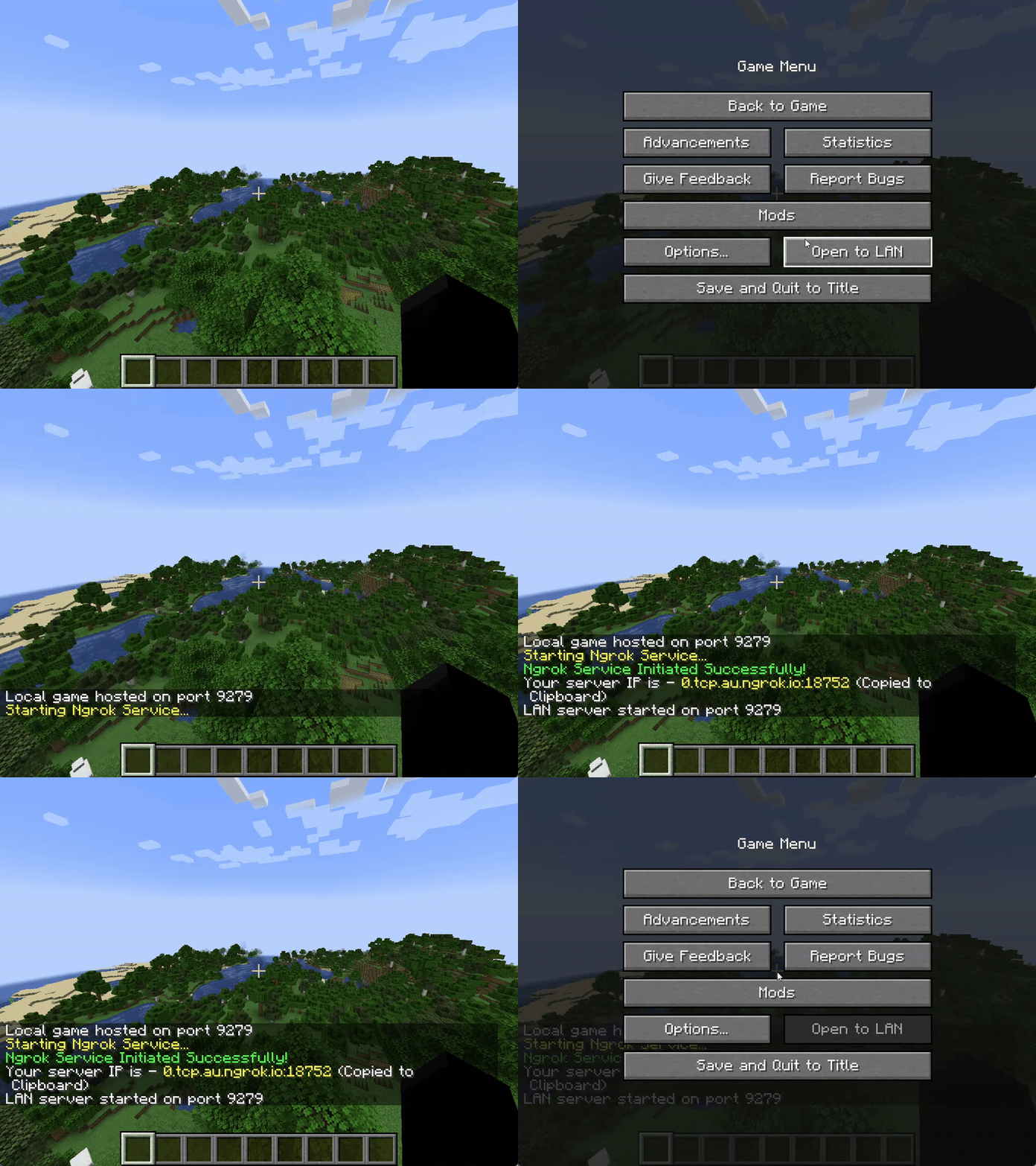
In your Minecraft menu screen, a new "Mods" button should be visible, click on it. In the list of mods on the left hand side, find Ngrok LAN, and click on the sliders button on the top right corner, above the "issues" button. You should be presented with a few options:
| Command | Description |
|---|---|
/op <username> |
Gives the specified player server operator status. |
/deop <username> |
Removes server operator status from specified player. |
/whitelist add <username> |
Adds the player profile(s) to the whitelist. The player does not need to be online. |
/whitelist on |
Enables the server's use of a whitelist. |
/whitelist off |
Disables the server's use of a whitelist. |
/whitelist remove |
Removes the player profile(s) from the whitelist. The player does not need to be online. |
/whitelist list |
Displays all player profiles in the whitelist. |
/whitelist reload <username> |
Reloads the list of player profiles in whitelist.json from disk (used when whitelist.json has been modified outside of Minecraft). |
| Error Message | Resolution |
|---|---|
| An attempt was made to access a socket in a way forbidden by its access permissions. | Restart "Host Network Service" under the "Services" program |
| The authtoken you specified does not look like a proper ngrok tunnel (ERR_NGROK_105) | Check that your auth token is valid, and is correctly inputted into the mod config |
| Your account is limited to simultaneous ngrok agent session... |
Check that you are not running any other tunnels with this auth token, or that you are not hitting the limit for the max number of tunnels on your account |
Please open a new issue in Issues
Ngrok is a free service that exposes your applications running locally to the internet, without port forwarding. Usually, when setting up a Minecraft server, you would have to open the server, and "forward" your port through your router. Port forwarding "publishes" your server to the internet, so anyone with you IP can join. Think of this as your router "forwarding" the network packets from your server (part of your local network) to your friends (part of the wider internet).
Using Ngrok, however, we don't need to forward the port. All the internet traffic is routed through an application (Ngrok-LAN in this case), then their datacentres. Ngrok provides us with a link in return, that we can give to our friends to connect to our server. This doesn't require any other configuration on your side - as long as you have internet, and an Ngrok account, you can host your singleplayer world to your friends across the globe.

The mod only requires a free Ngrok account. The free tier for Ngrok allows you to have 1 free online tunnel simultaenously, which means that, with one Ngrok free account, you can only host 1 Ngrok-LAN server at the same time. The paid tiers allows you to have custom domains and more simultaenous online tunnels, but custom domains are not yet supported in this mod.
More pricing info please refer to Ngrok's website
Please refer to Incompatibilities to find a list of incompatible mods.
Currently, only Proximity Voice Chat mods are incompatible. This is unlikely to be fixed.
This mod is available under the MIT license.