It is a mod that allows the user to link their singleplayer/lan world or a multiplayer server to a channel in a discord server, only the host should have this mod installed.
First, drag the mod file into your mod folder. Fabric api is required for all versions. Use fabric version v0.16.14 or above.
If you are using forge, install Sinytra Connector and Forgified fabric api.
Now run the game, a file with the name lan-world-discord-integration.toml should be generated in your config folder:
After this step, you can close Minecraft and start setting up the discord bot.
Then check the following permissions:
Now copy the link below and paste it in a new tab.
If you can't add the bot to your discord server, it could be because you don't have the Manage Server permission in your discord server.
After your bot is in your server, time to set it up in Minecraft.
Go to the bot page in developer portal and click Reset Token:
Then copy it.
Open lan-world-discord-integration.toml, paste the token in like this, make sure you save the file too.
Now go to your discord settings, in Advanced section, enable developer mode.
Go to your server and right click the channel you want the bot to be at, then click Copy Channel Id
Now paste the channel id in like this in lan-world-discord-integration.toml, make sure to save the file.
Now you can start Minecraft, once you enter a world, the bot should start automatically. I will add a command in game to allow the user to start and stop the bot in the future I promise.
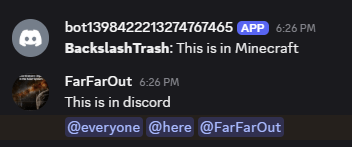
This is what it should look like once it started running normally:
Now enjoy your simple Minecraft-Discord messenger!
-BackslashTrash, 2025-07-25