BR:
By: Wiljafor1
KitHub fornece uma maneira rápida para os novos jogadores Você pode adicionar kit do servidor da lista, e os usuários podem ser capaz de deformar a eles, com base no que você definir na configuração..
Comandos
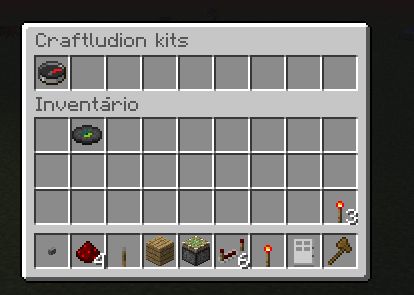
Atualmente, o único comando é /kithub. Quando o jogador executa esse comando, a GUI pop-up, similar ao abaixo. A GUI terá algumas opções de lugares ao redor do servidor, que é tudo definido na configuração, também explicado abaixo.

Configuração
Você pode visualizar um arquivo de configuração exemplo.
Aqui estão as coisas que você precisa para editar em seu arquivo de configuração:
gui-rows: [# of rows]
gui-name: [name]
click-item-id: [item-id]
Como adicionar um novo item ao seu GUI (coisas entre parênteses são o que você precisa para adicionar):
items:
slot-[numero]:
item-id: [id que vai ser clicado]
name: [nome do item quando pairava sobre]
lore:
line-[line number (inicia com 0)]: [texto que deseja na linha]
line-[line number]: [texto que você deseja na próxima linha]
command: [comando a ser executado pelo jogador quando o item é Clicked]
#Permissão
/kithub - kithub.kithub
/kithub reload - kithub.reload(OP)
EN
By: Wiljafor1
KitHub provides a quick way for new players kit you can add the server list , and users may be able to warp to them, based on what you set in the configuration ..
commands
Currently , the only command is /kithub . When the player runs this command , the GUI pop -up like the one below . The GUI will have a few choices of places around the server , which is all set in the configuration , also explained below .
Configuration
You can see an example configuration file .
Here are the things you need to edit in your configuration file :
gui-rows: [# of rows]
gui-name: [name]
click-item-id: [item-id]
Adding a new item to its GUI ( in brackets are the things you need to add ) :
items :
slot [ number ] :
item -id : [ id that will be clicked ]
name: [name of the item when hovered over ]
lore :
- line [line number ( starting with 0 ) ] : [ text you want on the line ]
- line [line number] : [ text you want in the next line ]
command : [ command to be executed by the player when the item is Clicked ]
#Permission
/kithub - kithub.kithub
/kithub reload - kithub.reload(OP)

 Download