Just Enough Markers (JEM)
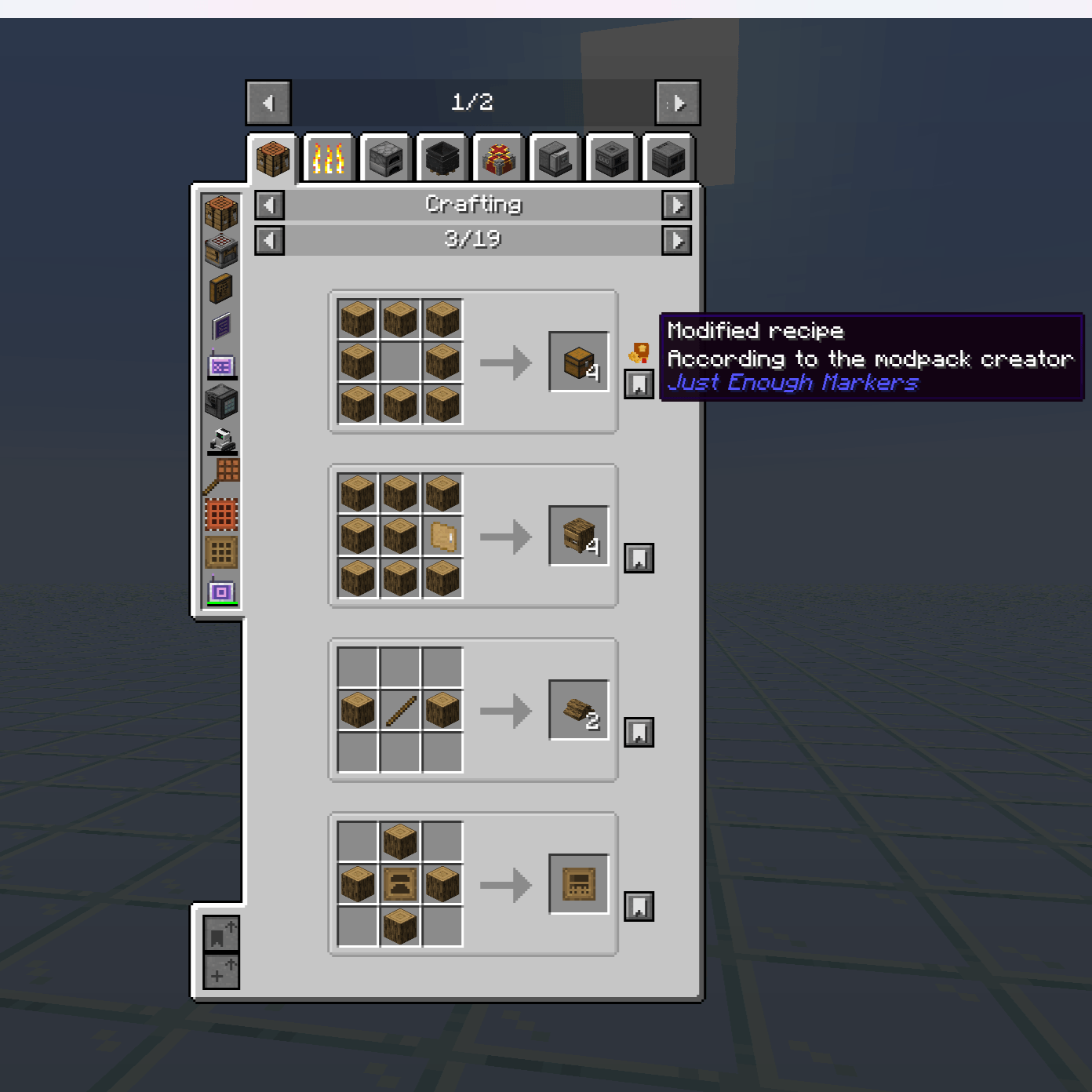
Enhance JEI with visual markers for modified recipes.
Just Enough Markers (JEM) is a lightweight NeoForge mod that helps modpack creators and technical players quickly identify recipe changes made by KubeJS or other modifications.
🌟 Key Features
- Highlight recipe changes: Added, removed, or altered recipes are clearly marked in JEI.
- Recipe filtering:
- Recipes with IDs matching your filter (
recipeIdFilter) are automatically highlighted.
- Recipes without IDs can be highlighted based on their outputs (
outputFilter).
- Customizable markers:
- Per-category marker positions (
categories).
- Adjustable X/Y offsets.
- Tooltips with configurable messages (2 lines by default).
- Debug mode: Force all recipes to display markers, useful for testing and modpack development.
- Lightweight & client-side only: Does not alter recipes, only enhances JEI’s display.
⚙️ How It Works
- At startup, JEM checks recipes for their ID.
- If the ID contains the
recipeIdFilter, a marker is displayed.
- Recipes without an ID are compared against the
outputFilter list.
- Markers can be positioned per recipe category with custom offsets.
- Tooltips show your configured text when hovering over a marker.
- Debug mode (
onlySpecificRecipeID) can override filters to display markers on all recipes.
⚙️ Configuration
Main config options (from JEMConfig.java):
| Option |
Description |
Default |
recipeIdFilter |
Text to match recipe IDs for highlighting |
kubejs |
outputFilter |
List of item IDs used when recipe has no ID |
[] |
tooltipLine1 |
First line of marker tooltip |
Modified recipe |
tooltipLine2 |
Second line of tooltip |
According to the modpack creator |
onlySpecificRecipeID |
Debug flag to show markers on all recipes |
false |
defaultOffsetX |
Default X offset for markers |
19 |
defaultOffsetY |
Default Y offset for markers |
-25 |
categories |
Custom marker positions per recipe category |
Predefined examples included |
📦 Installation
- Install Minecraft 1.21.1 with NeoForge.
- Add JEI (required) and optionally KubeJS.
- Download the latest JEM
.jar file.
- Place it in your
mods folder and launch Minecraft.
🎮 Usage
- Open JEI in-game.
- Recipes matching
recipeIdFilter or outputs in outputFilter will display markers.
- Hover over markers to see tooltip information.
- Use debug mode to highlight all recipes during development or testing.
🛠 Support
Issues & suggestions: GitHub Issues
📄 License
All Rights Reserved
This mod may not be redistributed, copied, or modified without the author’s permission.
📌 Notes
- Requires NeoForge (Forge/Fabric not supported).
- Works best with the latest JEI & KubeJS versions.
- Intended primarily for modpack developers and technical players.
- Lightweight, client-side, and keeps JEI intact.